How to Connect Airtable with PostgreSQL (With or Without an AI Agent)
Connect Airtable and PostgreSQL in FlowRunner so records created or updated in Airtable automatically sync to your PostgreSQL database, optionally with an AI agent that reconciles conflicts and pauses for a human before any bulk write.
How do you connect Airtable to PostgreSQL?
Use FlowRunner’s On New or Updated Record trigger in Airtable to fire a flow whenever a row is created or changed, then call the PostgreSQL Upsert Row action to write the data into your database keyed on a conflict column, so re-runs never create duplicates. FlowRunner is a visual AI-agent orchestration platform where automations run autonomously and pause for human judgment on the steps that carry real consequence. The same connection runs as an AI agent that reconciles field conflicts, calls Select Rows to compare incoming values against what is already in PostgreSQL, and invokes a human-in-loop flow before any bulk write touches a production table.
The problem with managing Airtable and PostgreSQL manually
Most operations teams end up in the same place: Airtable for the flexible, human-managed work, and PostgreSQL as the operational database that the application actually reads. The bridge between them is a person or a script. The person exports rows to a spreadsheet, compares values, pastes updates into a query tool, and hopes nothing falls through the cracks. The script runs on a cron job no one owns, has no WHERE guard, and silently rewrites rows when the filter logic drifts.
The cost is not just time. It is exceptions that land in email threads instead of a structured queue, reconciliation that runs days late, and database writes with no audit record of who approved them or when. An AP clerk chasing invoice mismatches between an Airtable approval queue and a PostgreSQL billing table is doing work that should not exist. Every hour spent on that reconciliation is an hour not spent on the decisions that require judgment.
How the connection works
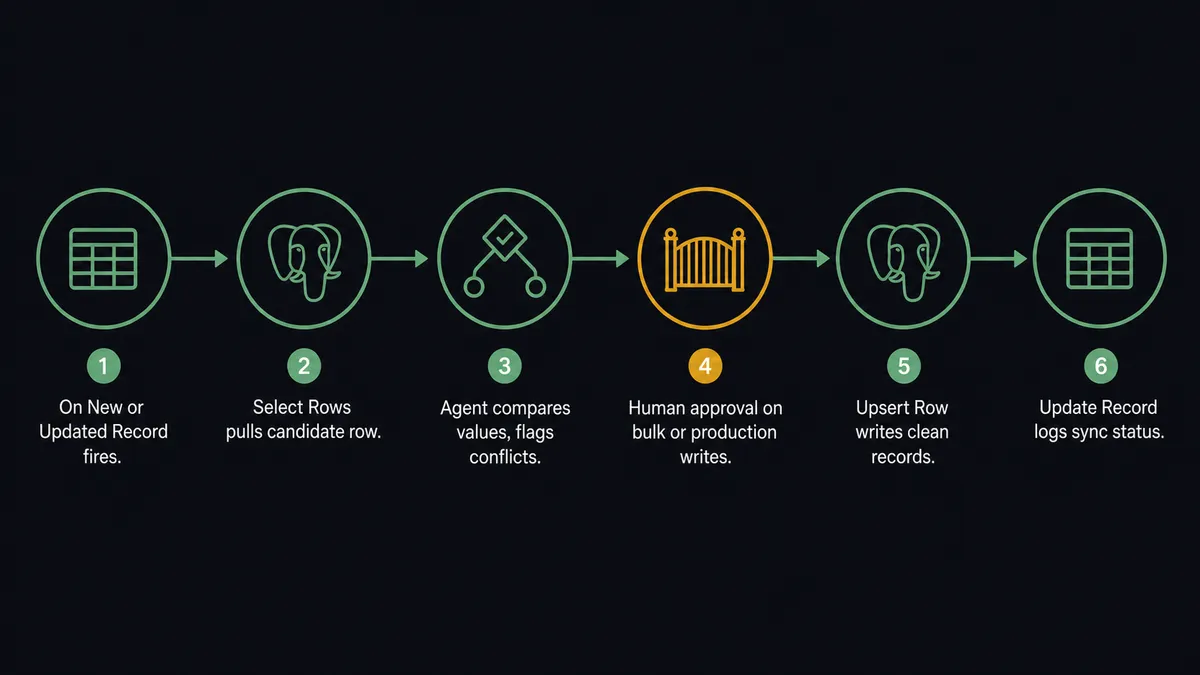
The flow starts with FlowRunner’s Airtable trigger. On New or Updated Record monitors a table you choose and fires whenever a row is created or any field changes. The trigger delivers the full record payload: every field value, the record ID, and a timestamp.
The PostgreSQL connector then takes over. For a simple sync, the agent calls Upsert Row, which runs INSERT … ON CONFLICT … DO UPDATE keyed on the conflict column you specify (typically a unique ID shared between the two systems). Re-running the flow on the same Airtable record updates the existing PostgreSQL row rather than inserting a duplicate. You never get phantom copies from a retry or a double-trigger.
For a full sync that also catches deletions, the agent calls Execute Query with a parameterized DELETE or a soft-delete UPDATE, using $1, $2 placeholders bound from the flow context. No SQL is concatenated, so there is no injection surface.
When you need to write back, FlowRunner’s Update Record action in the Airtable connector closes the loop. After the PostgreSQL write completes, the agent updates the source Airtable row, marking it Synced with a timestamp and a row count. The team sees sync status directly in the tool they already work in.
Can an AI agent run it? (And why a human stays in the loop)
A plain trigger-to-upsert connection works well for clean data. Real operational data is not always clean. An Airtable approval queue might have a status field that changed three times in an hour. A PostgreSQL invoice table might have a row that another system updated between the Airtable trigger and the FlowRunner write. A simple sync tool overwrites without checking. An AI agent reads the situation and decides.
The agent calls Get Table Schema first to confirm the target columns exist and match the expected types. It calls Select Rows with an explicit Where object to pull the current state of the row before writing. It compares the incoming Airtable values against what is already in PostgreSQL field by field. If the values are clean, it calls Upsert Row and moves on. If there is a conflict, it does not guess. It packages the context and asks.
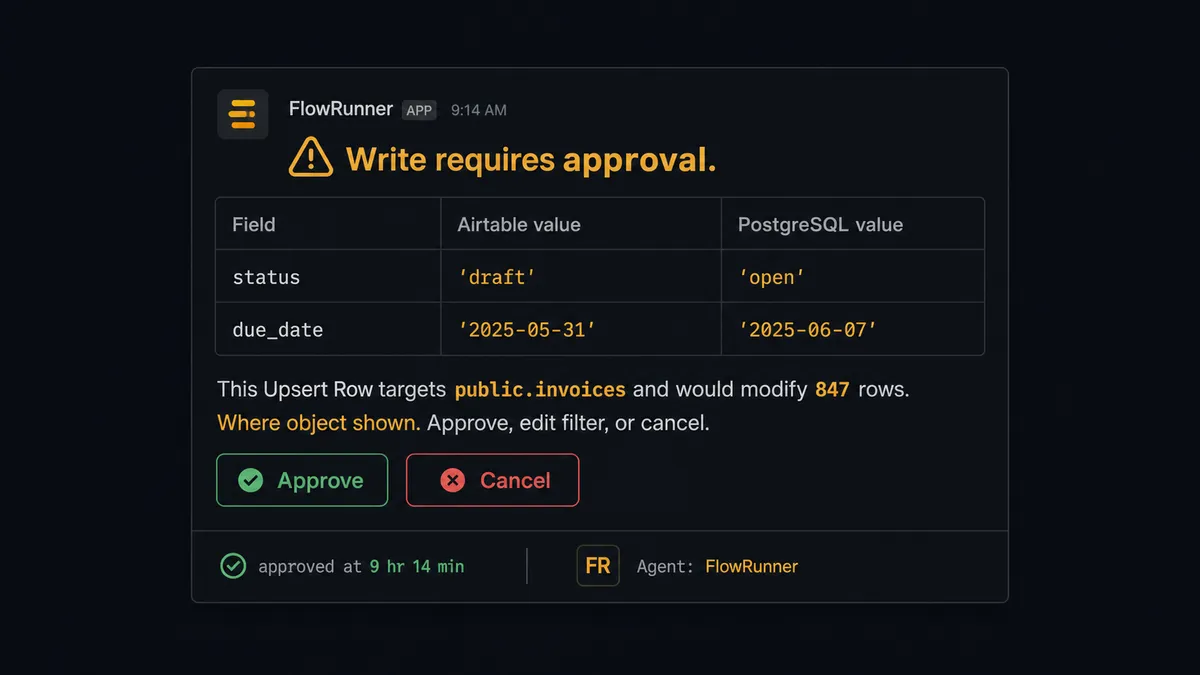
Here is what the human-in-loop moment looks like in practice. An agent processing a batch sync detects that an Upsert Row would modify 847 rows in the production invoices table. That is above the configured threshold. The agent does not proceed on its own. It pauses, assembles the context (the Where object, a sample of the affected rows, the Airtable source record that triggered it), and routes to the responsible operations manager through Slack: “This Upsert Row on public.invoices matches 847 rows. Here is the filter and a sample of the affected records. Approve, edit the filter, or cancel?”
The manager reviews the sample, approves, and the agent resumes. The approver identity, the decision, and the timestamp are captured in the FlowRunner run log. That is not a threshold rule. That is the agent reading context, the row count, the table name, the business impact, and making the call to stop and ask. This is the digital andon cord: the agent stops the line when it hits uncertainty rather than pushing through and creating a problem that costs more to fix than to prevent.
FlowRunner vs Zapier for Airtable and PostgreSQL
Zapier handles straightforward Airtable triggers well and is the tool most non-technical teams reach for first. If you need a single trigger firing a single insert with no conditional logic, Zapier works. The gaps appear when you add the requirements most production workflows actually have.
| FlowRunner | Zapier | |
|---|---|---|
| Human-in-loop on risky writes | Native: agent pauses, routes for approval, resumes on response | Not available as a workflow pattern |
| AI agent with reasoning | Agent reads data, compares values, decides which action to take | Linear step execution only |
| PostgreSQL write guard | Update Rows and Delete Rows require a Where object; bulk writes pause for approval | No built-in guard; any write runs as configured |
| Unlimited users on every plan | Yes, all tiers | Task-based limits affect team use |
| BYOK for AI inference | Yes, connect your own OpenAI or Claude key | Zapier AI uses its own models; no BYOK |
| Audit trail for approvals | Approver, decision, and timestamp captured per run | No approval audit trail |
Zapier is the right choice if the connection is simple and your team has no compliance requirement for who approved a write. FlowRunner is the right choice when the write carries consequence and you need a record of who said yes.
Before and after
| Category | Before | After |
|---|---|---|
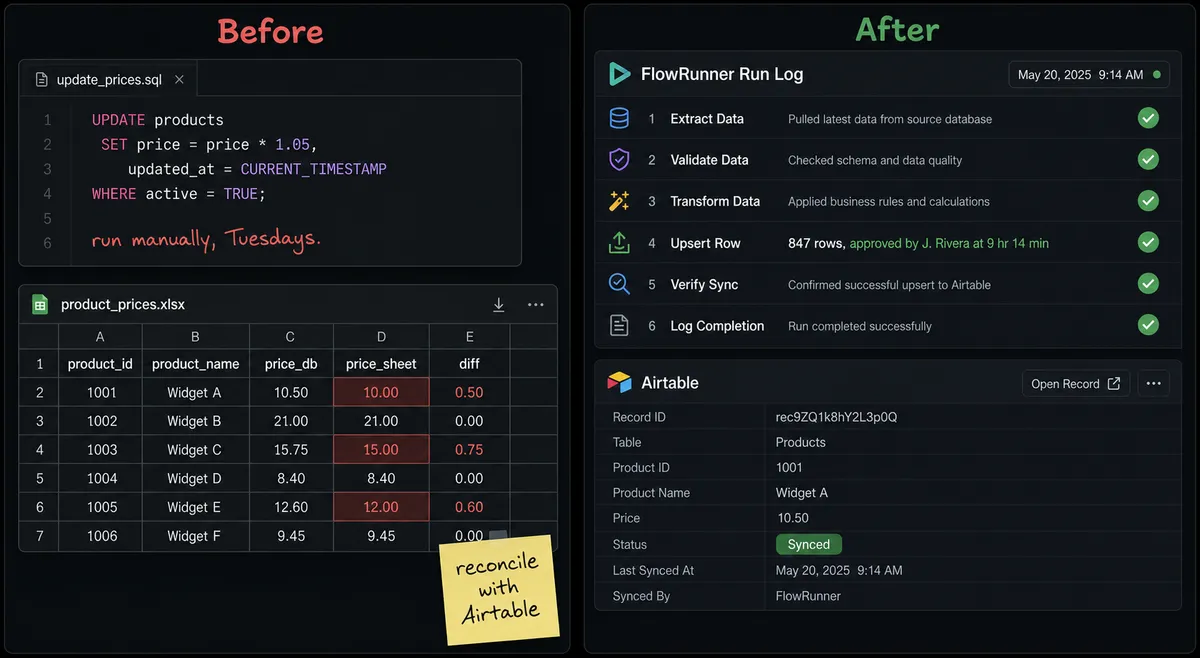
| Sync mechanism | Manual export to spreadsheet, paste into query tool | On New or Updated Record trigger fires automatically; Upsert Row runs within seconds |
| Duplicate protection | None; re-running a script inserts duplicate rows | Upsert Row keyed on conflict column; re-runs update, never duplicate |
| Write guard | UPDATE or DELETE with a missing WHERE rewrites an entire table silently | Update Rows and Delete Rows require a non-empty Where object; bulk writes pause for approval |
| Reconciliation effort | Operations lead sorts rows by hand; exceptions land in email threads | Agent calls Select Rows, compares values, surfaces only the rows that need judgment |
| Approval record | No record of who approved a bulk write or when | Approver identity, decision, and timestamp captured in run log per operation |
| Sync status visibility | Airtable rows have no indication of sync state | Agent calls Update Record to mark each row Synced with timestamp after PostgreSQL write |
What you can build
Exception queue with structured resolution. Use On New or Updated Record to fire when an Airtable exception row changes status to Resolved. The agent reads the resolution, calls Update Rows in PostgreSQL with an explicit Where object to apply the correction to the originating transaction, and calls Create Comment on the Airtable record to log what was written and when. The AP manager resolves in Airtable; the database update is automatic.
Nightly reconciliation with human review on conflicts. A scheduled flow calls Select Rows in PostgreSQL to pull open invoices, calls Find Many Records in Airtable to pull the corresponding approval rows, compares them field by field, and calls Upsert Row for clean matches. Rows with value conflicts go to a Slack message with the conflicting fields and an approval prompt. Clean matches require no human attention.
Schema-aware bulk load from Airtable to PostgreSQL. When a batch of Airtable records is approved for import, the agent calls Get Table Schema to confirm target columns and types, then calls Insert Rows to bulk-load the array in a single statement. If the batch would exceed the row threshold, the agent pauses for approval before the insert runs.
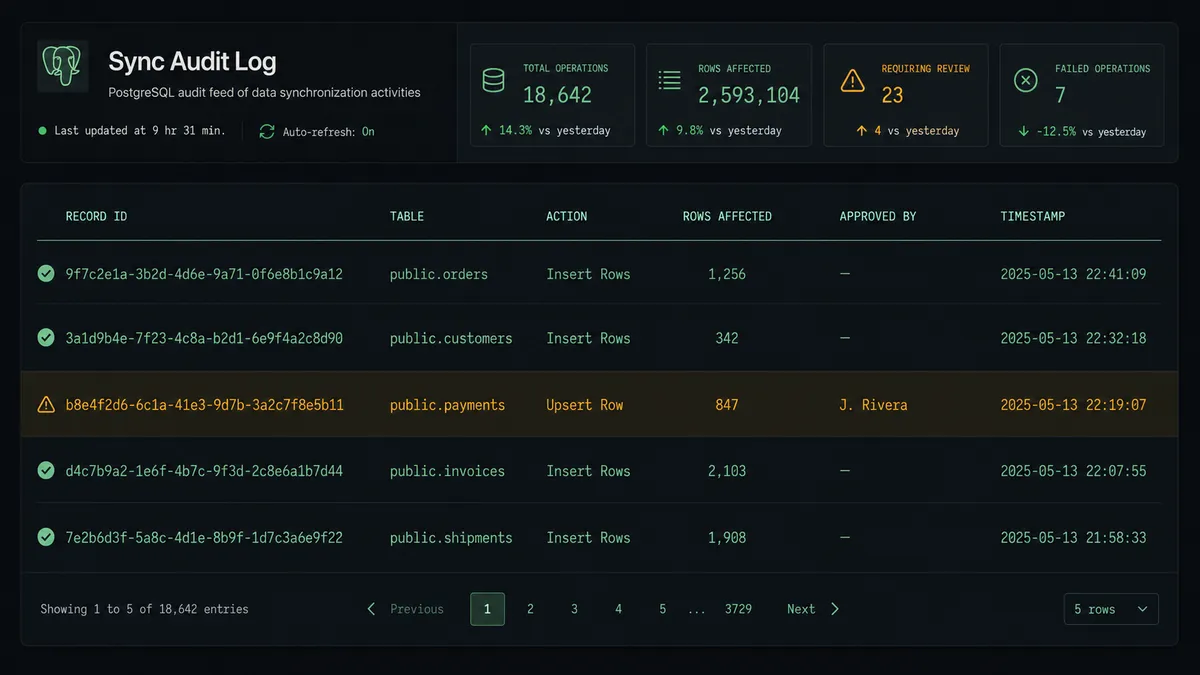
Sync status dashboard feed. After every PostgreSQL write, the agent calls Insert Row into a PostgreSQL audit table with the record ID, field values written, approver (if applicable), and timestamp. The operations team queries this table for a live feed of every sync event without touching the source tables.
Content calendar publish with writeback. A marketing team manages a content calendar in Airtable. When a record changes to Ready for Publishing, the agent reads the content fields, calls Execute Query in PostgreSQL to log the publish event to the content database, updates the Airtable record status to Publishing, and calls Create Comment to record the publish timestamp and target channel. The editorial team works entirely in Airtable. The database record is automatic.
Getting started
FlowRunner has a free plan with 100 executions a month, every integration included, and no credit card required, and new accounts get 14 days of Professional on top. Both connectors are available from day one.
Start at flowrunner.ai to create your account. Connect your Airtable account at /integrations/airtable and your PostgreSQL database at /integrations/postgresql. Build the trigger-to-upsert flow first, run a test with a real Airtable record, and confirm the row appears in PostgreSQL with the correct values. Add the AI agent and the human-in-loop step once the basic sync is working.
If you want to walk through the setup with someone who knows the platform, book a call at calendly.com/flowrunner/intro. No sales pitch. Just the working flow by the end of the call.
Frequently asked questions
Is it free to connect Airtable and PostgreSQL on FlowRunner?
FlowRunner has a free plan with 100 executions a month, every integration included, and no credit card required, and new accounts get 14 days of Professional on top. That credit covers both the Airtable and PostgreSQL connectors at full capacity. Corporate email required; no Gmail or Yahoo addresses.
Can I self-host FlowRunner to keep database credentials on my own infrastructure?
Yes. FlowRunner offers a self-hosted Community Edition at no cost for single-instance deployments. The Enterprise self-hosted plan adds multi-instance clustering, full compliance features, and dedicated support. Your PostgreSQL credentials and Airtable API key stay within your own network.
Does the AI agent need my own OpenAI or Claude API key?
Yes. FlowRunner uses a Bring Your Own Key model, so you connect your preferred AI provider directly. The agent uses your key and your quota. FlowRunner never marks up or resells AI inference.
What happens when the agent is not sure about a write?
The agent pauses execution and routes the decision to a human through your configured channel, such as Slack or email. It includes full context: what rows are affected, the Where filter, and a sample of the data. The write only runs after a human approves. The approver, decision, and timestamp are all captured in the run log.
Can I sync only specific Airtable tables to PostgreSQL, not the whole base?
Yes. Each flow is scoped to a specific Airtable trigger, either On New Record or On New or Updated Record, on a table you choose. You map exactly which fields flow to which PostgreSQL columns. Other tables in the base are untouched unless you build separate flows for them.
What is the difference between Insert Row and Upsert Row in the PostgreSQL connector?
Insert Row always creates a new record and will fail if a row with the same key already exists. Upsert Row runs an INSERT ... ON CONFLICT ... DO UPDATE keyed on conflict columns you specify, so re-running the same flow never creates duplicate rows. Use Upsert Row for any sync that may run more than once on the same source data.