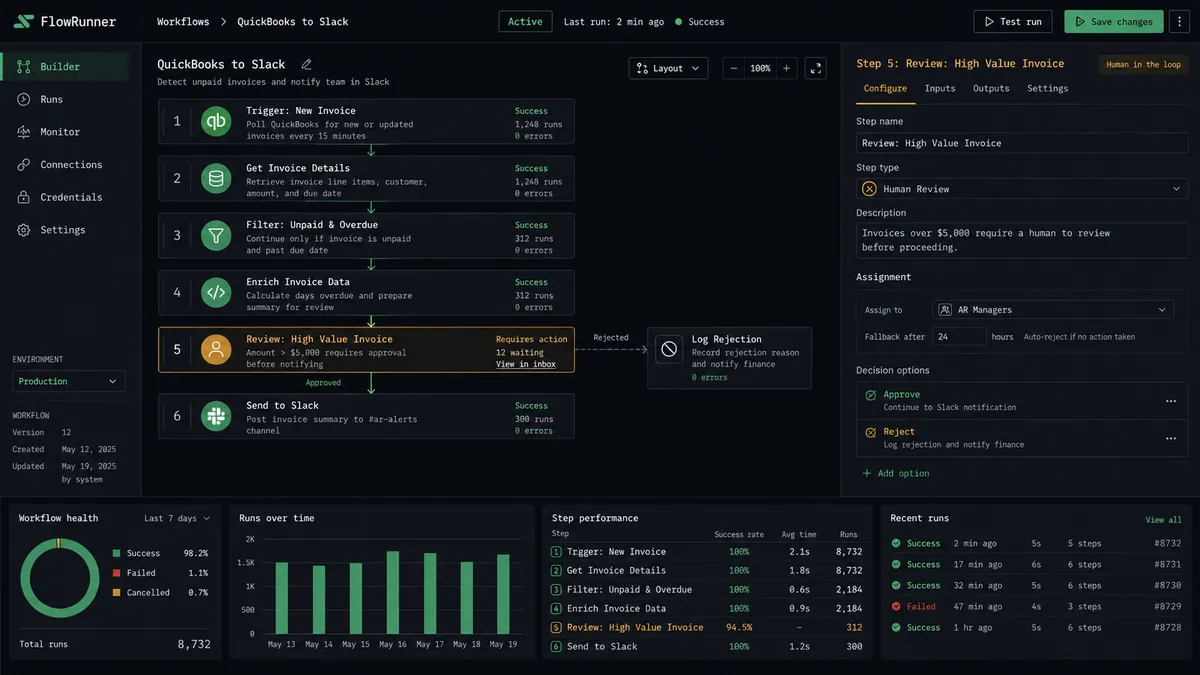
How to Connect QuickBooks Online with Slack Using FlowRunner
Route financial exceptions, post payment summaries, and deliver weekly P&L digests by connecting QuickBooks Online with Slack through FlowRunner.
The Problem: Financial Decisions Buried in Email Threads
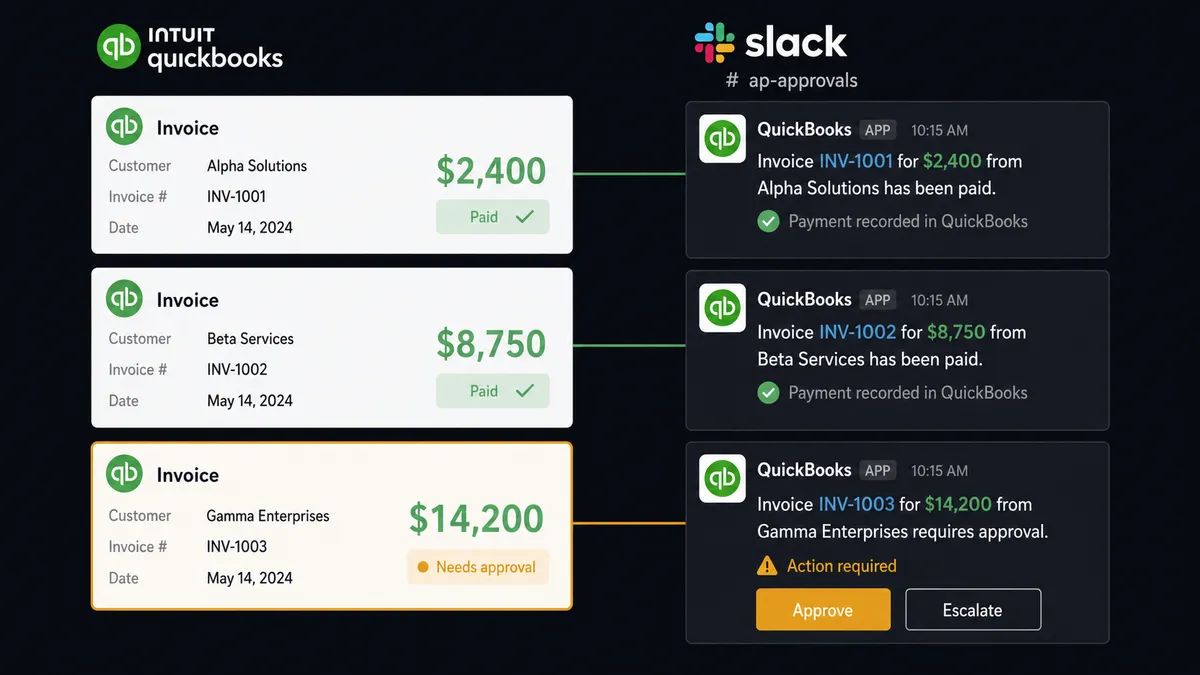
Your accounting team processes dozens of invoices, bills, and payments every day. When something needs attention, the current system is an email to the controller, a reply-all chain that adds three people who do not need to be there, and a resolution that takes hours. Sometimes days. Meanwhile, the bill sits unpaid, the invoice stays in limbo, and nobody can tell you who approved what or when.
The visibility problem is just as bad. Leadership wants to know where revenue stands. The answer is always “let me pull the numbers.” Someone logs into QuickBooks, exports a report, formats it, and drops it in an email. By the time anyone reads it, the data is already stale. Weekly financials arrive on Tuesday afternoon when the Monday morning meeting already happened without them.
Then there are the approvals that have no structure at all. A large vendor bill arrives and gets paid because it looked routine. An invoice gets voided because someone thought the customer already paid. These decisions happen in hallway conversations, text messages, and forwarded PDFs. There is no record of who decided. Approvers can’t reliably recall who decided what, days or weeks later.
The Solution: Financial Events Routed Where Decisions Happen
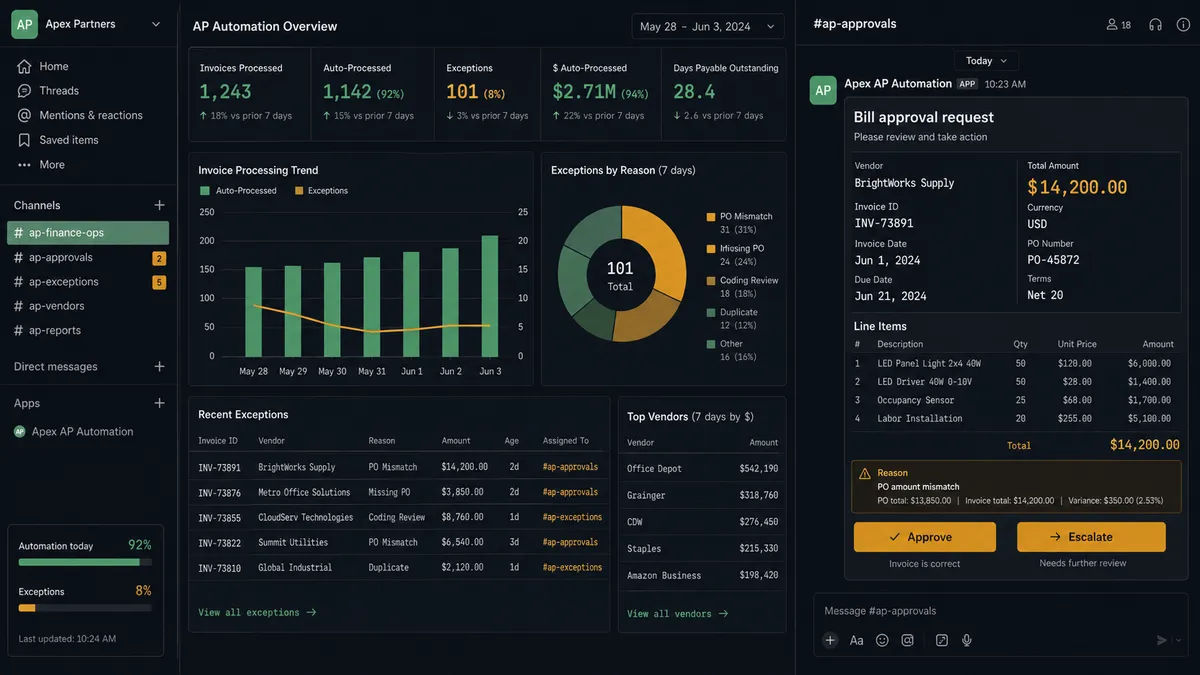
Connect QuickBooks Online with Slack through FlowRunner and your financial operations get a nervous system. Every payment, every exception, every scheduled report flows to the right person in the right channel at the right time. Your team stops digging through QuickBooks to find what needs attention. The work finds them.
The end state: payments post to a dedicated #accounting channel as they are recorded. Bills over your threshold pause and surface to the accounting manager with one-click approval buttons. A formatted P&L digest lands in #finance-weekly every Monday before the team arrives. Invoice void requests route to managers with the full customer context, and the decision is captured with the approver’s name and timestamp.
FlowRunner is the coordination layer between your financial data and your team’s decision-making. Routine transactions generate clean summaries. Exceptions generate structured decisions with decision history attached. Your team stops being data-entry operators and starts being the judgment layer.
Why Human-in-Loop Matters Here
Financial workflows carry real risk. A voided invoice cannot be unvoided. A paid bill cannot be easily reversed. An approved expense becomes a line item in your financials. When these decisions happen through unstructured channels, there is no governance. No record of who decided, what context they had, or whether they had authority to decide.
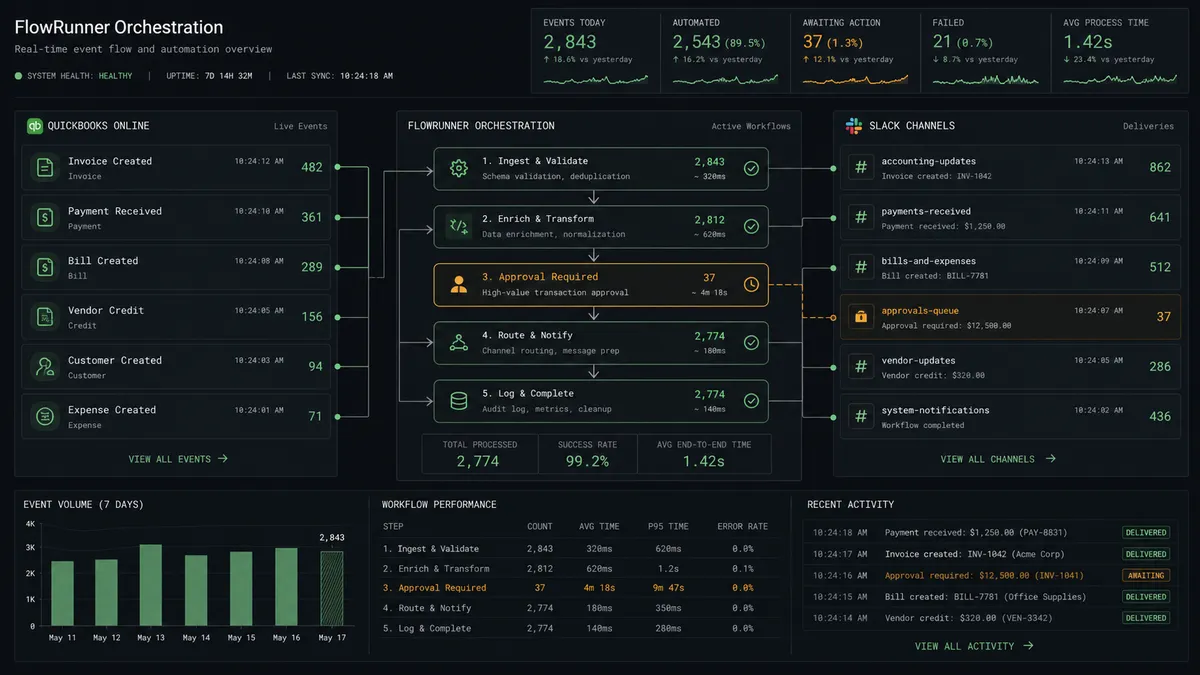
FlowRunner’s human-in-loop is not a basic approval gate. When a bill exceeding the configured threshold arrives in QuickBooks, the workflow pauses execution and sends a structured Slack message to the accounting manager. That message includes the vendor name, the bill amount, line item details, and two interactive buttons: Approve and Escalate. The manager clicks one button. The workflow resumes. The decision, the decider’s identity, and the timestamp are all captured in the decision history. This is the “digital andon cord” that operations leaders describe: the system stops the line when the stakes require human judgment, and only human judgment pulls it back into motion.
How It Works
Workflow 1: Payment Recorded to Accounting Channel Summary
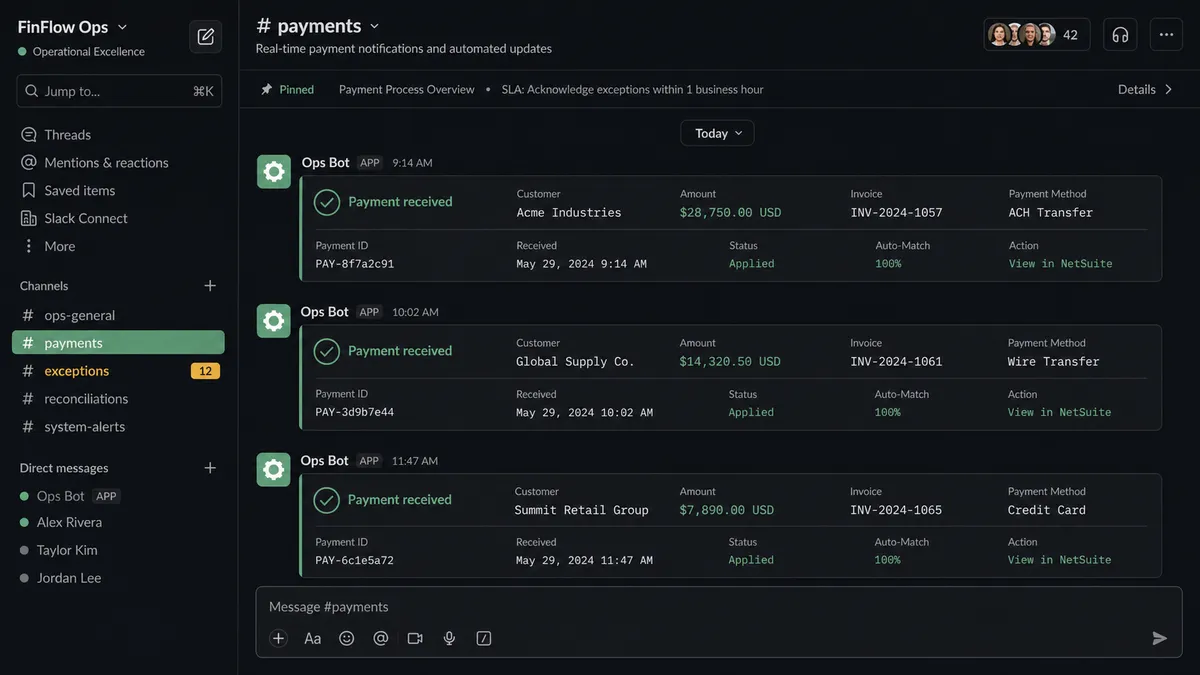
Every payment recorded in QuickBooks should be visible to the accounting team without anyone logging in to check. This workflow delivers a clean summary to Slack as the payment is recorded.
- Trigger: A scheduled check runs against QuickBooks for newly recorded payments
- Action: The flow calls Get Payment in QuickBooks Online to retrieve payment details: amount, customer, invoice reference, payment method
- Action: The flow calls Get Customer in QuickBooks Online to pull the customer’s account status and outstanding balance
- Action: The flow calls Get Invoice in QuickBooks Online to confirm the invoice is now marked paid
- Action: The flow calls Send Message to Channel in Slack, posting to #accounting with the customer name, payment amount, invoice reference, and updated outstanding balance.
- Result: The accounting team has real-time AR visibility in Slack without touching QuickBooks
No manual data entry. No morning reconciliation ritual. AR status updates arrive as they happen.
Workflow 2: Large Bill Approval with Slack Interactive Buttons
When a vendor bill exceeds the configured threshold, the workflow does not process it automatically. It pauses and routes the decision to a human with full context and structured response options.
- Trigger: A new bill is detected in QuickBooks Online via Create Bill event
- Action: The flow reads the bill details: vendor name, amount, line items, due date, purchase order reference
- Check: The flow evaluates the bill amount against the configured approval threshold
- Action: For bills under threshold, the flow posts a summary to #accounting via Send Message to Channel and the workflow completes
- Human: For bills at or above threshold, the flow pauses execution and calls Send Direct Message in Slack to the accounting manager. The message includes vendor name, bill total, line item breakdown, due date, and two interactive buttons: Approve and Escalate
- Trigger: On Block Action fires in Slack when the manager clicks a button
- Action: If Approved, the workflow resumes and posts confirmation to #accounting via Send Message to Channel with the bill details, the named approver, and the timestamp.
- Action: If Escalated, the flow calls Send Direct Message to the CFO with the same context plus the manager’s escalation note
- Decision history: The approver’s identity, decision, and timestamp are logged for review
The accounting manager spends seconds reviewing context and clicking a button. No email chains. No ambiguity about who approved the spend. Average resolution time drops from hours to minutes.
Workflow 3: Monday Morning P&L Digest
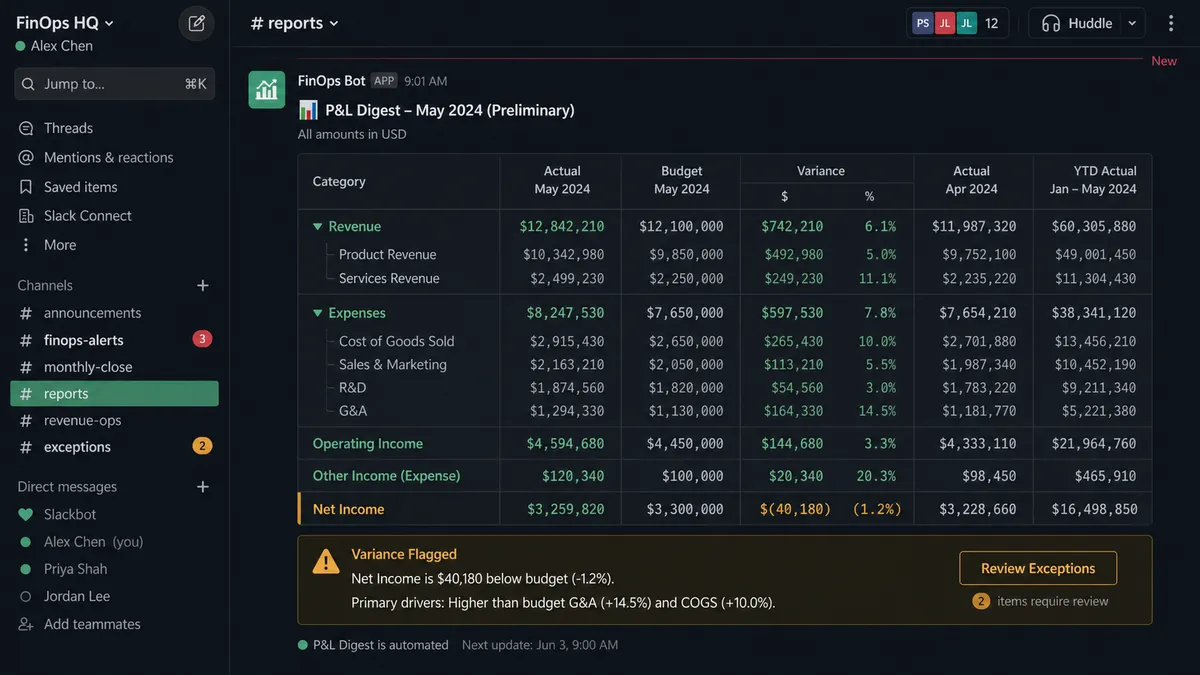
Leadership wants financial visibility without asking for it. This workflow pulls the numbers from QuickBooks and delivers them before anyone arrives Monday morning.
- Trigger: Scheduled run fires every Monday morning
- Action: The flow calls Get Profit and Loss in QuickBooks Online for the current month-to-date period
- Action: The flow calls Get Profit and Loss again for the prior month’s same date range (for comparison)
- Action: The flow formats the report: total revenue, total expenses, net income, and month-over-month variance for each category
- Action: The flow calls Send Message to Channel in Slack, posting the formatted digest to #finance-weekly with key variance callouts highlighted
- Human: If any expense category shows a meaningful variance from the prior period, the flow flags it in the message and tags the relevant department head for review
No exports. No formatting in Excel. No waiting until Tuesday for numbers that should have been available Monday. The P&L is in Slack before the first meeting starts.
Before and After
| Before | After | |
|---|---|---|
| Payment recording | Manual payment entry, AR updated in batches | Real-time AR updates. Invoice marked paid as the payment is recorded. |
| Data entry | Staff enters every payment into QuickBooks by hand | Zero manual payment entry for routine transactions |
| Financial visibility | No weekly visibility until someone pulls the report | Monday P&L digest posted to #finance-weekly before the team arrives |
| Exception handling | Exception emails with reply-all chains and no resolution tracking | Exceptions surface in minutes via structured Slack messages |
| Approval governance | No structured approval process for large bills or voids | Decision history is captured for every approval: who chose what, when, with the bill context attached. |
What You Can Build
Invoice void approval pipeline. When a void is requested in QuickBooks, the flow calls Get Invoice to pull the full invoice history and customer context. It routes the request to the manager via Send Direct Message with Approve and Reject buttons. On Block Action captures the decision. Every void is authorized and traceable.
Vendor bill discrepancy alerts. The flow compares a new bill against the purchase order amount in QuickBooks. When the bill exceeds the PO by more than a configured threshold, it posts an exception card to #accounting via Send Message to Channel with the vendor name, PO amount, bill amount, and the discrepancy percentage. The team investigates before payment.
Customer payment confirmation notifications. After Create Payment records a customer payment, the flow calls Send Direct Message to the account manager in Slack with payment details and updated balance. Account managers know immediately when their clients pay without checking QuickBooks.
Overdue invoice escalation. A daily scheduled check calls List Invoices filtered to overdue status. The flow groups them by aging bucket (30, 60, 90+ days) and posts a summary to #collections via Send Message to Channel. Invoices over 90 days trigger a Send Direct Message to the collections lead with customer contact details.
Monthly close checklist. On the first business day of each month, the flow calls Get Profit and Loss and List Invoices (filtered to the prior month) from QuickBooks. It posts a structured close checklist to #accounting with outstanding items, revenue totals, and open invoices that need resolution before the books close.
Getting Started
Both QuickBooks Online (45 actions) and Slack (8 triggers, 16 actions) are available on every FlowRunner tier, starting at Growth ($45/mo). Every tier includes unlimited users and unlimited workflows.
Start on the free plan: 100 executions a month, every integration included, no credit card required, plus 14 days of Professional for new accounts. Any real email address works; disposable domains are not accepted.
For teams that need decision history on financial approvals, Professional at $299/mo adds longer log history. Role-based access is available on Professional and above. That is compliance infrastructure at a fraction of what other platforms charge.
Explore the integration details:
- QuickBooks Online integration (45 actions covering customers, vendors, invoices, bills, payments, and P&L reports)
- Slack integration (8 triggers and 16 actions covering channels, direct messages, interactive buttons, and message search)
Start building free at flowrunner.ai or book a demo to see a live QuickBooks-to-Slack workflow running on your data.