How to Connect Google Drive with OpenAI (With or Without an AI Agent)
Connect Google Drive and OpenAI in FlowRunner so files landing in Drive trigger AI analysis, generation, or extraction automatically, with a human reviewing output before it leaves the flow.
How do you connect Google Drive to OpenAI?
You set an On New File trigger on a watched Drive folder, pass the file content to OpenAI’s Create Response or Create Chat Completion action, and route the output back into Drive or downstream to your team. FlowRunner is a visual AI-agent orchestration platform where automations run autonomously and pause for human judgment on the steps that carry real consequence. That same connection can run as an AI agent that reads the document, reasons about what it found, and invokes a human reviewer before the output reaches anyone who acts on it.
The problem it solves
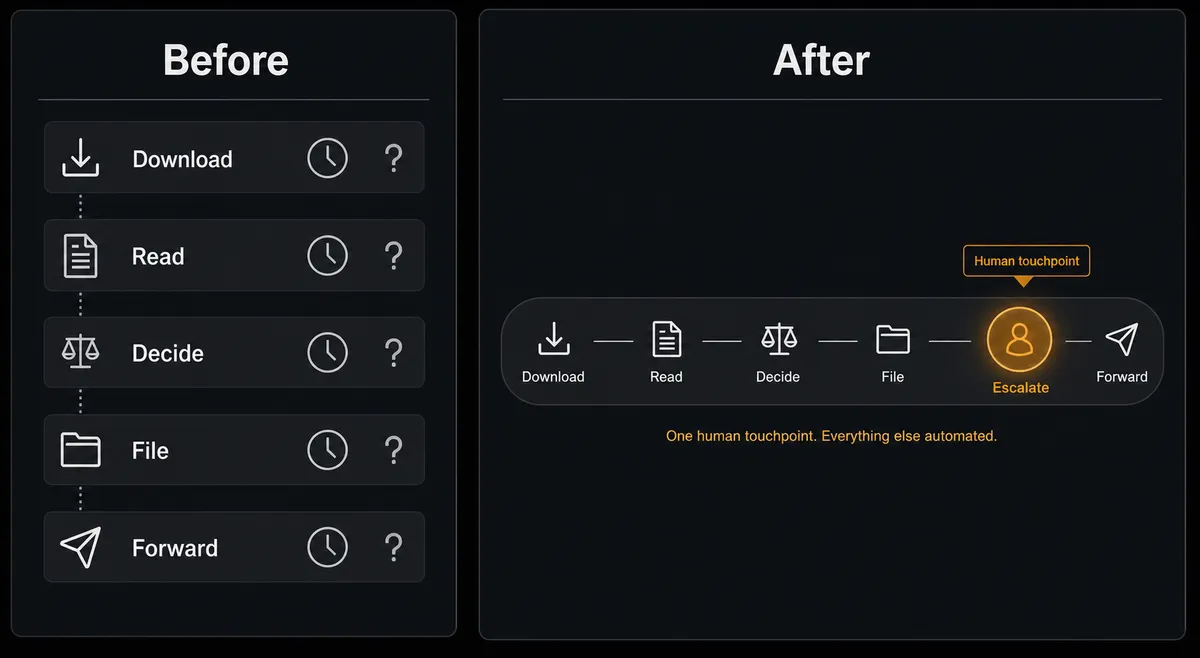
Most teams have a version of the same manual loop. A document lands somewhere: a shared inbox, a Slack DM, a folder someone monitors. Someone downloads it, reads it, decides what it means, and either files it or forwards it to whoever needs to act. When volume is low, that works. When volume picks up, the loop starts leaking. Files get processed out of order. Summaries are inconsistent because different people read the same document differently. The reviewer who approves outputs goes on vacation and nothing moves for a week. The operations lead knows it is fragile but has not found a clean way to fix it without rebuilding the whole process.
The specific pain with Google Drive and OpenAI together is that each tool is already doing something useful in isolation. Drive is where documents live. OpenAI is where text gets processed. But connecting them means someone is always in the middle: download, paste, prompt, copy the output back, file the original. That is a job, not a workflow. It is the kind of work that falls through the cracks when the person doing it is busy with something else.
How it works: the connection
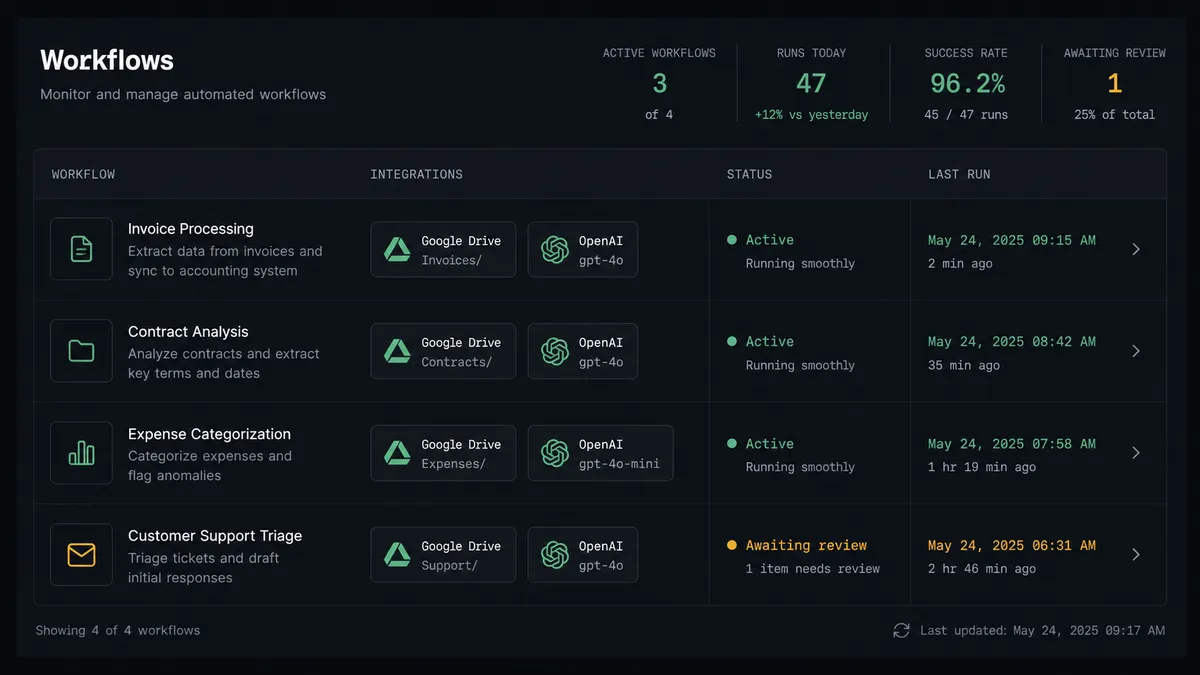
The flow starts with an On New File trigger on a watched Google Drive folder. The moment a file lands, the agent calls Get File Content to read it. That content goes directly to an OpenAI action: Create Response for the primary generation interface, or Create Chat Completion for a full messages-array approach with system, user, and assistant roles.
The agent’s instructions define what it does with the content: extract named entities from a contract, classify an invoice by vendor and amount, summarize a research document, or draft a reply to an inbound request. The output is structured and ready for the next step.
After generation, the agent calls Moderate Content to screen the output against OpenAI’s safety categories before anything moves downstream. Clean output routes to the filing steps: Upload File saves the processed document or extracted JSON back into Drive, and Move File routes the original into a vendor-named or date-organized archive folder. Add File Sharing Preference applies the right access level if the output needs to reach a specific person or team.
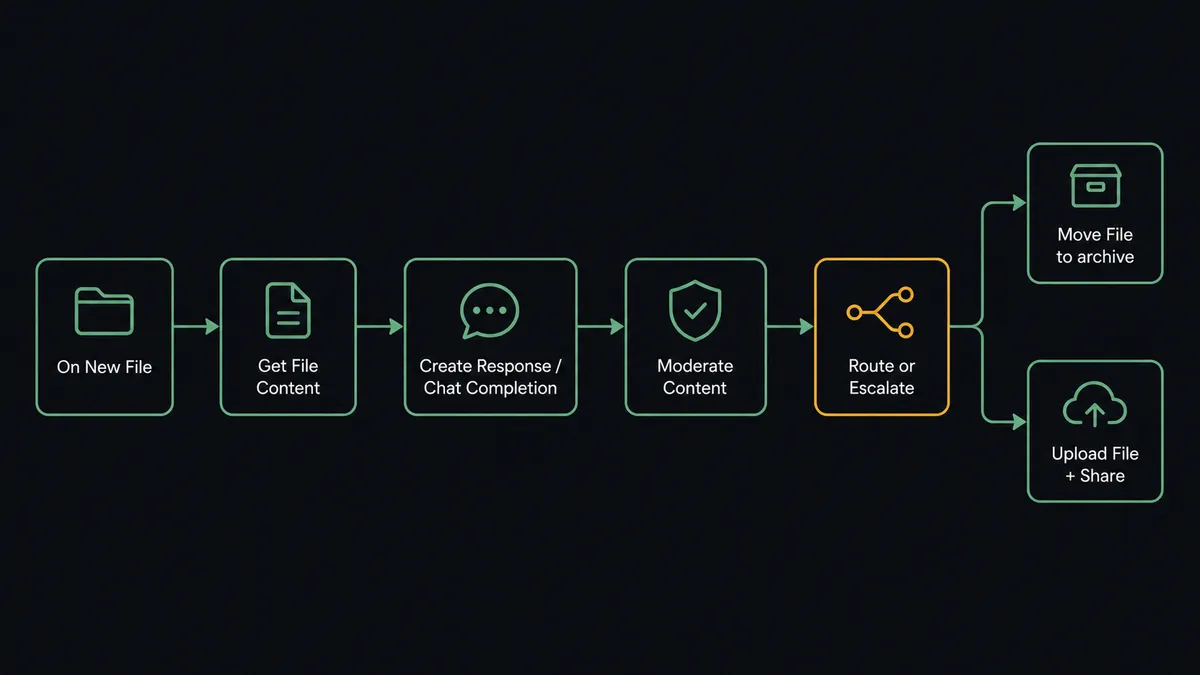
Can an AI agent run it? (and why a human stays in the loop)
A basic Zapier or n8n connection moves the file and calls the API. The agent does something different: it reads the output, evaluates what it found, and decides what to do next based on context, not a preset rule.
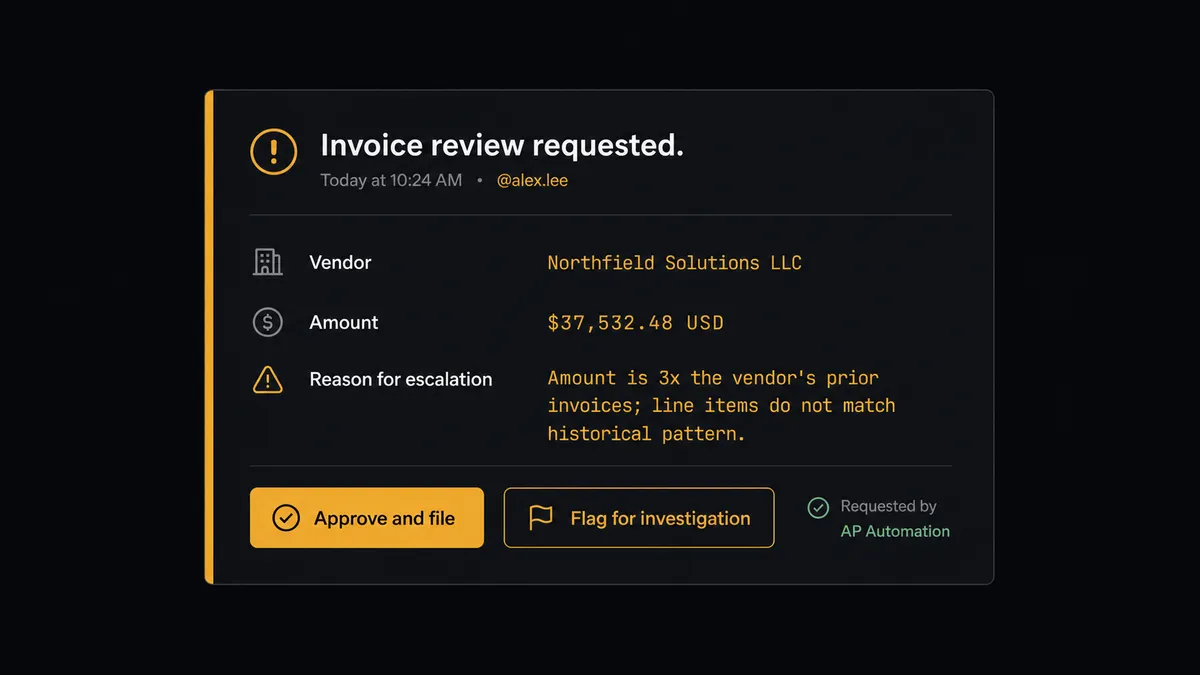
Here is the distinction in practice. An invoice arrives in the intake folder. The agent calls Get File Content, passes the content to Create Chat Completion with instructions to extract vendor name, amount, invoice number, and line items. It gets the structured data back. Now it checks. This vendor has a history in the system. The amount is 3 times their usual monthly invoice. The agent does not have a hardcoded threshold for “escalate if amount > X.” It reads the situation: unfamiliar line items, unusual amount, no prior invoices matching this pattern. It decides this is a step that carries real consequence and invokes the human-in-loop flow as a callable tool.
The reviewer gets a Slack message with the full context: the extracted data, the agent’s note on why it paused, the vendor history, and two options. Approve and file, or flag for investigation. The agent waits. When the reviewer responds, the workflow resumes. The decision, the reviewer’s identity, and the timestamp go into the audit trail. Everything else, the routine invoices from known vendors at expected amounts, processes without interruption.
This is the digital andon cord in practice. The agent stops the line when it hits something it should not decide alone. Not because a rule told it to. Because it evaluated the situation and made the call.
FlowRunner vs the tool you are probably comparing
If your team is already on Zapier, you have tried connecting Drive and OpenAI before. Zapier gets the job done for a fixed trigger-to-action sequence. It reliably fires the OpenAI API call when a file lands in Drive and does what you configured it to do. For a stable, high-volume process where the inputs and outputs are predictable, that is a reasonable fit.
The difference shows up at the edges. Zapier does not reason about what it finds. There is no step where the tool evaluates the output and decides whether a human should review it before the result goes anywhere. The agent either runs or it does not. Adding a human approval step means building a separate Zap, using a third-party forms tool, and manually connecting the threads. It is possible but not native.
FlowRunner’s human-in-loop is a callable tool inside the agent. The agent decides when to invoke it based on what it finds, not based on a preset condition. That is a different architecture, not a different feature tier.
| Feature | Zapier | FlowRunner |
|---|---|---|
| Google Drive + OpenAI connection | Yes, via trigger-action | Yes, via trigger-action or AI agent |
| Native human-in-loop orchestration | No (requires third-party workaround) | Yes, invoked by the agent as a callable tool |
| Agent reasons about output before routing | No | Yes, using context from both integrations |
| Unlimited users on every paid tier | No (user limits vary by plan) | Yes |
| BYOK for AI providers | No | Yes |
| Self-host option | No | Yes (Community and Enterprise editions) |
Before and after
| Category | Before | After |
|---|---|---|
| File processing | Someone downloads each file, reads it, and decides what to do manually | On New File fires and the agent processes, classifies, and files within seconds |
| Consistency | Output quality varies by who reviews the document and when | The same extraction and classification instructions run on every file |
| Exceptions | Unusual files sit in the queue until the right person notices | Agent escalates exceptions to a named reviewer via Slack with full context |
| Filing | Processed documents live in inboxes or desktop folders | Move File and Upload File route originals and outputs to the right folders automatically |
| Access control | Sharing is done manually after someone remembers to do it | Add File Sharing Preference applies the right scope as part of the flow |
| Audit trail | No record of who reviewed what or when decisions were made | Every human decision is captured with reviewer identity and timestamp |
What you can build
Document intake and extraction pipeline. A watched Drive folder fires On New File when a contract, invoice, or form arrives. The agent calls Get File Content and passes the document to Create Chat Completion with field-extraction instructions. It saves the structured JSON back to Drive with Upload File and routes exceptions to the contracts team via the human-in-loop flow.
Retrieval-grounded Q&A from Drive content. The agent embeds Drive documents into a vector store using Create Embeddings and Add File to Vector Store. When a question comes in, it calls Search Vector Store to retrieve the relevant passages and Create Response to generate a grounded answer with citations. Questions touching sensitive policy route to the owning team instead of returning a guess.
Automated report generation and distribution. A flow runs on a weekly schedule, calls Get Folder Listing to enumerate the source files, passes each through Create Chat Completion with summarization instructions, then calls Upload File to save the generated report and Add File Sharing Preference to grant the right team view-only access. The report lands in the right folder, named correctly, with access already set.
Multimodal content production with Drive as the asset store. A campaign brief lands in Drive. The agent reads it with Get File Content, drafts copy with a reasoning model via Create Response, generates image options with Generate Image, and produces a voiceover with Text to Speech. All assets upload back into the campaign folder with Upload File. A human reviews and approves before anything publishes.
Getting started
FlowRunner has a free plan with 100 executions a month, every integration included, and no credit card required, and new accounts get 14 days of Professional on top. Connect your accounts, build the flow, and see what it looks like when your Drive intake folder runs without someone sitting in the middle of it.
Start at flowrunner.ai or book a 30-minute intro to walk through the build with the team.
Integration pages: Google Drive and OpenAI.
Frequently asked questions
Is it free to connect Google Drive and OpenAI on FlowRunner?
FlowRunner has a free plan with 100 executions a month, every integration included, and no credit card required, and new accounts get 14 days of Professional on top. Beyond the free plan, Growth is $45 per month. All tiers include unlimited users and workflows.
Do I need my own OpenAI API key?
Yes. FlowRunner uses a bring-your-own-key (BYOK) model for AI providers. You connect your own OpenAI API key in FlowRunner's credentials settings. This keeps your data out of FlowRunner's infrastructure and your costs transparent.
Can I self-host FlowRunner?
Yes. FlowRunner offers a free Community Edition for self-hosted single-instance deployments and an Enterprise self-hosted option with multi-instance clustering and a full compliance suite.
What happens when the AI agent is not confident about a file?
The agent invokes a human-in-loop flow as a callable tool. It pauses execution, packages the file metadata, the content it extracted, and the reason for uncertainty, then sends it to the designated reviewer via Slack, email, or another channel. The workflow resumes after the reviewer responds.
Does the agent need both a Google Drive and an OpenAI connection?
Yes. You connect each account separately in FlowRunner's credentials settings. Google Drive uses OAuth2. OpenAI uses your API key. Once both are connected, any flow can use actions from either platform as agent tools.
Can I process files already in Drive, not just new uploads?
Yes. The On File Updated trigger fires when a watched file changes. The Get Folder Listing action lets you enumerate files in a folder for batch processing. You can also trigger a flow manually or on a schedule to process existing documents.