How to Connect OpenAI with Weaviate (With or Without an AI Agent)
Connect OpenAI embeddings and generation to Weaviate vector search in FlowRunner, optionally as an AI agent that pauses for human approval before any batch delete removes data.
How do you connect OpenAI to Weaviate?
You use OpenAI’s Create Embeddings action to turn text into vectors, then Weaviate’s Batch Create Objects action to write those vectors into a collection, and Weaviate’s Search (Hybrid) or Search (Vector) action to retrieve them back for OpenAI’s Create Response to generate a grounded answer. FlowRunner is a visual AI-agent orchestration platform where automations run autonomously and pause for human judgment on the steps that carry real consequence. The same connection can run as an AI agent that embeds, indexes, searches, and generates on its own, and invokes a human before any batch delete removes data from the collection.
The problem most teams are solving manually today
When a team decides to build a retrieval-augmented generation pipeline, they usually start with scripts. A developer writes one script to call OpenAI’s API, a second to push the results into Weaviate, and a third to run searches and pipe records into a prompt. That works for the first project. Then the second team wants a similar pipeline for a different collection. Then someone needs to update records on a schedule. Then the compliance team asks who approved the last batch delete that removed 12,000 objects.
Each script is a point of failure with no audit trail. When something breaks, the ops lead finds out when a downstream process starts returning empty results. When a cleanup job removes the wrong objects, nobody knows who ran it or what filter it used. The team is not short on capability. They are short on the coordination layer that sequences the steps, gates the dangerous ones, and keeps a record of every decision made along the way.
This is not a tooling problem. OpenAI and Weaviate are both well-built platforms. The gap is the orchestration layer between them and the humans who are accountable for what the pipeline does to production data.
How it works: the connection
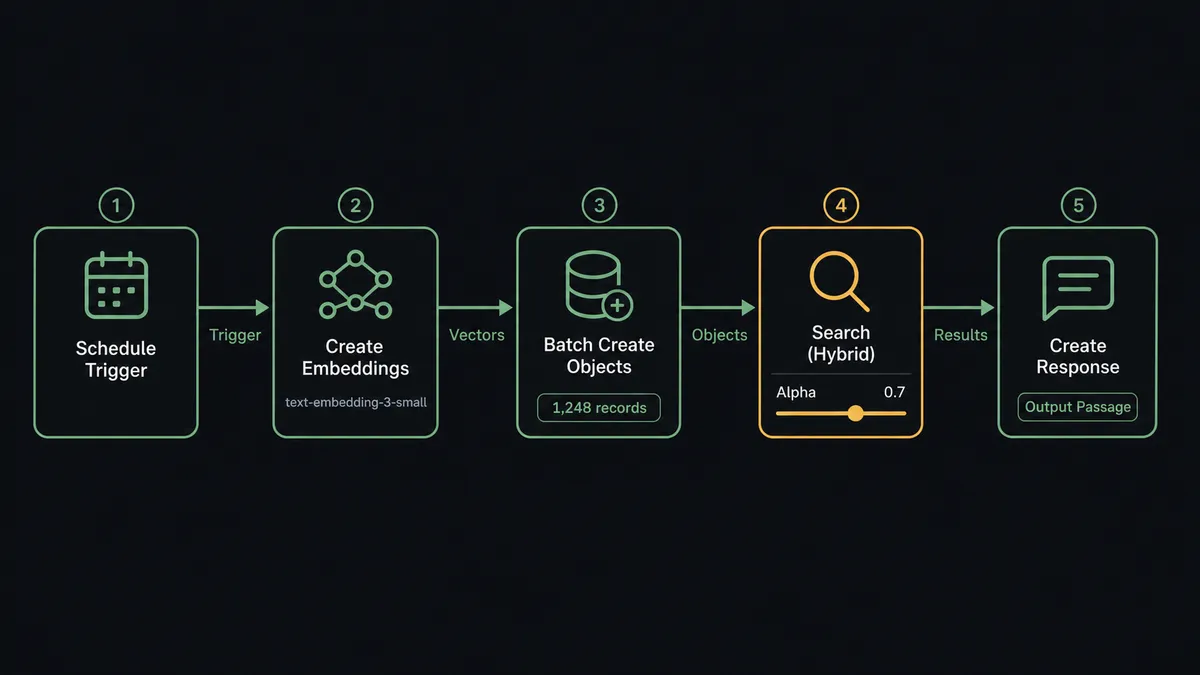
The core loop has three parts: embed, index, retrieve and generate.
Embed
The OpenAI connector’s Create Embeddings action accepts one or more text inputs and returns a vector for each, using a model like text-embedding-3-small or text-embedding-3-large. In a FlowRunner workflow, this action sits right after the trigger. The trigger produces records. The Create Embeddings action converts each record’s relevant text fields into a vector.
Index
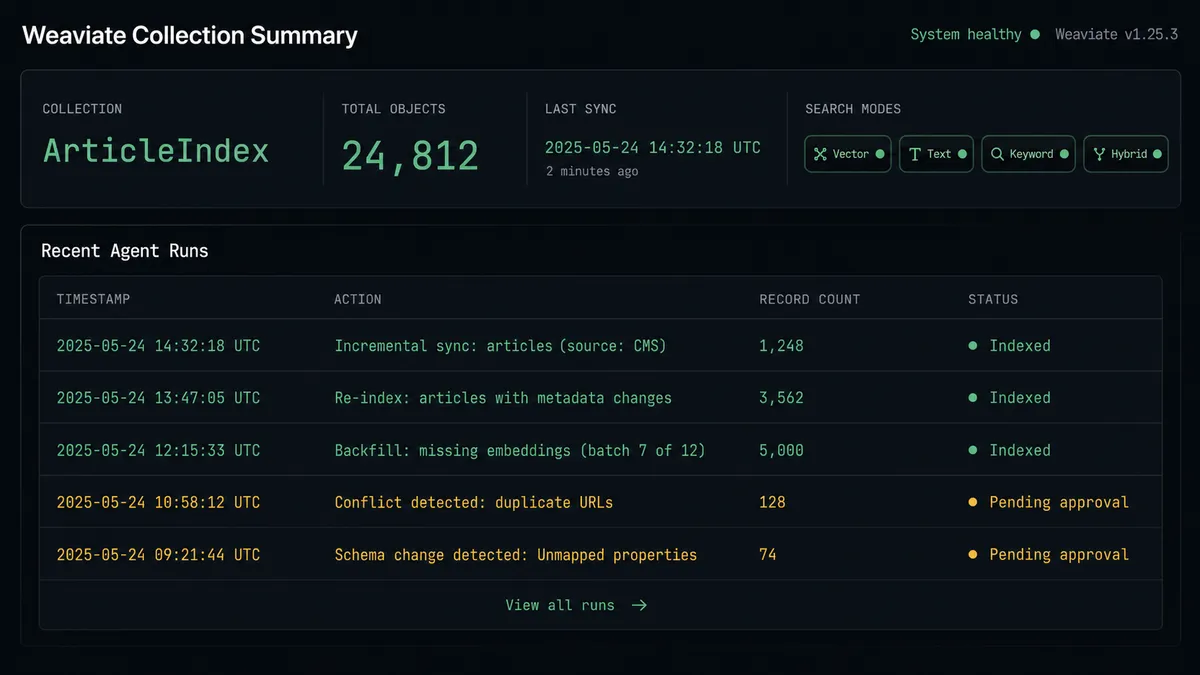
Weaviate’s Batch Create Objects action writes multiple objects to a collection in a single request. The agent maps the original record properties and the embedding vector from the Create Embeddings step into the batch payload. One call handles what would otherwise be dozens or hundreds of individual Create Object calls. After the batch write, Aggregate Count confirms the collection size changed as expected.
Retrieve and generate
When the pipeline’s job is to answer questions or produce grounded content, the agent calls Search (Hybrid) or Search (Vector) on the Weaviate collection. Search (Hybrid) blends vector similarity and BM25 keyword ranking, which means a query finds the right content even when the wording differs from what was indexed. The retrieved passages go directly into the OpenAI Create Response or Create Chat Completion action as context. The model generates an answer grounded in what the collection actually contains, not what it was trained on.
This three-step sequence, embed in OpenAI, store in Weaviate, retrieve and generate with both, is the complete RAG backend. FlowRunner sequences it as a workflow, so the same logic runs on every new record without manual intervention.
Can an AI agent run it? (And why a human stays in the loop)
Yes. In FlowRunner, an AI agent is a workflow node that reads its instructions, evaluates the data in front of it, and picks the best tools from its toolbox. For an OpenAI and Weaviate pipeline, the agent’s tools include Create Embeddings, Batch Create Objects, Search (Hybrid), Search (Vector), Create Response, Aggregate Count, and the human-in-loop subflow.
The agent handles the read-only operations on its own. Embedding new records and searching the collection are safe, reversible, and do not need a human checkpoint. The agent calls those actions in whatever order the situation calls for.
Where the agent stops is Batch Delete Objects. A batch delete removes every object in a collection that matches a where filter, up to the server limit per call. That operation is irreversible. The agent does not skip over it or apply a hardcoded threshold like “always approve deletes above 1,000 objects.” Instead, it reasons about the operation itself.
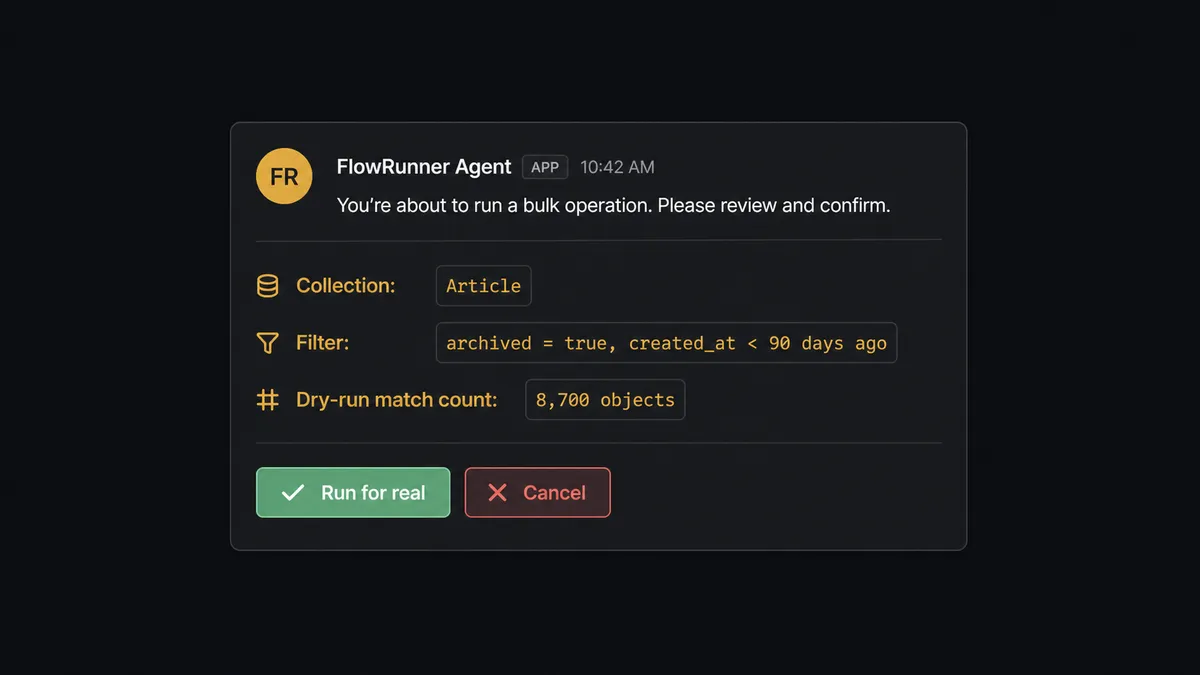
Here is what that looks like in practice. A retention policy says to remove objects from the Article collection older than 90 days. The agent receives the filter parameters. Before it runs the delete, it calls Batch Delete Objects with Dry Run enabled. The dry run returns the exact count of objects the filter would remove without touching any data. The agent assembles a summary: collection name, filter used, match count, and timestamp of the review. It routes that summary to the data owner via Slack with two options: “Run it for real” or “Cancel.”
The data owner gets a message that reads something like: “This retention cleanup would delete 8,700 objects from the Article collection matched by the archived filter. Run it for real?” That is the digital andon cord: the agent stops the line when it reaches an operation where human confirmation is the right call, not because of a rule that says “always ask,” but because the operation is irreversible and the data owner is accountable for what disappears.
When the owner approves, the agent runs Batch Delete Objects for real. The decision, the decider’s identity, and the timestamp are captured in FlowRunner’s audit trail. When the owner cancels, the delete does not run. Either way, the record is there.
FlowRunner vs Zapier
Zapier is the right call for many teams. It connects thousands of apps, the setup is fast, and the learning curve is low. If your OpenAI and Weaviate workflow is a simple trigger-action pair and you do not need audit trails or human checkpoints, Zapier will get you running quickly.
Where the difference shows up is when the pipeline needs judgment. Zapier does not have native AI agent nodes that reason about their toolbox. It does not have a human-in-loop mechanism where an agent decides at runtime to pause and escalate based on what it found in the data. A Zapier workflow follows the same path every time. The OpenAI and Weaviate use case often needs something different: an agent that embeds and indexes autonomously, but stops before a batch delete and presents the data owner with exactly what would be removed.
| Feature | Zapier | FlowRunner |
|---|---|---|
| Native AI agent node | No | Yes, with reasoning and tool selection |
| Human-in-loop at runtime | Conditional step, not agent-invoked | Agent decides when to pause based on context |
| Weaviate Dry Run before delete | Not native | Built into the Batch Delete Objects action |
| BYOK for OpenAI | Yes | Yes |
| Audit trail with decision records | Limited | Full: action, decider, timestamp on every human decision |
| Unlimited users on every tier | No (per-seat on higher tiers) | Yes |
| Self-hosted option | No | Yes (Community Edition free, Enterprise custom) |
Before and after
| Category | Before | After |
|---|---|---|
| Embedding pipeline | Developer writes and maintains separate scripts for embedding and indexing | FlowRunner workflow embeds with Create Embeddings and indexes with Batch Create Objects in sequence, no scripts |
| Batch writes | Records inserted one at a time, slow and fragile | Batch Create Objects writes many records in a single request |
| Search | One search mode per codebase | Search (Vector), Search (Text), Search (Keyword), and Search (Hybrid) available as single agent actions |
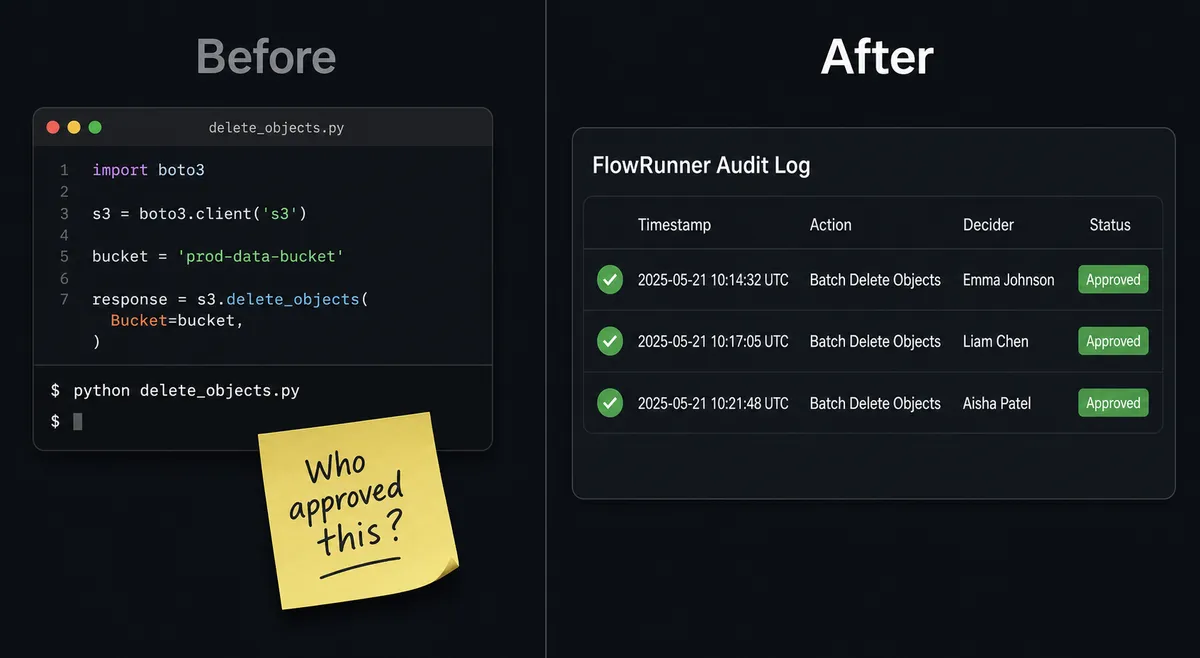
| Destructive operations | Batch deletes run from command line with no preview and no approval record | Agent runs Dry Run first, presents match count to data owner, records approval before executing |
| Audit trail | No record of who ran which operation or when | Every human decision logged with action, decider, and timestamp |
| Team access | One developer controls the pipeline | Unlimited users, operations team manages workflows without code |
What you can build
Retrieval-augmented knowledge base. Use Create Embeddings to index internal documents into a Weaviate collection. When a team member submits a question, the agent calls Search (Hybrid) to retrieve the most relevant passages, then passes them to Create Chat Completion for a grounded answer with citations. Questions touching sensitive policy route to the owning team instead of returning a generated answer.
Automated content moderation pipeline. New content arrives via webhook. The agent calls Moderate Content (OpenAI) to screen for harmful categories. Clean content embeds with Create Embeddings and writes to Weaviate with Create Object. Flagged content routes to a human reviewer with the moderation result before any decision is made.
Scheduled bulk sync with cleanup. On a schedule, the agent pulls changed records from a source system, embeds them with Create Embeddings, and writes them with Batch Create Objects. Aggregate Count confirms the collection size. When the retention window triggers a cleanup, the agent runs Batch Delete Objects with Dry Run, presents the count to the data owner, and runs for real only after approval.
Multimodal content indexing. A campaign publishes new assets: copy, images, and audio. The agent embeds the copy with Create Embeddings, stores it in Weaviate, and generates a voiceover with Text to Speech (OpenAI). Everything goes to a person for review before the final assets publish. Search (Vector) on the Weaviate collection makes past campaigns retrievable by concept, not just keyword.
Semantic duplicate detection. Before indexing a new record, the agent calls Search (Vector) with the new record’s embedding to find near-neighbors in the collection. If the top result exceeds a similarity threshold, the agent flags the potential duplicate and routes it to a human for a merge decision rather than writing a second copy.
Getting started
FlowRunner has a free plan with 100 executions a month, every integration included, and no credit card required, and new accounts get 14 days of Professional on top.
To build the OpenAI and Weaviate pipeline:
- Add the OpenAI connector and paste your API key.
- Add the Weaviate connector and supply your cluster URL and API key.
- Build your first flow: embed with Create Embeddings, index with Batch Create Objects, and add the human-in-loop step before any Batch Delete Objects action.
Start at flowrunner.ai. If you want to walk through your specific pipeline before building, book a call at calendly.com/flowrunner/intro.
Frequently asked questions
Is it free to connect OpenAI and Weaviate on FlowRunner?
FlowRunner has a free plan with 100 executions a month, every integration included, and no credit card required, and new accounts get 14 days of Professional on top. You bring your own OpenAI API key and your own Weaviate instance or cloud cluster, so the only FlowRunner cost is workflow executions.
Does the agent need my own OpenAI API key?
Yes. FlowRunner uses a BYOK (Bring Your Own Key) model for all AI providers. You supply your OpenAI API key in the connector settings and your Weaviate API key separately. You keep full control of costs and rate limits for both.
Can I self-host FlowRunner?
Yes. FlowRunner offers a Community Edition (free, single instance) and an Enterprise self-hosted option with multi-instance clustering and the full compliance suite. Cloud tiers start at $45 per month.
What happens when the agent is not sure about a destructive action?
The agent runs Batch Delete Objects in Weaviate with Dry Run enabled first, assembles the match count and filter details into a summary, and routes it to the responsible person via Slack or email. The real delete only runs after that person approves. The agent does not skip this step based on a hardcoded threshold; it invokes human review as a callable tool when a write operation is irreversible.
Can FlowRunner handle hybrid search combining vector and keyword results?
Yes. The Weaviate connector exposes Search (Hybrid), which blends vector similarity and BM25 keyword ranking on an alpha parameter you configure. The agent calls it as a single tool action and passes the results to OpenAI's Create Response or Create Chat Completion for grounded generation.
How many users and workflows are included?
All FlowRunner tiers include unlimited users and unlimited workflows. The tiers differ by monthly execution volume: 12,000 on Growth ($45), 75,000 on Professional ($299), and 250,000 on Business ($999).