How to Connect PostgreSQL with Snowflake (With or Without an AI Agent)
Sync PostgreSQL records into Snowflake automatically with a FlowRunner workflow that runs autonomously and pauses for human approval before any production write.
How do you connect PostgreSQL to Snowflake?
You connect them by triggering a FlowRunner workflow on a schedule or an upstream event, reading rows from PostgreSQL with Select Rows, and loading them into Snowflake with Execute SQL using an INSERT or MERGE statement with bound parameters. FlowRunner is a visual AI-agent orchestration platform where automations run autonomously and pause for human judgment on the steps that carry real consequence. The same connection can run as an AI agent that reads the data, reasons about it, and invokes a human-in-loop approval flow before any write touches a production Snowflake database.
What breaks when PostgreSQL and Snowflake are not connected
The operational database holds the live record of what happened. The warehouse holds the governed version of the numbers the business runs on. When nothing connects them automatically, someone owns the gap between them.
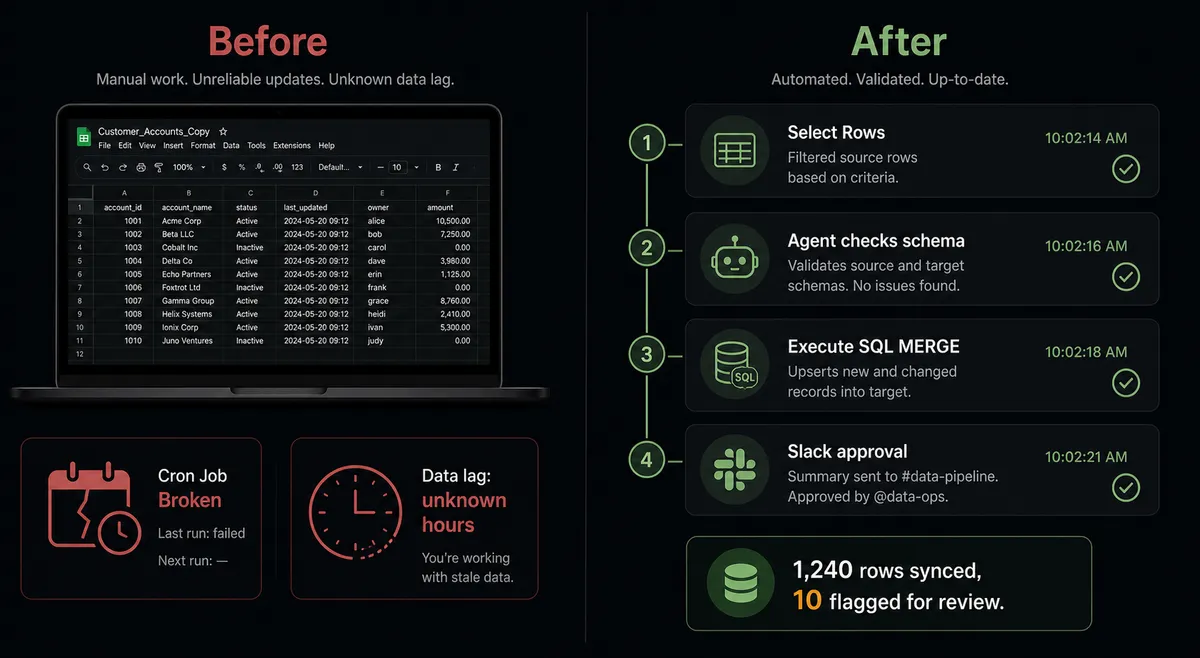
That person is usually an analyst or an ops lead. Their process is a spreadsheet export from PostgreSQL, a manual upload or script into Snowflake, and a hope that nothing changed between the two steps. The spreadsheet lives on a laptop. The script runs on someone’s cron job. When that person is out, the pipeline is out. When the schema changes, the script breaks silently. The team running reports out of Snowflake is looking at data that is anywhere from hours to days old, and nobody knows by how much.
The exceptions fall through the cracks at the boundary. A record that could not be matched during a manual reconciliation sits in someone’s inbox waiting for a judgment call. A load that failed overnight is noticed the next morning when the dashboard numbers look wrong. These are not edge cases. They are the normal state of a manual handoff between two systems that were never designed to talk directly.
How the connection works
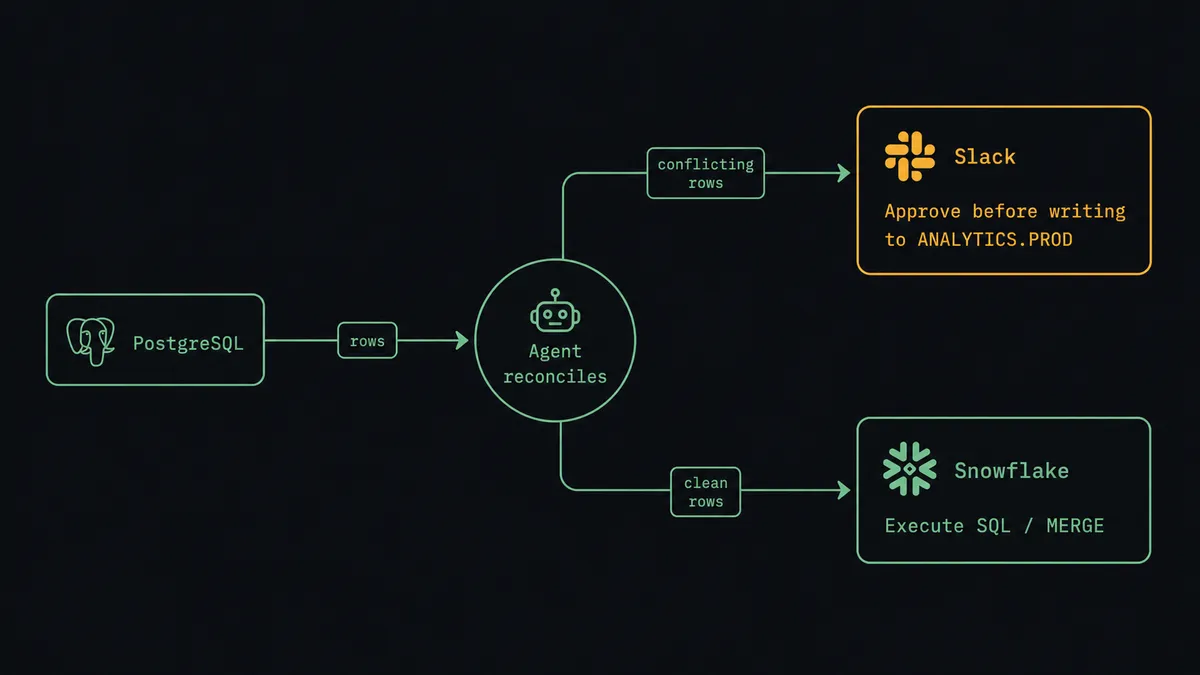
A FlowRunner workflow treats the sync as a governed sequence of named steps. Here is how the pieces connect.
The flow starts on a schedule (nightly, hourly, or on-demand from an upstream trigger). The first action is Select Rows on the PostgreSQL connector. You configure the table, the column selection, the Where object, and optional ordering and pagination. The connector uses the official pg driver and binds every filter value as a $1, $2 parameter, not a string concatenated into the query. The Where object is required, so the action cannot accidentally pull an entire table.
The returned rows come back as plain objects. The agent reads them and checks their shape against what the Snowflake target expects. For clean records, it calls Execute SQL on the Snowflake connector with an INSERT or MERGE statement. The parameters are bound using ? placeholders, so malformed values from the source cannot corrupt the statement. A MERGE keeps the load idempotent: re-running the flow twice does not produce duplicate rows.
When a Snowflake statement takes longer than the synchronous API window allows, Execute SQL returns a statement handle instead of rows. The agent does not stall. It calls Get Statement Results by handle and polls until the rows arrive, or calls Cancel Statement if the query needs to be aborted. Long-running analytical queries across a wide table do not block the rest of the flow.
Every step appears in the FlowRunner run log by name: which action ran, what parameters it used, how many rows it returned or affected, and when. The ops lead sees the sync history without opening either database.
Can an AI agent run it, and why a human stays in the loop
A plain automation follows a fixed sequence. An AI agent reads the data, reasons about it, and decides which tools to use. That distinction matters most at the moment a write would touch a production system.
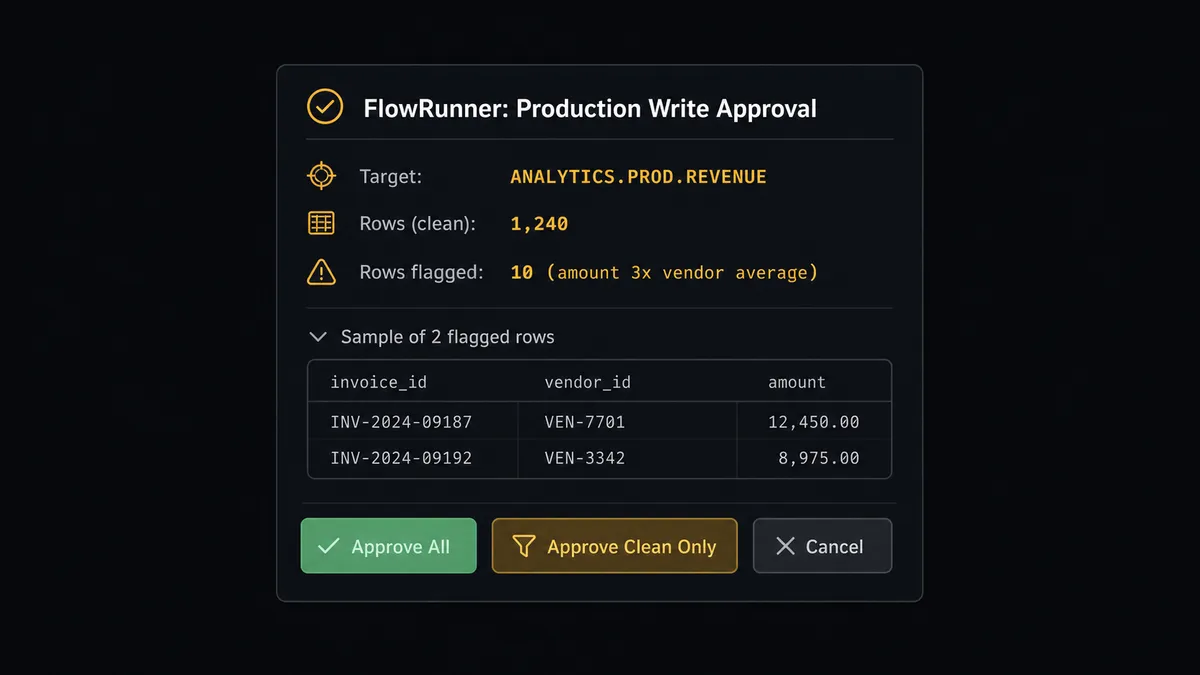
Here is a real decision moment. The agent runs Select Rows and gets back 1,400 records from a PostgreSQL invoices table. It calls Get Table Schema on the Snowflake target to confirm the column names and types still match. Everything looks clean on 1,390 rows. On the remaining 10, the amount field is three times the vendor’s historical average. The agent does not apply a hardcoded threshold to catch this. It evaluates the vendor’s prior records, sees the pattern is an outlier by context, and decides those 10 rows need a human before they land in the warehouse.
The agent invokes the human-in-loop tool it has been given. That tool is a separate FlowRunner flow that sends a Slack message: “Ready to MERGE 1,240 rows into ANALYTICS.PROD.REVENUE. 10 rows flagged: invoice amounts are 3x the vendor’s 12-month average. Here is the statement, the source records, and a sample of the flagged rows. Approve all, approve clean only, or cancel?” The warehouse write pauses. The person reviewing sees the full context, not a summary. They choose. The agent resumes with the decision as input. The approver’s name and the timestamp go into the run log.
This is not a sync tool that happens to have an approval checkbox. The agent’s decision to involve a human is itself a reasoned call based on the data it sees. That is the difference.
FlowRunner vs Zapier for connecting PostgreSQL and Snowflake
Zapier’s strength is speed to first connection for non-technical teams. Its trigger-and-action model covers thousands of apps and you can build a simple sync in minutes without reading documentation.
For a PostgreSQL-to-Snowflake sync, the limitations show up quickly. Zapier does not expose parameterized SQL execution against PostgreSQL or the Snowflake SQL API v2. There is no native way to run a MERGE, poll a long-running statement by handle, or inspect a table schema before writing. There is no AI agent layer that can evaluate whether a specific row set needs human review before it lands in a production warehouse. And every user on your Zapier account counts toward your plan.
| Feature | Zapier | FlowRunner |
|---|---|---|
| Parameterized SQL against PostgreSQL | No | Yes, via Execute Query and Select Rows |
| Snowflake SQL API v2 with MERGE and DDL | No | Yes, via Execute SQL with bound parameters |
| Long-running query polling | No | Yes, via Get Statement Results and Cancel Statement |
| AI agent reasoning about data before writing | No | Yes, agent reads rows and decides |
| Human-in-loop as a callable tool (not a branch) | No | Yes, agent invokes approval flow by judgment |
| Unlimited users on every plan | No (user limits by tier) | Yes |
| Self-hosted option | No | Yes (Community Edition free, Enterprise custom) |
Before and after
| Metric | Before | After |
|---|---|---|
| Sync frequency | Manual export on analyst’s schedule | Automated on configurable schedule |
| Write safety | No guardrail on schema mismatches or bad rows | Agent inspects schema before writing; flagged rows routed for review |
| Production write oversight | No approval layer | Agent pauses and routes to Slack before any MERGE or DDL on a production database |
| Long query handling | Script stalls or times out | Agent polls Get Statement Results by handle; Cancel Statement available |
| Audit trail | Spreadsheet and script history on a laptop | Every step logged by name, row count, timestamp, and approver in FlowRunner |
| Team visibility | Analysts query each system separately to check the sync | Run log shows the full sync history without opening either database |
What you can build
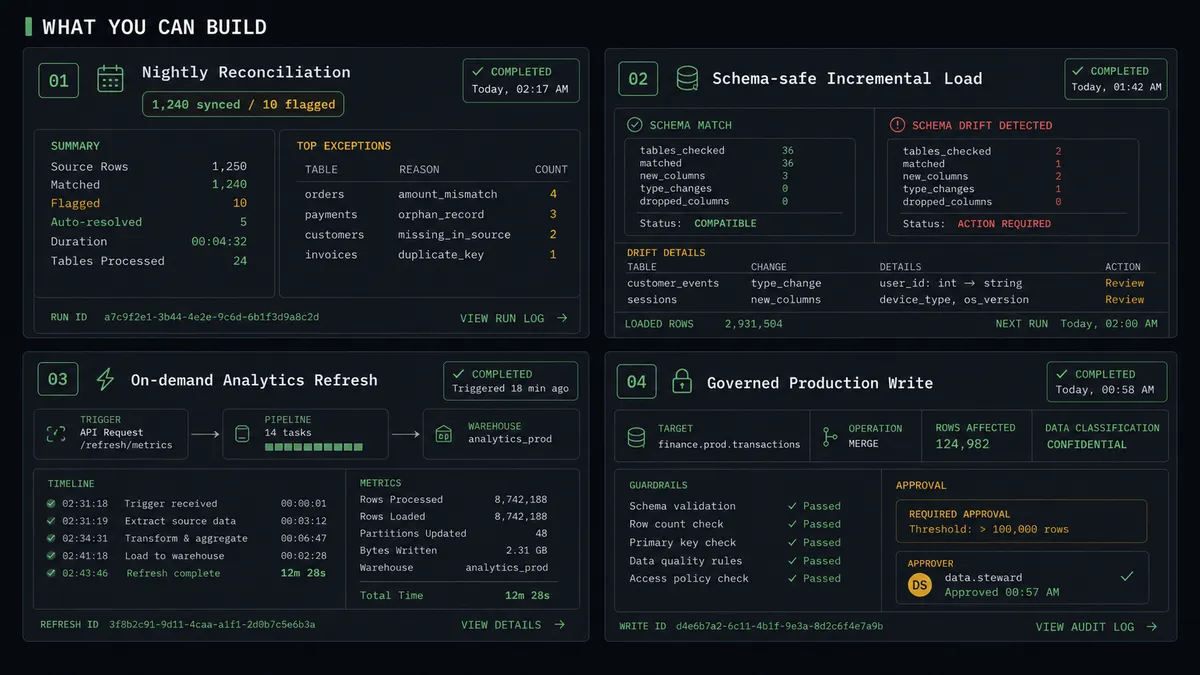
Nightly reconciliation with exception routing The agent runs Select Rows each night to pull open invoices from PostgreSQL, merges clean records into the Snowflake revenue table with Execute SQL, and routes any row whose amount is anomalous for that vendor to Slack before touching the warehouse.
Schema-safe incremental loads Before each write, the agent calls Get Table Schema on the Snowflake target and Get Table Schema on the PostgreSQL source to confirm columns still align. If the schema has drifted since the last run, the agent pauses and alerts the ops team rather than loading mismatched data silently.
On-demand analytics refresh An upstream flow event (a closed deal, a shipped order, a completed billing cycle) triggers the agent to pull the relevant PostgreSQL records and immediately execute an INSERT into a Snowflake reporting table. The analytics team gets fresh numbers in the warehouse within minutes of the source event.
Governed production writes with full audit trail Any Execute SQL that targets a production-flagged Snowflake database requires an explicit approval in the run log. The agent assembles the statement, the row count, and a sample of the affected records, routes them for review, and only executes after confirmation. Every approval is timestamped and tied to the person who made it.
Getting started
FlowRunner has a free plan with 100 executions a month, every integration included, and no credit card required, and new accounts get 14 days of Professional on top. Any real email address works; disposable domains are not accepted.
Connect both systems from the integrations library: PostgreSQL uses a connection string or direct credentials over TCP, and Snowflake uses a programmatic access token against the SQL API v2. Both connectors are built and verified against the official drivers.
Start a trial at flowrunner.ai or book a 30-minute walkthrough at calendly.com/flowrunner/intro.
Frequently asked questions
Is it free to connect PostgreSQL and Snowflake on FlowRunner?
FlowRunner has a free plan with 100 executions a month, every integration included, and no credit card required, and new accounts get 14 days of Professional on top. Beyond the free plan, Growth is $45 per month.
Can I self-host FlowRunner?
Yes. A Community Edition is available at no cost for a single instance. Enterprise self-hosted includes multi-instance clustering and the full compliance suite.
Does the FlowRunner agent need my own OpenAI or AI provider key?
Yes. FlowRunner uses a bring-your-own-keys model, so you connect the AI provider you already use. No provider is locked in.
What happens when the agent is not sure whether to write to Snowflake?
The agent pauses on its own, assembles the context (the SQL statement, the row count, and the source data), and routes it to a person on Slack or email. The write runs only after the person confirms. The approver's identity and timestamp are captured in the run log.
Can an agent handle long-running Snowflake queries?
Yes. When Execute SQL returns a statement handle instead of rows, the agent uses Get Statement Results to poll until the rows arrive, or Cancel Statement to abort it cleanly. The flow does not stall.
Does FlowRunner support unlimited users and workflows?
Yes. Every tier, including Growth at $45 per month, includes unlimited users and unlimited workflows.