How to Connect Slack with Stripe Using FlowRunner
Route Stripe payment failures, refund approvals, and revenue alerts through Slack with intelligent human oversight at every decision point.
The Problem: Payment Exceptions Buried in Email
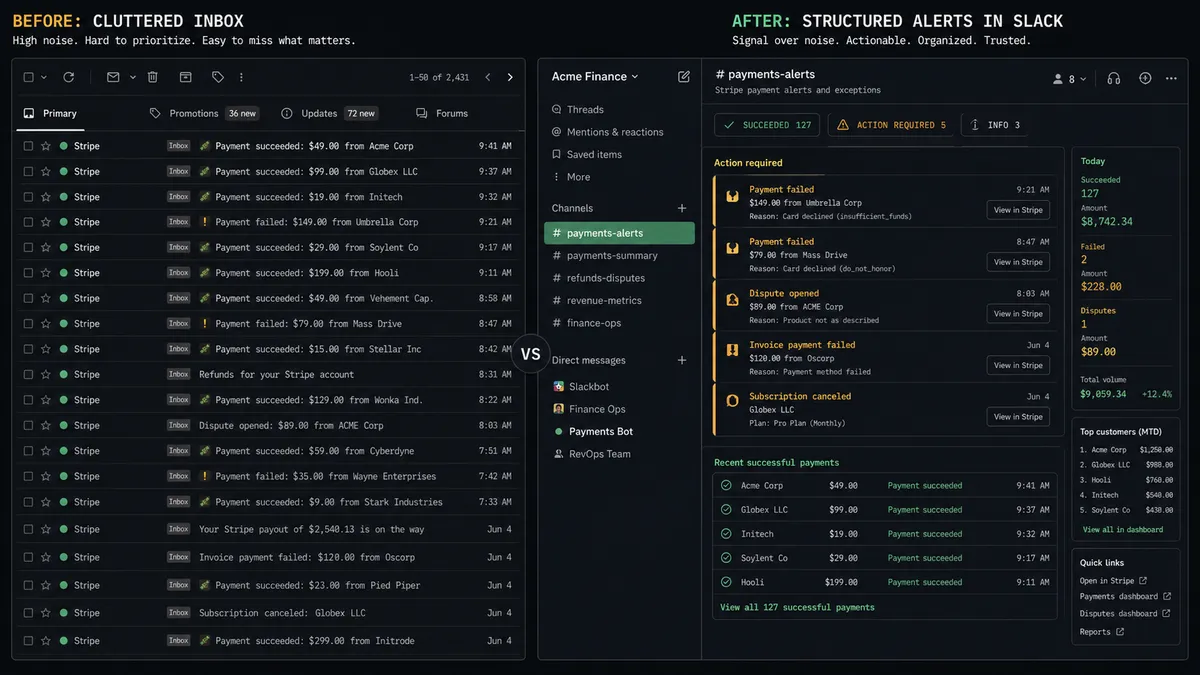
Your billing team finds out about payment failures the same way they find out about everything else. Someone checks a dashboard, notices a problem, and starts an email chain. By the time three people have weighed in, the customer has already churned or the dispute deadline has passed.
Stripe sends webhooks for every meaningful event. Failed payments, chargebacks, successful charges, subscription changes. But those events land in a developer’s inbox or a monitoring tool that nobody on the operations team checks. The people who need to act on payment exceptions are not the people receiving the alerts.
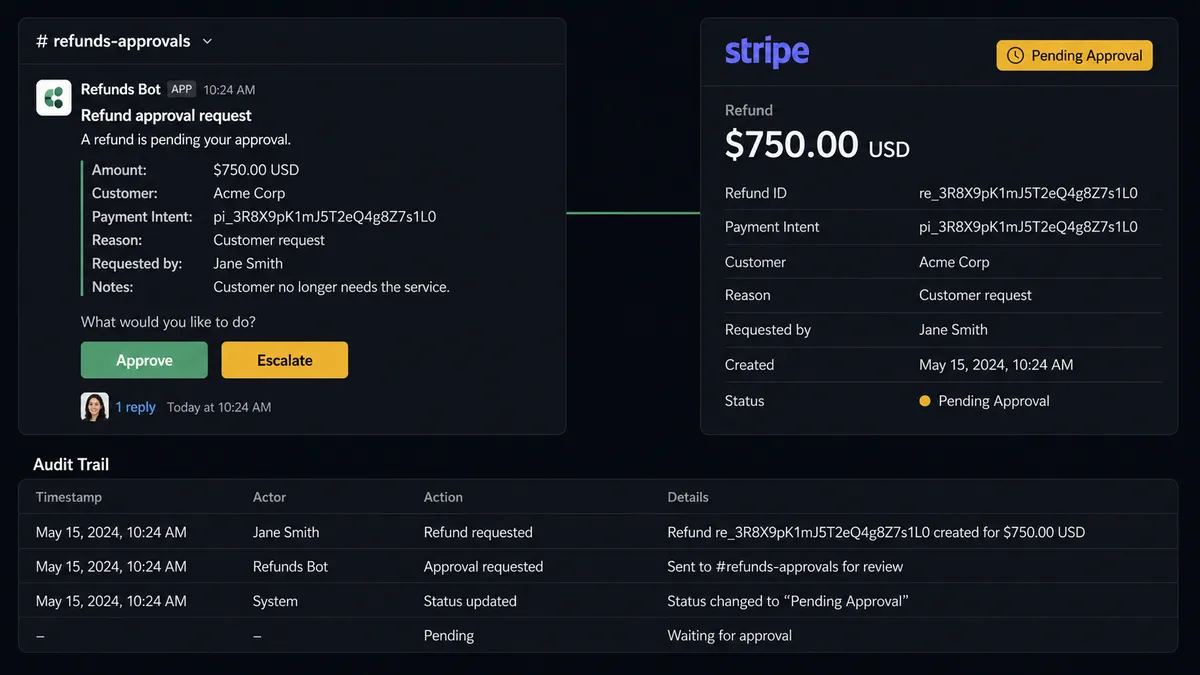
Refunds are worse. A customer requests a refund. Someone processes it in Stripe without structured approval because the process is informal. Nobody logged the decision. When finance asks why revenue dropped, the answer lives in a deleted email thread. There is no decision history, no structured approval, and no way to enforce a review threshold.
The Solution: Stripe Events Routed to the Right People in Slack
Connect Stripe and Slack through FlowRunner and every payment event reaches the right person in the right channel within seconds. The workflow parses Stripe webhooks, determines what happened and why, and routes structured alerts to Slack with the context your team needs to act. No dashboard checking. No email chains. No missed deadlines.
The workflow does not just forward notifications. It investigates. When a payment fails, the flow checks the failure reason in Stripe and routes accordingly. Expired cards get one recovery path. Insufficient funds get another. Your billing team only sees the cases that need a human decision, delivered as interactive Slack messages with Approve and Escalate buttons.
For refunds, disputes, and high-value transactions, FlowRunner adds a human-in-loop checkpoint. The workflow pauses, sends the decision to Slack with full context, and waits. One click resumes the workflow. Every decision is logged with the approver’s identity and timestamp.
Why Human-in-Loop Matters Here
Money is the one domain where full automation without oversight creates real liability. A refund processed without approval is revenue lost without accountability. A chargeback response assembled too slowly is a dispute lost by default. A failed payment ignored for 48 hours is a customer who found another vendor.
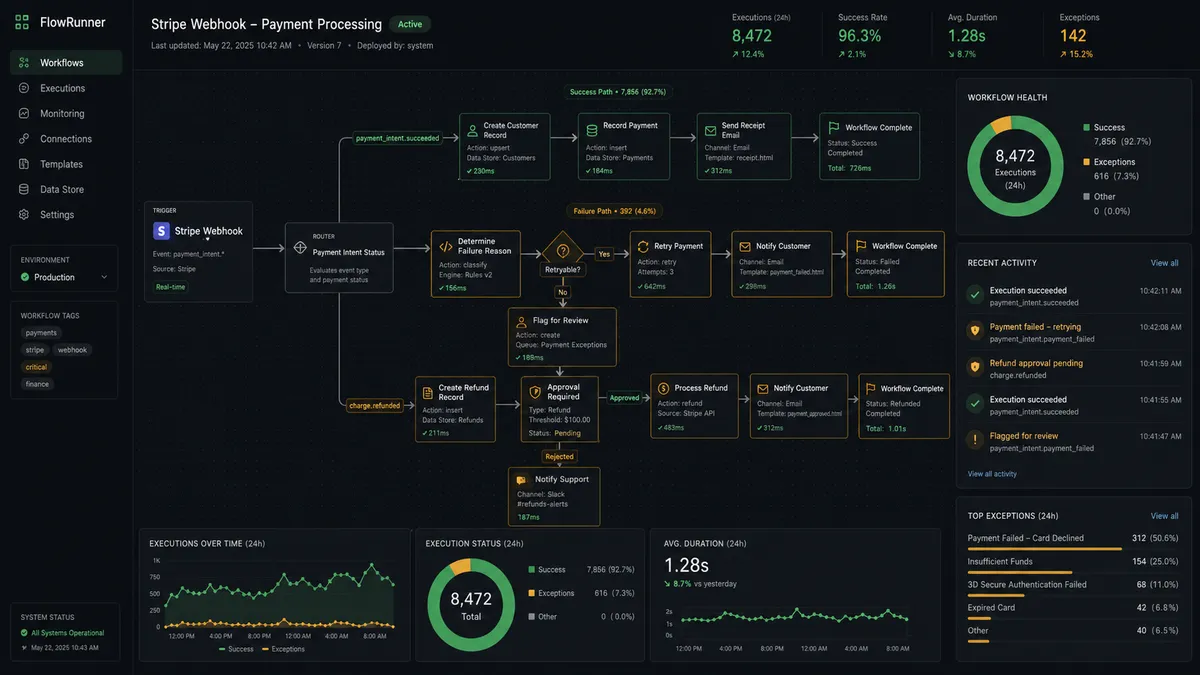
FlowRunner’s human-in-loop is not a basic approval gate. The workflow builds the decision package: customer name, payment history, refund amount, failure reason, original invoice reference. It sends that package to Slack as an interactive message with Approve, Modify, and Escalate buttons. When the billing manager clicks Approve, the On Block Action trigger fires and the workflow resumes execution. The entire interaction, from pause to approval to completion, surfaces in minutes, not days. Every step is recorded in the decision history. Your CFO can pull a structured view of who approved what, when, and why. That is the difference between “we have a refund process” and “we have a refund process structured for review.”
How It Works
Workflow 1: Payment Failure with Intelligent Routing
When a Stripe payment fails, the reason matters more than the failure itself. An expired card and insufficient funds require completely different responses. This workflow handles that logic automatically and only escalates when the situation needs human judgment.
- Trigger: Stripe’s Parse Webhook Event fires on payment failure
- Action: The flow calls Get Customer in Stripe to retrieve the account details and payment history
- Check: The flow reads the failure reason from the webhook payload: expired card vs. insufficient funds vs. other
- Path A (Expired Card): The flow sends a payment update request to the customer via Send Direct Message or email with a link to update their card
- Path B (Insufficient Funds): The flow waits 3 days, then retries using Create Payment Intent with the same amount
- Check: If the retry also fails, the flow calls Get Subscription to pull plan details
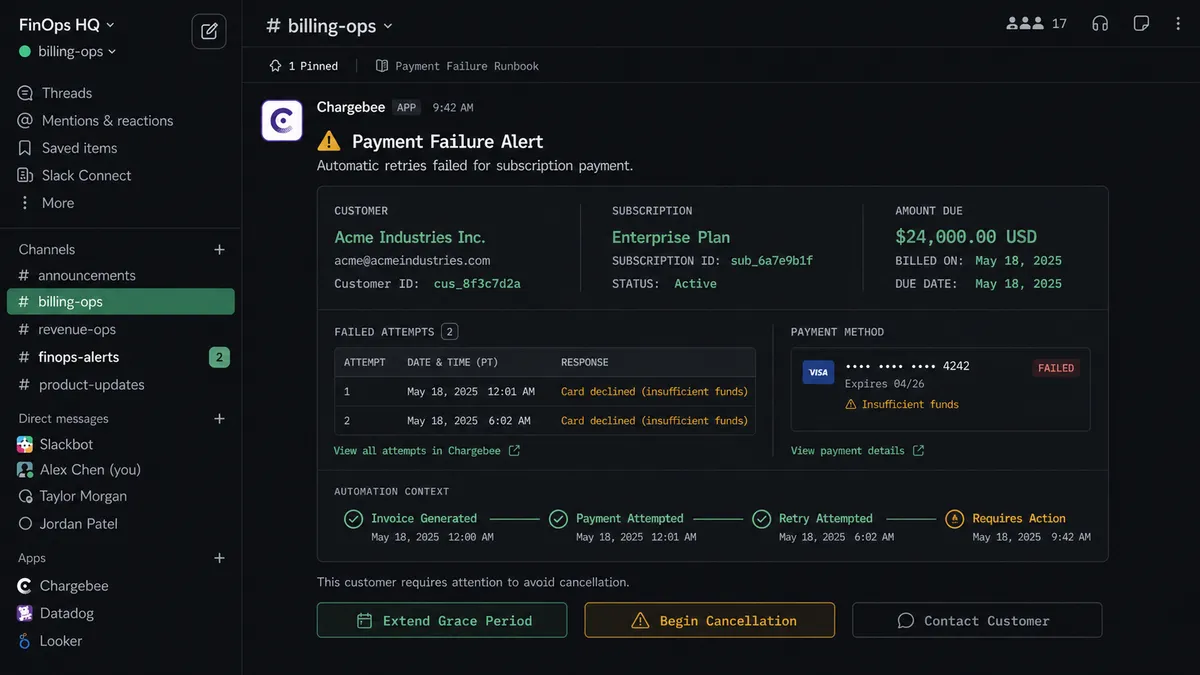
- Action: The flow posts to #billing-ops via Send Message to Channel with the customer reference, the subscription plan, the amount, and the failure reason.
- Human: The billing team receives interactive buttons via On Block Action. Options: Extend Grace Period, Begin Cancellation, Contact Customer. The flow executes the selected path.
Your team never manually checks the Stripe dashboard for failed payments. The workflow handles the triage. Humans handle the judgment calls.
Workflow 2: Refund Approval Over Threshold
Any refund request above the configured threshold pauses for billing manager approval before the money moves. Below threshold, the workflow processes automatically. This is the workflow where human-in-loop earns its keep.
- Trigger: A refund request is submitted (via internal Slack command or support ticket)
- Check: The flow evaluates the refund amount against the configured threshold
- Action (Under threshold): The flow calls Create Refund in Stripe, posts confirmation to #billing-ops via Send Message to Channel, and the workflow ends
- Action (Over threshold): The flow calls Get Customer in Stripe to pull payment history and subscription status
- Human: The flow sends a structured message to the billing manager via Send Direct Message. The message includes: customer name, refund amount, original charge date, subscription tier, lifetime value, and the reason for the refund. Two buttons: Approve and Modify Amount.
- Trigger: On Block Action fires when the billing manager clicks a button
- Action: If Approve, the flow calls Create Refund in Stripe for the full amount. If Modify, the flow processes the adjusted amount.
- Action: The flow posts the outcome to #billing-ops via Send Message to Channel with the approver’s name and the final refund amount
Every refund over threshold has a named approver and a timestamp in the decision history. No refund slips through without review.
Workflow 3: Chargeback Dispute Response
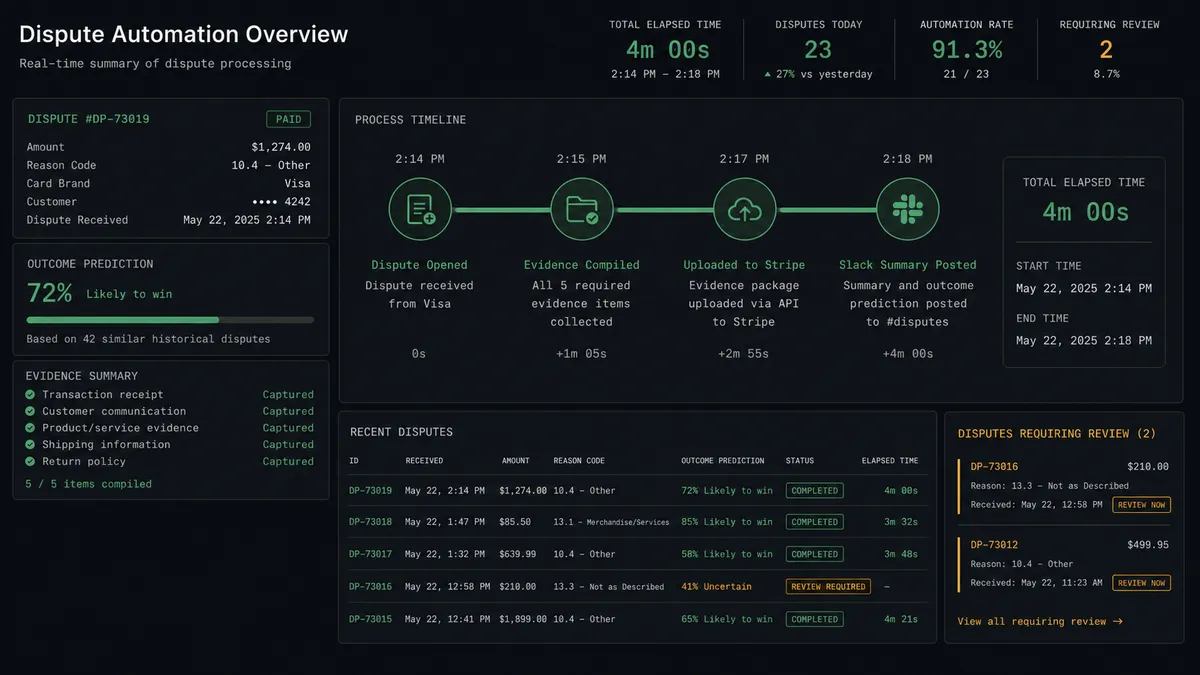
Stripe gives you a limited window to respond to disputes. Manual evidence gathering takes hours of pulling records from multiple systems. This workflow compiles the evidence package automatically and posts a summary to Slack so your team can review before submission.
- Trigger: Parse Webhook Event fires on dispute creation
- Action: The flow retrieves the dispute details from Stripe, including the disputed charge and customer information
- Action: The flow calls Get Customer in Stripe for the full account history
- Action: The flow compiles the evidence package: original payment confirmation, delivery records, customer communication logs, and terms of service
- Action: The flow uploads the evidence to Stripe’s dispute response
- Action: The flow posts a summary to #disputes via Send Message to Channel: dispute amount, customer name, dispute reason, evidence submitted, and response deadline
- Human: If the dispute exceeds the configured threshold, the flow pauses before submission and routes the evidence package to the finance director for review via Send Direct Message with Approve and Revise buttons
Evidence assembly that used to take hours now runs automatically. Your team reviews the summary in Slack instead of scrambling to assemble documents from three different systems.
Before and After
| Before | After | |
|---|---|---|
| Payment failure handling | Staff manually checks the Stripe dashboard for failed payments and handles each one the same way | Failure reason determines recovery path automatically. Expired cards and insufficient funds each get the right sequence. |
| Dunning logic | No structured retry process. Failed payments sit until someone notices. | Smart retry with 3-day wait for insufficient funds. Second failures escalate to billing team with full context. |
| Dispute response | Evidence gathered by hand from multiple systems | Evidence package assembled automatically, uploaded to Stripe, and summarized in Slack |
| Exception resolution | Email chains averaging 1-2 days for a billing decision | Exceptions surface in minutes via interactive Slack buttons with decision history attached |
| Refund approval | Refunds processed informally with no structured approval chain. | Refunds over the configured threshold require named approval via Slack. Decision logged with approver, timestamp, and amount. |
What You Can Build
These are specific workflow combinations using actions from both integrations:
Payment failure recovery with channel routing. Parse Webhook Event fires on payment failure. The flow checks the failure reason, routes expired cards to customer outreach, retries insufficient funds after 3 days, and posts to #billing-ops via Send Message to Channel if the second attempt fails. Different problems get different solutions.
Refund approval pipeline. Refund requests over the configured threshold trigger a Send Direct Message to the billing manager with customer history, refund amount, and Approve/Modify buttons. On Block Action resumes the workflow and the flow calls Create Refund in Stripe for the approved amount. Decision history captured on every refund.
Chargeback rapid response. Parse Webhook Event fires on dispute creation. The flow compiles evidence, uploads it to Stripe, and posts a summary to #disputes via Send Message to Channel. Disputes over the configured threshold pause for finance director approval before submission.
New subscription revenue alerts. Create Subscription triggers a Send Message to Channel in #revenue-ops with the customer name, plan tier, MRR impact, and subscription start date. Your revenue team sees every new customer the moment they convert.
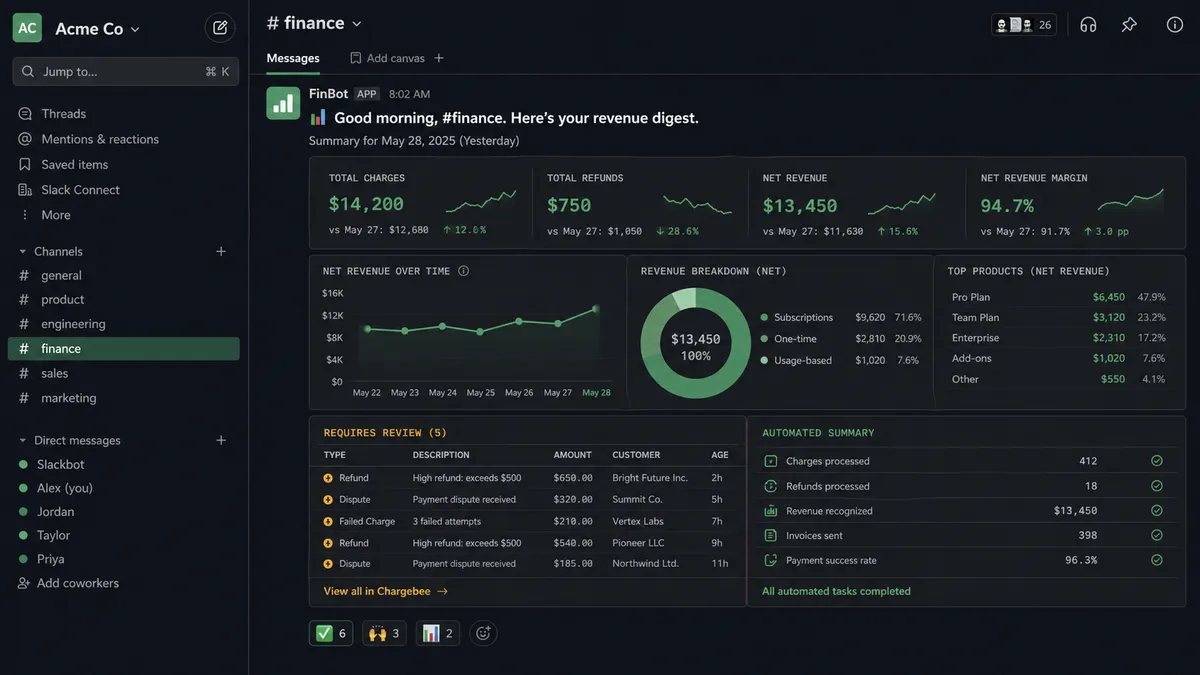
Daily revenue digest. A scheduled trigger calls Retrieve Balance in Stripe each morning. The flow formats a summary of yesterday’s charges, refunds, and net revenue, then posts to #finance via Send Message to Channel. Leadership starts the day with a clear financial picture.
Getting Started
Both Slack (8 triggers, 16 actions) and Stripe (1 trigger, 63 actions) are available on every FlowRunner tier, starting at Growth ($45/mo). Every tier includes unlimited users and unlimited workflows.
Start on the free plan: 100 executions a month, every integration included, no credit card required, plus 14 days of Professional for new accounts.
For teams processing refunds and disputes that need decision history, Professional at $299/mo adds longer log history. Role-based access is available on Professional and above. Every refund approval, every dispute response, every escalation decision is logged and reviewable.
Explore the integration details:
- Slack integration (8 triggers and 16 actions covering messages, channels, interactive buttons, and file sharing)
- Stripe integration (63 actions and 1 webhook trigger covering payments, subscriptions, refunds, disputes, and invoicing)
Start building free at flowrunner.ai or book a demo to see a live Slack-to-Stripe workflow running refund approvals in real time.