Processing Vendor Documents into NetSuite Without Manual Entry
How a FlowRunner workflow extracts vendor invoices, validates them against ERP data, and records bills in NetSuite with human oversight on exceptions.
The Problem
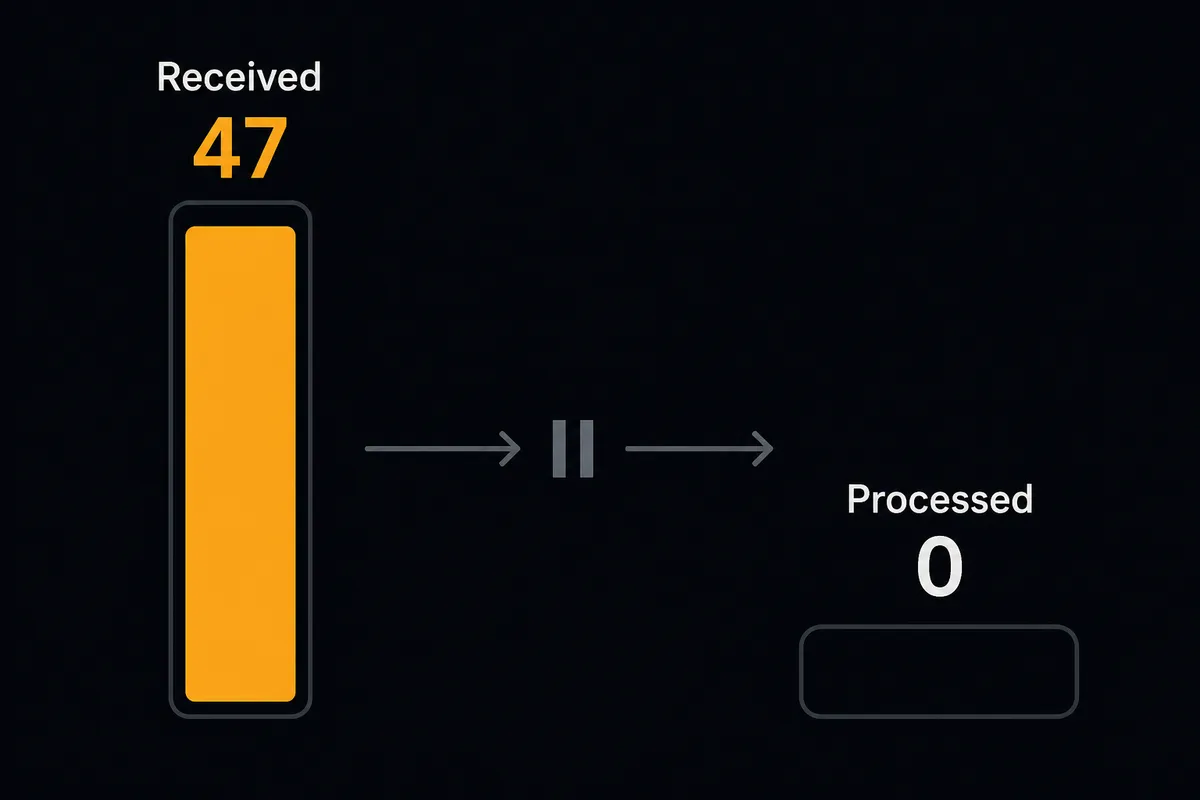
Every accounts payable team knows the routine. An invoice arrives by email. Someone downloads the PDF, opens it, and starts copying fields into the ERP. Vendor name. Invoice number. Line items. Amounts. Due date. They alt-tab to NetSuite, search for the vendor, check whether a bill already exists for that reference number, compare the amount against the purchase order, and manually create the bill. Several minutes per invoice on a good day.
Now multiply that across dozens of vendors, each with their own invoice format. Some send structured PDFs. Others send scanned images. A few still send Word documents. The AP clerk adapts to every format, translating unstructured information into structured records. When they are done entering the bill, they send a Slack message to the controller or AP manager asking for approval. Then they wait. The approval might come in minutes or hours. The invoice sits in limbo.
The real cost is not just the data entry per invoice. It is the errors that accumulate. A transposed digit on a five-figure invoice becomes a different bill amount. A duplicate invoice slips through because the reference number was entered with a slightly different format. An unusual amount from a trusted vendor gets approved without question because the clerk is processing a large batch that day and does not have time to cross-reference historical averages. These are the things that fall through the cracks, and they show up as reconciliation headaches at month-end.
The Solution
FlowRunner replaces that sequence with a single coordinated workflow spanning document processing, ERP, and team communication. Vendor invoices arrive in a Parseur mailbox. Parseur extracts the structured data. The FlowRunner workflow receives that data, cross-references it against NetSuite records, creates the bill if everything checks out, and routes exceptions to your team through Slack with context and decision buttons.
The workflow does not care that your data lives in three different systems. It treats Parseur, NetSuite, and Slack as one environment. It has tools from every system in its toolbox: Get Parsed Data and Upload Document from Parseur, Get Vendor and Create Invoice and Run SuiteQL Query from NetSuite, Send Message to Channel and Send Direct Message from Slack. It reads, reasons, decides, and acts across all of them.
The result is an AP process where your team only touches invoices that genuinely need human judgment. Everything else flows from email to NetSuite bill with no manual entry, and every decision (automated or human) is recorded for review.
Why This Requires Coordination, Not Point Automation
Simple automation can move data between two systems. A trigger fires, an action runs. But vendor invoice processing is not a two-step relay. The decision to create a bill in NetSuite depends on data from multiple systems evaluated simultaneously. Is the vendor in the approved vendor list? Does a bill with this reference number already exist? Is the amount consistent with this vendor’s history? Each of those checks hits a different data source, and the answer to one affects what the workflow does next.
This is where FlowRunner’s coordinated workflow becomes essential. It holds context from all connected systems and makes judgment calls that span across them. An unusually large invoice might be perfectly normal from one vendor and deeply suspicious from another. The workflow knows the difference because it queries NetSuite for historical bill data before deciding. And when it encounters something it should not decide alone, it has the human-in-the-loop tool available. It packages context from Parseur (the extracted data), NetSuite (the vendor history and duplicate check results), and delivers it through Slack with action buttons. The human gets a complete picture without opening a single system.
The Complete Workflow
Here is the end-to-end process, from invoice arrival to recorded bill in NetSuite.
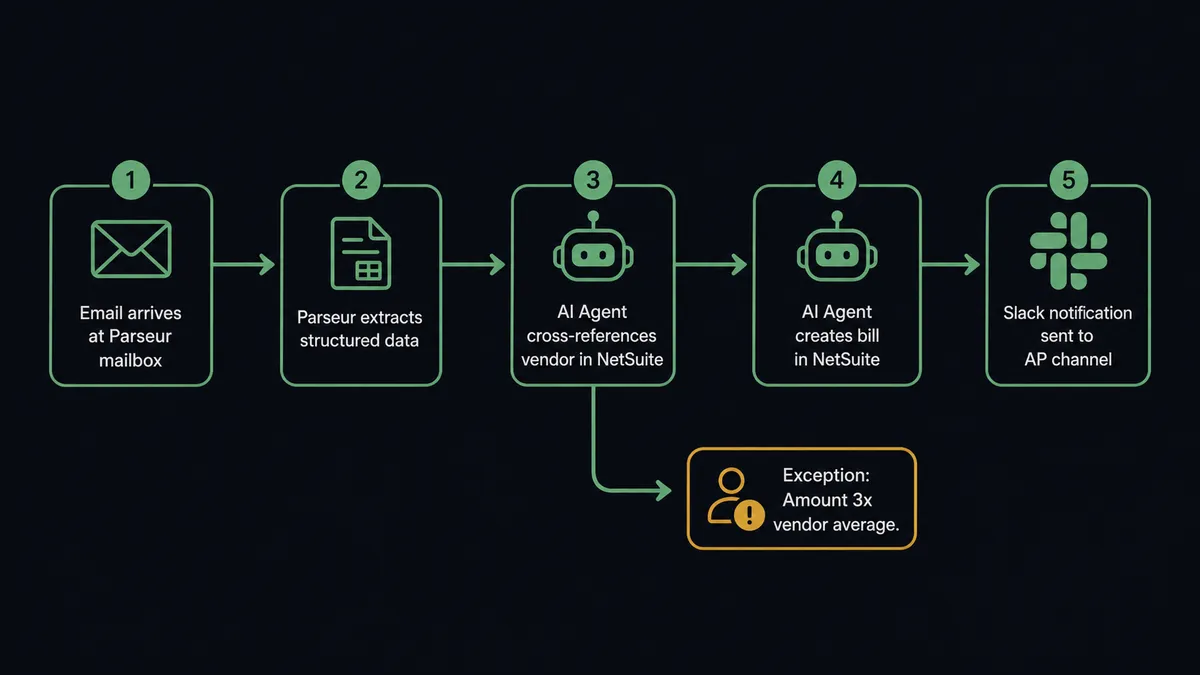
1. Invoice arrives in Parseur mailbox. A vendor emails an invoice. Parseur receives it and begins extraction. The On Document Processed (Realtime) trigger fires the moment parsing completes, delivering structured JSON to the FlowRunner workflow: vendor name, invoice number, amount, due date, and line items.
2. Workflow checks extraction quality. It evaluates the parsed output. If Parseur flagged the extraction as failed or partial, the workflow routes the document to the ops team immediately via Send Message to Channel in Slack: “Document extraction failed for [filename]. View the document and reprocess, or enter manually?” The failed extraction does not sit unnoticed in a queue.
3. Workflow validates the vendor in NetSuite. Using the extracted vendor name, it calls List Vendors in NetSuite to find a matching vendor record. If no match exists, the workflow flags this as a new vendor and routes it for review rather than creating an unknown vendor bill.
4. Workflow checks for duplicate bills. It calls Run SuiteQL Query to search for existing bills with the same vendor and reference number. Duplicate invoices are caught before they become duplicate payments.
5. Workflow cross-references the amount against vendor history. It runs another Run SuiteQL Query to pull the vendor’s billing history from NetSuite: average invoice amount, highest previous invoice, and total bills in the last 12 months. It compares the current invoice amount against that history.
6. Workflow evaluates and decides. If the vendor exists, no duplicate is found, and the amount falls within normal range, the workflow proceeds to bill creation. If any check raises a concern, it moves to human escalation.
7. Workflow creates the bill in NetSuite. It calls Create Invoice with the extracted line items, amount, due date, and vendor reference. The bill is recorded in NetSuite without manual data entry.
8. Workflow notifies the AP team. Using Send Message to Channel, the workflow posts a summary to the #ap-ops channel with the vendor, amount, invoice reference, due date, and confirmation that no duplicates were found.
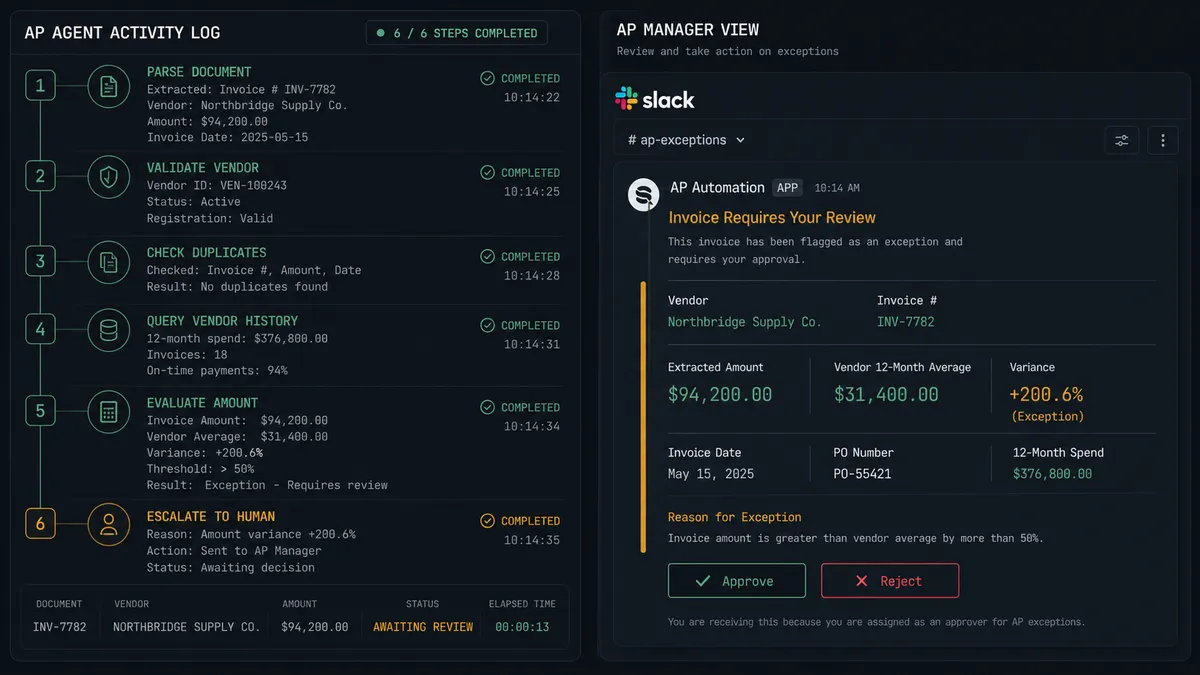
9. Workflow escalates exceptions via human-in-the-loop. When the amount is well above the vendor’s average, the workflow invokes human review. It calls Send Direct Message to the AP manager with context assembled from both Parseur and NetSuite: the parsed invoice amount, the vendor’s average over the past year, the highest prior invoice, and whether a matching purchase order exists. The message includes Approve and Reject buttons. The workflow pauses until the human responds.
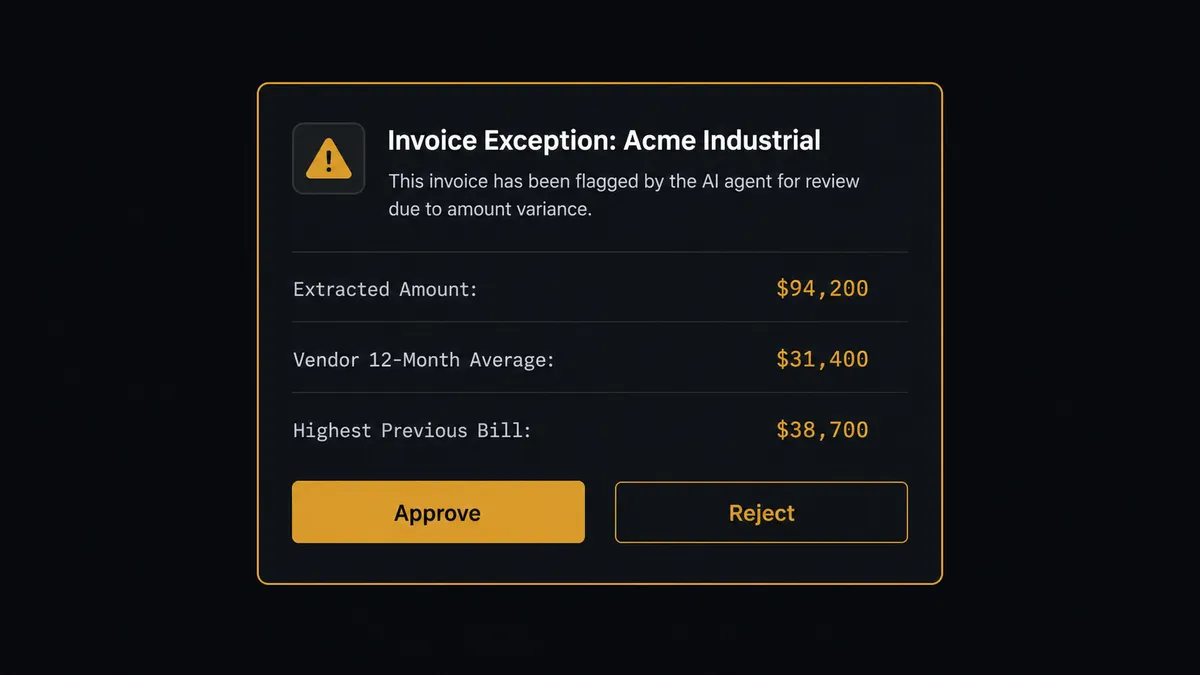
10. Human decides, workflow resumes. The AP manager reviews the context and clicks Approve or Reject. The On Block Action trigger in Slack fires, returning the decision to the workflow. If approved, the workflow creates the bill in NetSuite. If rejected, the workflow logs the rejection and notifies the vendor contact. Either way, the decision, the decider’s identity, and the timestamp are recorded.
What the Workflow Sees vs. What Humans See
The workflow operates across all three systems simultaneously. On a single invoice, it might execute five or six actions: retrieve parsed data from Parseur, query vendor records in NetSuite, run a SuiteQL query for duplicate detection, run another SuiteQL query for historical averages, create the bill, and post a notification. It evaluates extraction quality, vendor validity, duplicate risk, and amount anomalies before making a single decision about what to do next.
The human sees none of that complexity. When the workflow escalates, the AP manager receives a clean Slack message with exactly the information needed to make a decision. The extracted amount. The vendor’s historical average. The highest previous bill. Whether a matching purchase order exists. Two buttons: Approve or Reject. The workflow did all the research the human would have done manually, opening NetSuite, pulling reports, comparing numbers. It just handed over the final call.
The workflow handles the research. The human handles the decision. Decision history is captured for both.
Before and After
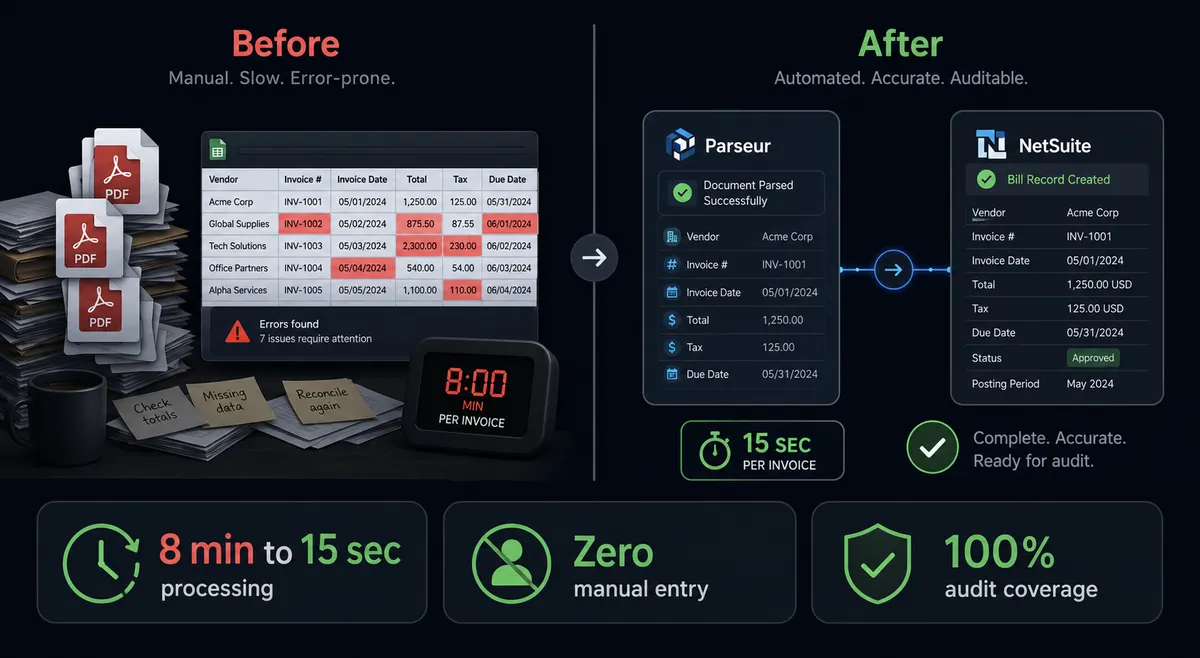
| Before | After | |
|---|---|---|
| Invoice processing | Manual data entry per invoice | Automated processing with structured extraction |
| Format handling | Each vendor format requires a different entry approach | Parseur normalizes any format into consistent structured data |
| Duplicate detection | Manual spot checks; duplicates caught at reconciliation | Workflow queries NetSuite for matching reference numbers on every invoice |
| Amount validation | Unusual amounts approved without cross-referencing history | Workflow compares every amount against the vendor’s 12-month NetSuite history |
| Exception handling | Email threads and meetings to resolve discrepancies | Slack messages with context and decision buttons; real-time exception handoff |
| Extraction failures | Failed extractions sit unnoticed in a processing queue | Workflow routes failures to ops team via Slack the moment they occur |
| Decision history | No structured record of approvals | Each decision recorded with approver identity and timestamp |
Getting Started
Every integration used in this workflow is available on all FlowRunner tiers, including Growth at $45/month. NetSuite, Parseur, and Slack are all included with unlimited users and unlimited workflows.
Start on the free plan: 100 executions a month, every integration included, no credit card required, plus 14 days of Professional for new accounts.
Explore each integration:
Ready to stop entering invoices by hand? Start your free trial at flowrunner.ai or book a walkthrough with the FlowRunner team to see this workflow running on your data.