Qualifying Inbound Leads Without Manual Research
One FlowRunner workflow coordinates Google Forms, HubSpot, and Slack to qualify inbound leads, enrich CRM records, and route exceptions to your team for the decisions that matter.
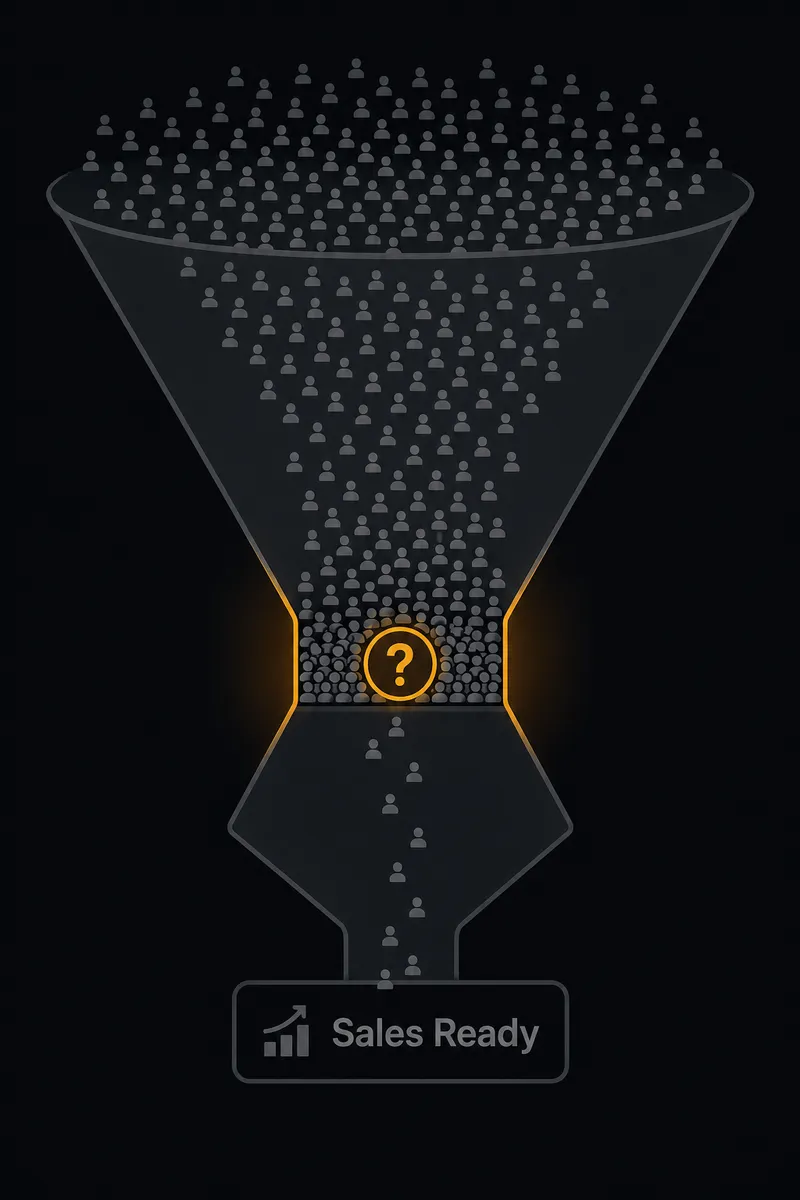
The Problem: Three Systems, Zero Coordination
A prospect fills out a form on your website. The form lives in Google Forms because your marketing team runs on Google Workspace. The CRM is HubSpot because your sales team needs pipeline visibility. And your team communicates in Slack because that is where decisions happen in real time.
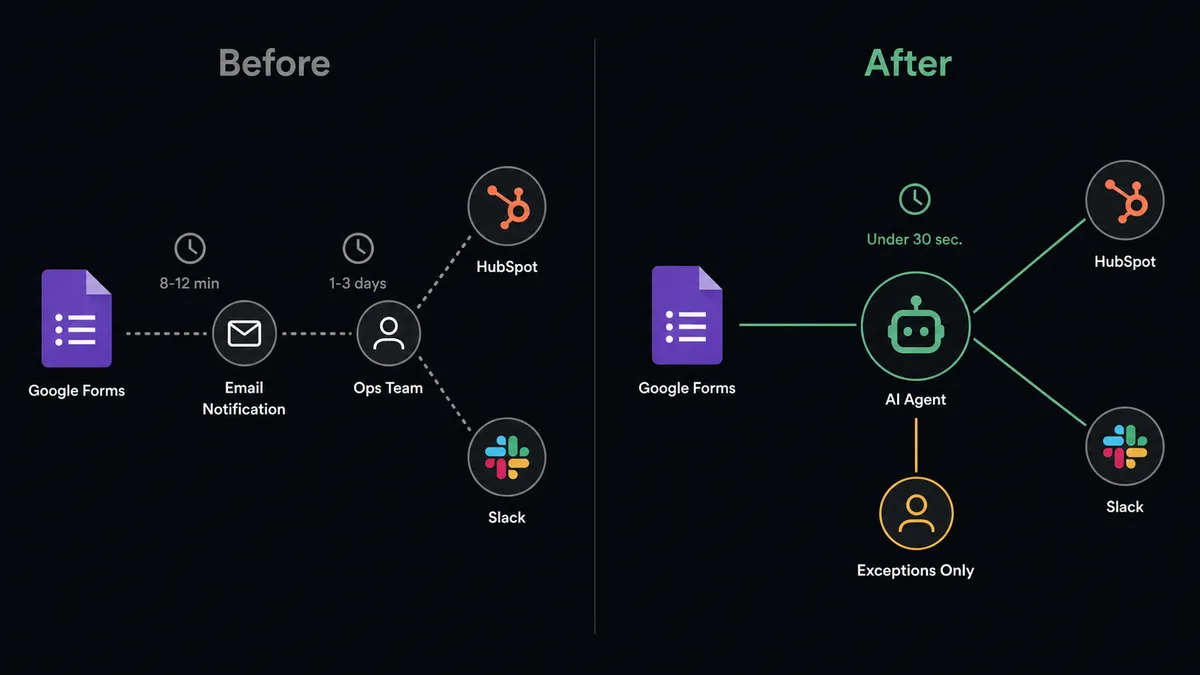
Here is what happens next. Someone on the ops team gets an email notification that a new form response came in. They open Google Forms, scan the answers, copy the prospect’s name and email, switch to HubSpot, search for an existing contact, decide whether to create a new record or update an existing one, manually enter the form data into custom properties, create a deal, figure out which rep should own it, and then switch to Slack to tell that rep about the new lead. If the prospect also submitted a satisfaction survey for an existing project, the same person has to find the right deal in HubSpot, log the score, and flag any negative feedback to the account manager.
That process takes several minutes of attention per submission when everything goes smoothly. When it does not, things fall through the cracks. A low satisfaction score sits in a Google Forms spreadsheet for days before anyone notices. A duplicate contact gets created because the ops person did not search HubSpot thoroughly enough. A hot lead goes cold because the rep did not get notified until the next morning.
The aggregate is what hurts. Every manual handoff between Google Forms, HubSpot, and Slack is a place where information gets lost, delayed, or entered incorrectly.
The Solution: One Workflow, Three Systems, Zero Manual Handoffs
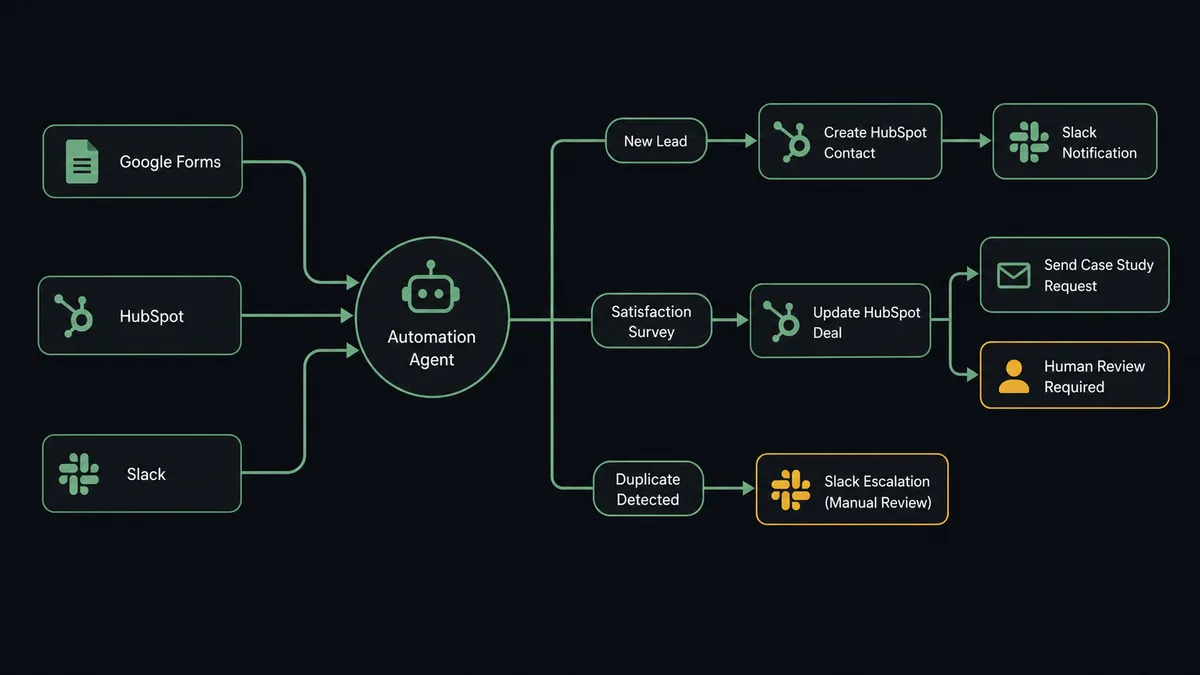
In FlowRunner, a single workflow handles the process across all three systems. It uses tools from Google Forms (Get Form Responses List, Get Form Response by ID), HubSpot (Get Contact by Email, Create Contact, Create Deal, Associate Objects, Update Deal), and Slack (Send Message to Channel, Send Direct Message). It does not just pass data between them. It reads the form response, evaluates the data, checks HubSpot for existing records, makes decisions about what to create or update, and notifies the right people in Slack with context attached.
The workflow does not care that your data lives in three different systems. It treats them as one environment. A form response triggers the workflow. It reads every field, determines what kind of submission it is (new lead, satisfaction survey, vendor qualification), cross-references against HubSpot records, takes the appropriate action in the CRM, and delivers a structured notification to the right Slack channel or person.
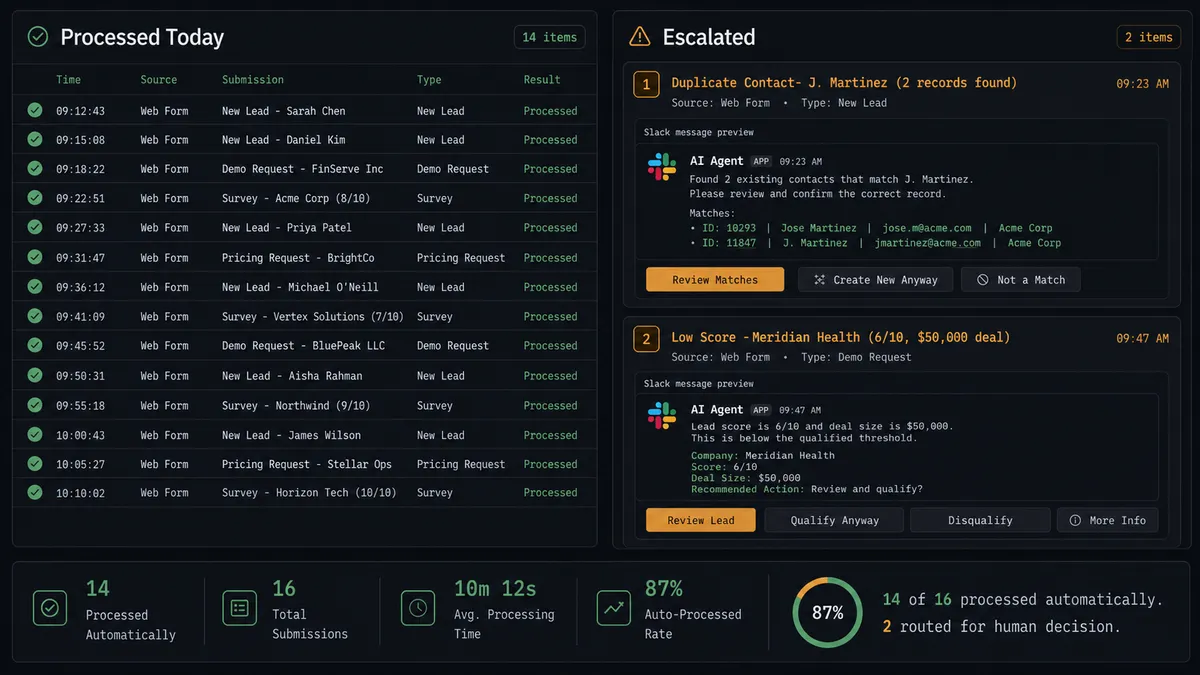
When the workflow encounters something it should not decide alone, such as a potential duplicate contact, a low satisfaction score, or a form response with conflicting data, it invokes the human-in-the-loop tool. The human receives a Slack message with context pulled from all three systems, makes the call, and the workflow resumes. Your team handles exceptions. The workflow handles everything else.
Why This Requires Coordination, Not Point Automation
A simple automation can connect Google Forms to HubSpot. When a form response comes in, create a contact. That works for the first five submissions. Then you get a response from someone who already exists in your CRM. The automation creates a duplicate. Or you get a satisfaction survey response that should update an existing deal, not create a new contact. The automation does not know the difference because it cannot cross-reference data across systems to make that determination.
FlowRunner’s workflow holds context from all connected systems simultaneously. It reads the form response, checks HubSpot for existing records, evaluates whether this is a new lead or a returning customer, and decides what action to take based on what it finds across all three systems. When it encounters a satisfaction score that falls below the threshold the account manager cares about, it does not just log the number. It pulls the deal record from HubSpot, packages the form response alongside the deal history, and sends the account manager a Slack message with everything they need to make a decision. The human-in-the-loop tool is available for any judgment call the workflow cannot make with confidence, and when it escalates, it brings context from every system involved.
The Complete Workflow
This is how the workflow processes an inbound form response from start to finish. Every step uses a real integration action from the workflow’s toolbox.
-
The workflow retrieves new form responses. On a scheduled interval (or triggered by a webhook), it calls Get Form Responses List from Google Forms to pull all unprocessed submissions. Each response includes the prospect’s name, email, company, role, and their answers to qualifying questions.
-
The workflow classifies the submission. It reads the form fields and determines the type: new lead inquiry, customer satisfaction survey, or vendor qualification response. This classification drives every decision that follows.
-
The workflow checks HubSpot for existing records. For every submission, it calls Get Contact by Email in HubSpot. If a record exists, the workflow retrieves the full contact profile including associated company, open deals, and lifecycle stage. If no record exists, the workflow knows to create one.
-
The workflow evaluates for duplicates. When Get Contact by Email returns a match, the workflow compares the form data against the existing HubSpot record. If the company name, role, or other fields conflict with what is already in the CRM, it flags the submission as a potential duplicate requiring human review.
-
For new leads: the workflow creates the CRM record. If no existing contact is found, it calls Create Contact in HubSpot with all form data mapped to the correct properties. It then calls Create Deal in the inbound pipeline with the lifecycle stage set to Lead. Finally, it calls Associate Objects to link the contact, company, and deal together.
-
For satisfaction surveys: the workflow updates the deal. It calls Get Form Response by ID to pull the specific submission, extracts the satisfaction score, and calls Update Deal to log the score against the corresponding deal in HubSpot.
-
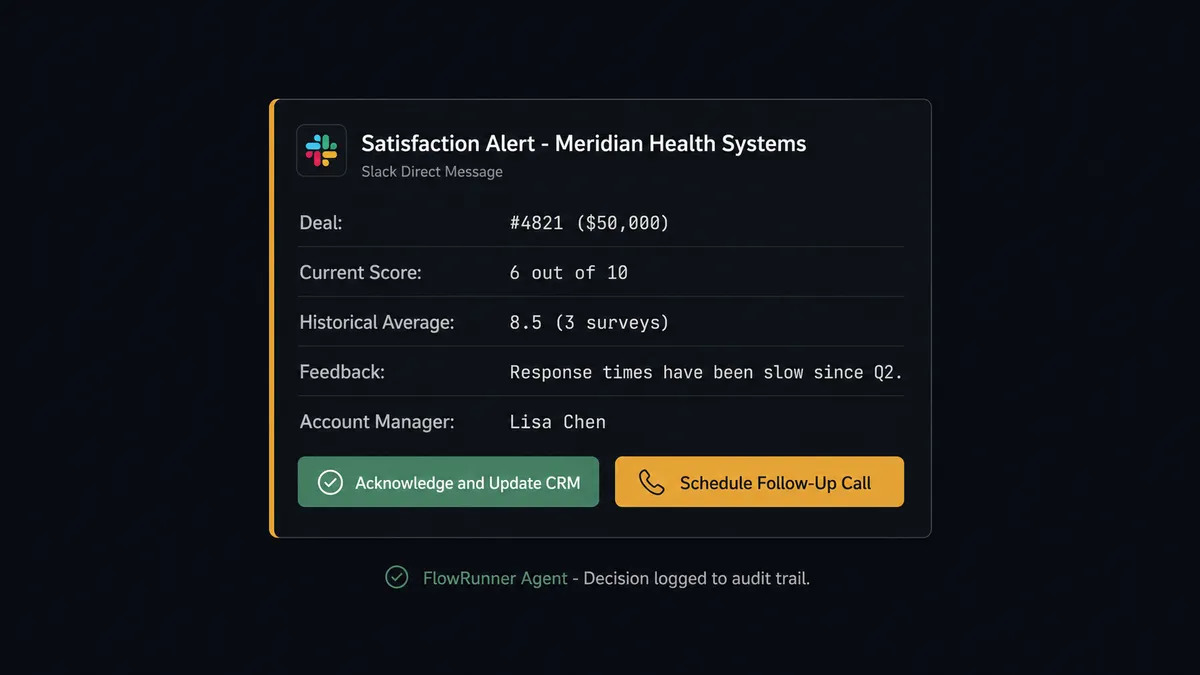
The workflow evaluates whether to escalate. For a satisfaction survey, it does not just check whether the score is below a fixed number. It looks at the deal value, the customer’s history in HubSpot, and the content of any open-text feedback in the form response. A middling score from a long-standing customer with a six-figure deal and a comment mentioning slow response times gets escalated. A similar score from a small pilot project with positive written feedback does not.
-
The workflow invokes human-in-the-loop when needed. When it decides to escalate, it sends a structured Slack message to the account manager via Send Direct Message with the customer name, the deal value, the current score compared to the historical average, the verbatim feedback, and a request to decide next steps before logging to the CRM. The account manager reviews, responds to the customer directly, then approves the CRM update. The workflow resumes.
-
The workflow notifies the team. For new leads, it calls Send Message to Channel to post a summary to #new-leads with the prospect’s role, company, request, and assigned rep. For satisfaction surveys that scored well, it posts a summary to #customer-success. For escalated items, the Slack notification from the previous step serves as the team alert.
-
The workflow routes the assigned rep. For new leads, it calls Send Direct Message to the assigned sales rep with the full context: prospect’s form responses, company details, any existing HubSpot activity, and a direct link to the deal record. The rep has everything they need to start working the lead without opening HubSpot first.
What the Workflow Sees vs. What Humans See
The workflow operates with a complete picture. For every form submission, it holds the raw form data from Google Forms, the full contact and deal history from HubSpot, and the routing rules for Slack notifications. It cross-references all of this before taking any action. When it finds a mid-range satisfaction score, it does not just see a number. It sees the deal value, how the current score compares to that customer’s average across prior surveys, who owns the account, and the verbatim text of any open feedback. The workflow processes all of this in seconds.
The human sees something different. The account manager receives a single Slack message. It is not a raw data dump. It is a structured summary: the customer name, the deal value, the current score compared to the historical average, the exact text of the feedback, and two buttons labeled “Acknowledge and Update CRM” and “Schedule Follow-Up Call.” The account manager does not need to open Google Forms to read the response. They do not need to search HubSpot for the deal. The workflow did all the research they would have done manually and gave them the decision to make.
When the account manager clicks “Schedule Follow-Up Call,” the On Block Action trigger fires in FlowRunner. The workflow logs the satisfaction score to the deal in HubSpot, notes that a follow-up was requested, and the decision is recorded with the decider’s identity and the timestamp. Decision history is captured for every approval.
Before and After
| Before | After | |
|---|---|---|
| Form submission to CRM record | Manual data entry across systems | Automated, with structured field mapping |
| Duplicate contact detection | Inconsistent manual search; duplicates found weeks later | Every inbound checked against existing records by email before creation |
| Satisfaction score tracking | Scores collected in Google Forms but never linked to CRM deals | Every score logged against the deal in HubSpot |
| Low score response time | Days before someone notices in a spreadsheet | Account manager notified in Slack with deal context |
| Lead routing to sales rep | Manual assignment, often delayed until next check-in | Rep receives Slack notification with context attached |
| Decision history | Scattered across email threads and informal channels | Each escalation and decision recorded for review |
Getting Started
All three integrations used in this workflow, Google Forms, HubSpot, and Slack, are available on every FlowRunner tier. Human-in-the-loop coordination, unlimited users, and unlimited workflows are included at every level.
Start on the free plan: 100 executions a month, every integration included, no credit card required, plus 14 days of Professional for new accounts. Any real email address works; disposable domains are not accepted.
Connect your Google Forms account, your HubSpot instance, and your Slack workspace. Build the workflow with the actions described above. Add a human-in-the-loop subflow for duplicate resolution and low satisfaction scores. Run it against your next batch of form submissions and watch the difference.
Explore each integration:
Ready to get started? Visit flowrunner.ai to create your free account, or book a call with Mark to see the workflow built on your data.