Turning a Signed Contract into an Invoice in Minutes
How a FlowRunner workflow takes a signed contract and automatically updates your CRM, creates an invoice, and notifies your team, with human oversight on exceptions.
The Problem
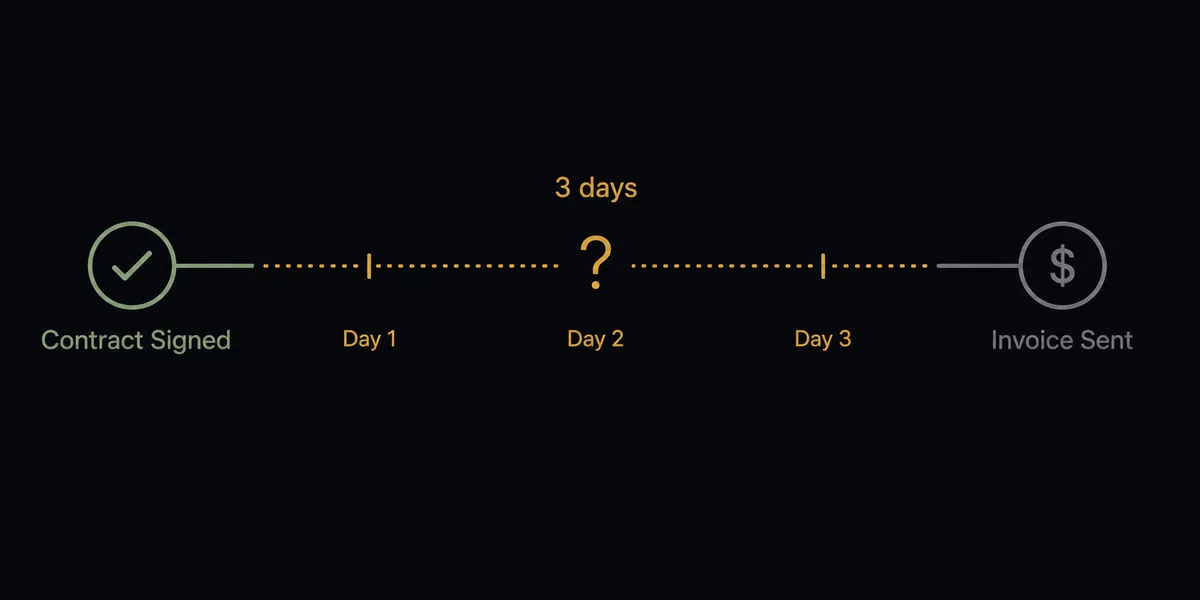
A contract gets signed. What happens next should be simple: update the CRM, create an invoice, notify the team. In practice, it is anything but.
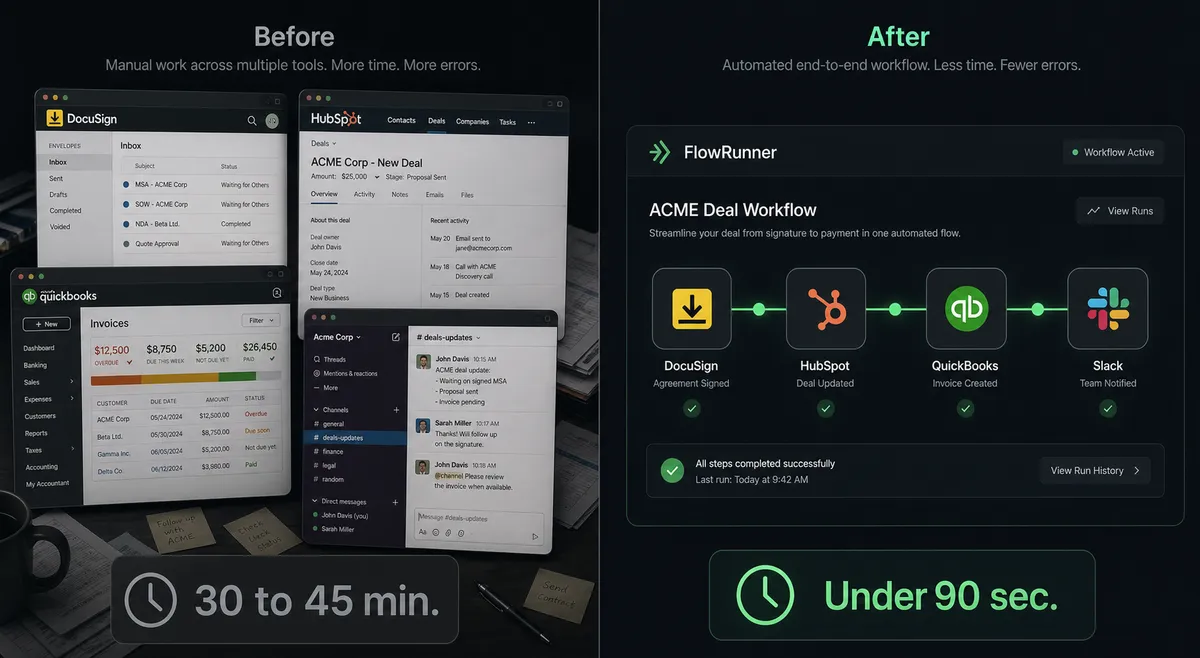
The sales rep sees the DocuSign notification and opens HubSpot to update the deal stage. They copy the contract value, set the close date, and move it to Closed Won. Then they message finance on Slack: “New deal closed, can you set up billing?” The finance team opens QuickBooks, creates a customer record if one does not already exist, builds an invoice with the correct line items and payment terms, and sends it. Someone has to remember to post in the revenue channel. Someone else has to remember to attach the signed contract to the deal record. On a busy day, the invoice does not go out until the next day. On a bad day, the deal sits in the wrong pipeline stage because the rep forgot to update HubSpot after the signing.
The real cost is not the time per transaction. It is what falls through the cracks between systems. Signed contracts that nobody follows up on. Invoices that go out with the wrong amount because someone misread the deal terms. Revenue recognized late because billing did not start on signing day. Every handoff between DocuSign, HubSpot, QuickBooks, and Slack is a place where work stalls or data gets lost.
The Solution
One FlowRunner workflow handles the process from signature to invoice to notification. It coordinates every system involved: DocuSign for document lifecycle, HubSpot for CRM updates, QuickBooks Online for invoicing, and Slack for team communication and human decisions.
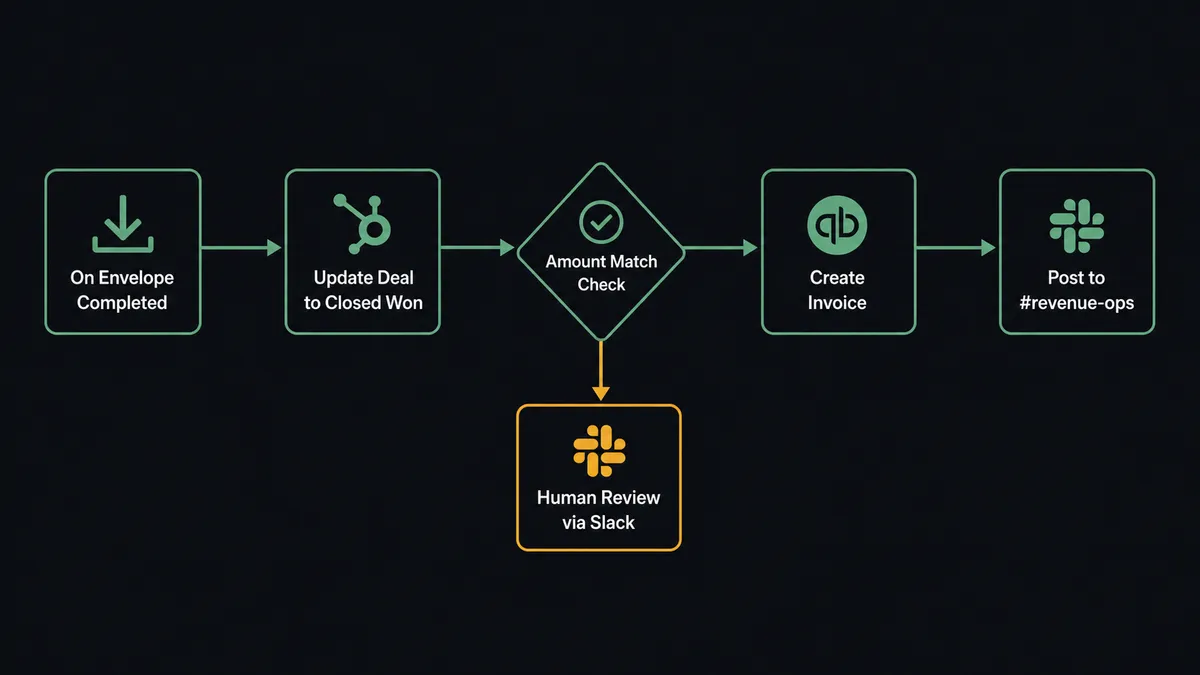
When a contract is signed, the workflow wakes up. It downloads the signed document, updates the deal in HubSpot, creates or locates the customer in QuickBooks, generates the invoice, sends it, and notifies the revenue team. The workflow does not care that your data lives in four different systems. It treats them as one environment. Your team does not touch a single field, copy a single number, or send a single message. The close-to-billing path runs end to end in seconds.
The workflow also knows when to stop. If the signed contract amount does not match the deal value in HubSpot, the workflow does not silently push through a wrong invoice. It pauses, packages the discrepancy with context from both systems, and asks a human to decide. Your team handles exceptions. The workflow handles everything else.
Why This Requires Coordination, Not Point Automation
A simple automation can connect DocuSign to HubSpot. Another can connect HubSpot to QuickBooks. But chaining point-to-point automations does not give you cross-system judgment. When the contract value diverges from the HubSpot deal value, a simple trigger-action pair does not notice. It just creates an invoice for whichever number it was told to use. The mismatch sits in your books until reconciliation catches it weeks later.
FlowRunner’s workflow holds context from all four systems simultaneously. It reads the signed contract details from DocuSign, cross-references the deal value in HubSpot, checks whether the customer already exists in QuickBooks, and then decides how to proceed. When data conflicts, the workflow has a human-in-the-loop tool available. Consider a small discrepancy on a six-figure annual contract from a long-time customer: that might be a rounding adjustment the workflow can flag and proceed. The same small discrepancy on a brand-new low-dollar deal with no history gets escalated. The decision to involve a human is itself a contextual decision, not a static threshold.
The Complete Workflow
Here is how the workflow runs the contract-to-invoice process, step by step.
-
DocuSign fires On Envelope Completed. The prospect signs the MSA. The trigger activates the workflow with the envelope ID and signer details.
-
Workflow calls Download Document from DocuSign. It retrieves the fully executed contract and stores it with a structured file name tied to the deal ID.
-
Workflow calls Get Contact by Email in HubSpot. Using the signer’s email from DocuSign, it locates the existing contact record. If no record exists, it calls Create Contact and associates it with the company.
-
Workflow calls Get Deal by ID in HubSpot. It pulls the deal record to verify the contract value, payment terms, and pipeline stage.
-
Workflow cross-references DocuSign contract details against HubSpot deal data. It compares the contract amount, billing frequency, and customer name. If everything aligns, it continues. If there is a discrepancy, it moves to the escalation step.
-
Workflow calls Update Deal in HubSpot. It sets the deal stage to Closed Won, updates the close date to today, and attaches the signed document to the deal record.
-
Workflow calls Get Customer in QuickBooks Online. It searches for an existing customer record matching the company name or email. If none exists, it calls Create Customer with the billing details from the HubSpot deal.
-
Workflow calls Create Invoice in QuickBooks Online. It builds the invoice with the correct line items, amount, payment terms, and customer reference. The invoice reflects the deal data from HubSpot, not manually entered figures.
-
Workflow calls Send Invoice in QuickBooks Online. The invoice is emailed to the customer directly from QuickBooks, creating a clean billing record.
-
Workflow calls Send Message to Channel in Slack. It posts to #revenue-ops with the deal name, contract value, deal ID, invoice ID, and a link to the signed contract. The team sees the picture without opening four different systems.
When the Workflow Escalates
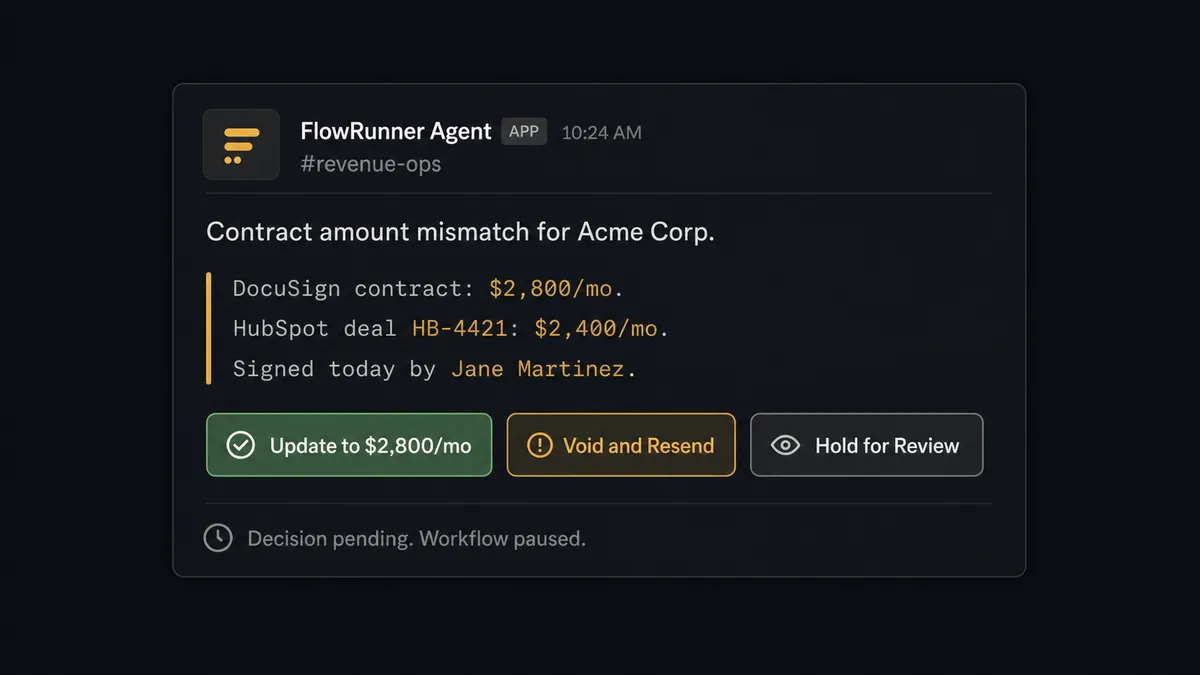
At step 5, the workflow compares the contract amount from DocuSign against the deal value in HubSpot. Imagine a signed contract that lists a higher monthly amount than the HubSpot deal record. The workflow does not pick one and continue. It does not fail silently.
The workflow invokes its human-in-the-loop tool. It sends a Slack message to the deal owner with context from both systems: the DocuSign contract amount, the HubSpot deal value, the deal ID, the signer, and three options. (1) Update HubSpot to match the contract and proceed with invoicing. (2) Void the envelope and send a corrected contract. (3) Hold for manual review.
The deal owner taps a button in Slack. The workflow resumes with the decision as input. If option 1 is selected, it updates the HubSpot deal to match the contract and creates the invoice at the corrected amount. The decision, the decider’s identity, and the timestamp are all captured.
What the Workflow Sees vs. What Humans See
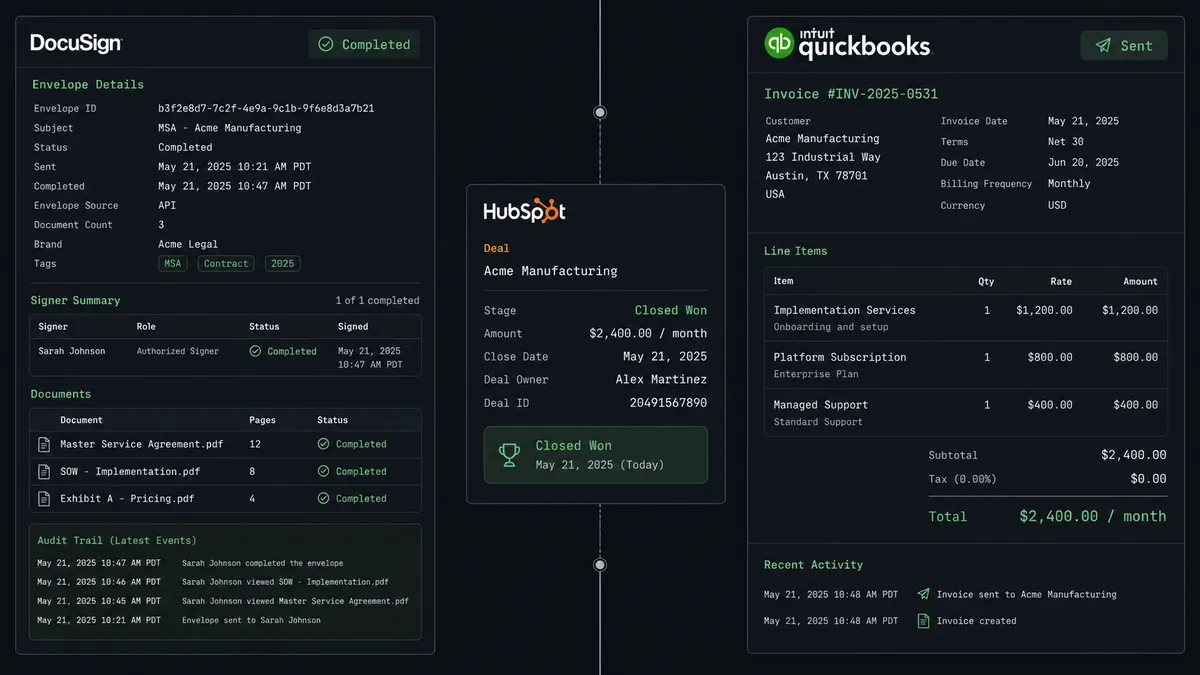
The workflow holds the full picture. It has the DocuSign envelope details: who signed, when, what document, what amount. It has the HubSpot deal record: pipeline stage, owner, expected revenue, contact associations. It has the QuickBooks customer record: billing address, payment history, open invoices. It cross-references all of this in seconds.
The human sees none of that complexity. When the workflow escalates, it packages the relevant facts into a clean Slack message with three buttons. The deal owner does not need to open DocuSign to check the contract amount. They do not need to log into HubSpot to verify the deal. They do not need to search QuickBooks for the customer record. The workflow did all the research they would have done manually, and just gave them the decision to make.
This is the difference between a notification and a coordinated handoff. A notification says “a contract was signed.” A coordinated workflow says “a contract was signed, here is what I found when I checked it against your CRM, here is the discrepancy, and here are your options.”
Before and After
| Before | After | |
|---|---|---|
| Contract to invoice | Manual work across four systems for every signed deal | End-to-end workflow runs without manual handoffs |
| CRM update timing | Hours or days after signing, when the rep remembers | Updates immediately on signature |
| Invoice accuracy | Manual data entry with copy-paste risk | Invoice amount verified against the deal record before sending |
| Discrepancy handling | Caught during monthly reconciliation | Caught in real time, escalated with context |
| Team visibility | Individual emails and messages, no single source of truth | #revenue-ops channel shows every closed deal with the relevant details |
| Decision history | Scattered across email threads, CRM notes, and memory | Each action, decision, and timestamp recorded for review |
Getting Started
Every integration used in this workflow is available on all FlowRunner tiers, including Growth at $45 per month. Start on the free plan: 100 executions a month, every integration included, no credit card required, plus 14 days of Professional for new accounts.
Connect your accounts, build the workflow, and let it handle the contract-to-invoice process end to end. Your team focuses on the deals that need human judgment. The workflow handles the rest.
Explore each integration:
Start your free trial at flowrunner.ai or book an intro call to see this workflow in action.