Salesforce Data Hygiene as a Control Surface, Not a Cleanup Project
Salesforce hygiene degrades because most teams run it as a quarterly project. The fix is to enforce it inline, on every write, and route ambiguous matches to a human.
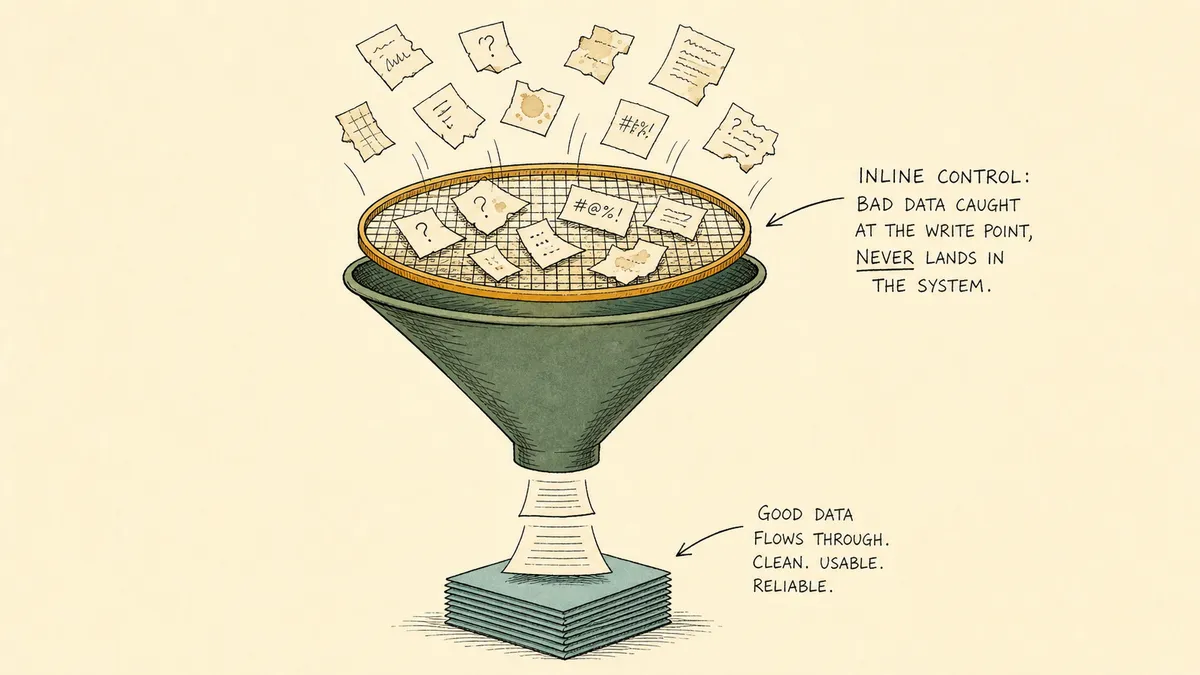
Salesforce data hygiene degrades not because teams lack standards, but because the standards only get enforced after the fact. Quarterly dedupe reports, mass updates, validation rule audits: by the time any of that runs, the records have already landed, the reps have already worked them, and the patterns that produced the mess are still producing it. Hygiene is treated as a cleanup project. It needs to be treated as a control surface on every record write.
That shift is what this article is about. Not better cleanup, but a different architecture for where the cleanup lives.
Why Salesforce data hygiene erodes between cleanup projects
The honest baseline in most orgs is not chaos. It is reasonable hygiene rules that only get applied retroactively. The team has a definition of a duplicate. There is some sense of how country codes should look, how industry picklists should map, what a phone number is supposed to be formatted as. The problem is timing.
New records arrive constantly. Web forms drop leads in. Enrichment tools push contacts back. Reps create accounts by hand. List imports load a few thousand records in a single afternoon. Each of those intake paths runs at its own pace, with its own field discipline, often before any validation logic has a chance to fire. By the time a quarterly cleanup runs, the cohort under review is months old. The patterns that produced it have not changed. The next quarter starts with the same intake, the same gaps, and a slightly smaller running surplus of bad records.
This is what people mean when they say hygiene is a treadmill. It is not that the team is undisciplined. It is that the intake outpaces the discipline. Catching the problem in the quarterly view is catching it three months too late.
What Salesforce native rules do, and where they leave a gap
Salesforce ships two relevant native controls. They both do real work. Neither one resolves the case that produces most hygiene debt.
Duplicate rules match incoming records against matching rules at save time. The configured response is either allow with alert or block. Allow surfaces the duplicates to the user and continues; block prevents the save. Validation rules check field-level conditions at save time and reject the record if a condition fails. Both fire across the standard Sales Cloud lineup (Starter, Pro Suite, Enterprise, Unlimited, Unlimited Plus, and Developer).
Two things they do not do.
First, they do not resolve ambiguous matches. A duplicate rule that finds a possible duplicate at save time either alerts the user (and the user makes the call, often without enough context) or blocks the save (and the record is gone, with no path to resolution other than the rep retrying). The hard cases in CRM hygiene are not “definitely the same” or “definitely different.” They are “probably the same, but the email is different and the company name is spelled three ways.” That is where the rules fall silent.
Second, they only fire on writes that actually reach Salesforce. A normalization rule cannot run on a record before the record exists. If a web form is wired to create a Lead directly, the lead lands first and the rules fire on what is already there. If the inbound has missing fields or non-standard formatting, the rules either block the save (which loses the lead) or accept it (which means the cleanup deferred to later).
Neither of those is a Salesforce flaw. The native rules do exactly what they document. They are not designed to be the inline orchestration surface for cross-system intake. That is a different shape of work.
What inline hygiene looks like as a workflow
Inline hygiene moves the checks one step upstream of the Salesforce write. The triggering event is not “a record was just saved in Salesforce.” It is “an intake source just produced a record candidate, and we have not yet decided what to do with it.”
The pattern, in concrete shape:
- Trigger on intake, not on save. Web form submissions, enrichment webhook payloads, list import rows, integration events from inbound tools. The candidate is in flight, not yet committed to Salesforce.
- Normalize the candidate in the workflow. Country codes, industry picklists, phone formats, company name casing, domain extraction from email. Standardization runs on the way in, not after.
- Run a match query against Salesforce. Use Find Record by Query on email, normalized company name, and domain. The query returns zero, one, or multiple candidates.
- Branch on the match result. Clean single match goes to Update Lead or Update Contact. Zero matches go to Create Lead or Create Contact. Ambiguous (multiple plausible matches, or a match where critical fields disagree) goes to a human reviewer.
- Resolve the ambiguous cases without blocking the rest. The clean cases and the no-match cases continue to flow. The ambiguous cases wait in Slack for sales ops to make a call.
That last point is the architectural difference. Native duplicate rules force a binary at save time. The workflow approach lets the easy cases run automatically and isolates the ambiguous ones for a person with context.
Handling the ambiguous cases without blocking pipeline
A workflow that pauses for a human is only useful if the human gets the right information at the right moment.
The pattern most teams settle into looks like this. The ambiguous match posts a structured card to a Slack channel that sales ops monitors. The card carries the candidate record (name, email, company, source, captured fields) and the closest existing matches from Salesforce (the records the Find Record by Query turned up, with the fields that overlap and the fields that disagree highlighted). Below the candidate and the matches, three actions: merge into existing, create new, or update existing. The reviewer picks one. FlowRunner executes the corresponding Salesforce action and logs the decision and the reasoning on the record.
Why this beats the native duplicate rule alert: the native alert fires at the moment the user is creating the record, often without time to investigate, with only the fields the user can see in the moment. The orchestration approach decouples the capture of the candidate (which happens immediately) from the resolution of the ambiguity (which happens with the reviewer in the right channel, with full context, on their own schedule). Pipeline does not stall. The ambiguous cases queue up. Sales ops works the queue.
What most posts on Salesforce data hygiene will not say plainly: native duplicate rules are not the bottom of the hygiene problem. The bottom of the problem is that no rule, however well written, is going to resolve the cases that need judgment. Hygiene is partly an automation problem and partly an exception-handling problem. The exception-handling part is where the debt actually accumulates, and that is where a workflow layer earns its keep.
Enrichment and ownership assignment as part of the same pass
Once a candidate is resolved, the same workflow can do the next two pieces of work without handing back to a rep.
Enrichment runs against the candidate once the match decision is made. The workflow calls whatever enrichment source the org uses (the integration page on FlowRunner lists the current set) and writes the enriched fields back to Salesforce with Update Lead or Update Record. The lead lands fully populated, not as a thin record someone is supposed to come back and fill in later.
Lead conversion paths work the same way. When a Lead crosses the qualification threshold, the workflow calls Convert Lead to Contact with the right Account match attached. Campaign attribution does not get dropped on the floor: Add Lead to Campaign and Add Contact to Campaign preserve the source signal without a rep having to remember.
The unifying point is that hygiene, enrichment, and campaign attribution are all the same shape of work. They happen at the moment of intake, on the same record, in the same workflow. The native CRM tooling treats them as three separate problems with three separate configurations. The orchestration layer treats them as one pass.
Why a workflow layer fits at the intake boundary
The CRM is the system of record. It owns the schema, the validation, the duplicate matching at save time, the field-level reporting, the user permissions. Those things belong inside Salesforce. They are good there.
What does not belong inside Salesforce is the inline coordination across intake sources, enrichment endpoints, and a Slack channel that sales ops actually monitors. That coordination is the work between systems, and the human judgment between those systems, and it is exactly the work that grows fastest as a sales stack matures. An orchestration layer is the category that owns that seam: a system above the systems of record that listens for the intake events, gathers the cross-system context the native rules cannot have, and pulls a human in at the moments that need judgment. FlowRunner is built for that layer. The CRM keeps its scope. The orchestration layer takes the work the CRM was never meant to do.
For the end-to-end implementation shape of the human review piece, see automate Salesforce workflows with human-in-the-loop approvals. The same architectural shape applies one CRM over: a workflow layer can flag duplicate contacts before they reach your CRM on the HubSpot side, where the intake source is a Google Form rather than a Salesforce-bound web form. The shape is the same; the records land in a different system of record.
What sales ops sees over time
A few things become visible once the workflow is in place.
- Per-record audit trail. Every create, update, merge, and human decision is recorded in the FlowRunner execution log. When the question comes back six months later (why did this Account end up linked to this Contact, who made that call, what fields disagreed), the answer is in the log, not in someone’s memory.
- Smaller cleanup surface. Mass-update fire drills get smaller because the cohort coming in is already filtered. Quarterly review still happens, but it is reviewing exceptions and edge cases, not re-running the same dedupe report on the same kinds of records.
- Visible exception volume. The Slack queue is itself a signal. If sales ops is resolving ten ambiguous cases a week, that is information about the intake quality. If the queue jumps to fifty in a week, something upstream changed. The volume of human review is now a metric.
This does not eliminate the need for periodic data review. There is no architecture that does. Schemas drift, picklists evolve, business rules change, and the cohort under management always carries some history that a new policy does not retroactively touch. The honest framing is that inline hygiene shrinks the surface periodic review has to cover. It does not erase it.
Edge cases and trade-offs worth naming
A few things this approach does not do, by design:
- It does not replace Salesforce native duplicate rules and validation rules. Those keep running. Their job is the last-mile check on whatever the workflow writes. The orchestration layer adds an upstream check, not a replacement.
- It does not work for intake paths that bypass the workflow. If a rep is hand-creating records directly in Salesforce, only the native rules apply. The workflow can only police the intake paths that route through it.
- A human review gate introduces latency. The ambiguous cases wait for sales ops. For most intake, that is the right trade (a record that needed a judgment call gets one before it lands). For high-velocity inbound where a five-minute delay actually costs revenue, the ambiguity rule needs to be tuned to escalate fewer borderline cases.
- The match query is the load-bearing piece. If the Find Record by Query uses weak match criteria, too much gets flagged as ambiguous and the Slack queue overwhelms the reviewer. If it uses overly strict criteria, near-duplicates slip through as no-match and become tomorrow’s dedupe problem. The match query is where the architecture earns or loses its weight. It deserves real design time, not a default.
- Normalization rules belong in one place. If the workflow normalizes phone format on the way in and a Salesforce validation rule normalizes it differently on save, the record ends up with both formats applied in sequence. Pick the canonical normalization point and stick with it.
Where to start
The right entry point is one intake path, not all of them. Pick the source where the hygiene problem is loudest (the web form that drops the most malformed leads, the enrichment integration that creates the most ambiguous contact rows, the list import path that produces the most quarterly cleanup work). Route that one path through a workflow first.
Three pieces of design work go in before any wiring:
- Define the match query. Which fields, in which combinations, count as a match. Email alone is rarely enough. Email plus normalized company name plus domain is a reasonable starting shape.
- Define the ambiguity rule. What turns “possible match” into “send to a human.” A common pattern: two or more candidates returned, or a single candidate where two or more critical fields disagree.
- Decide which fields the workflow normalizes and which stay rep-owned. Country codes, industry picklists, and phone formats are good candidates for in-flow normalization. Free-text fields, qualification notes, and judgment-based context belong to the human.
After the first path is running cleanly, the second one is faster. The match query and the ambiguity rule are reusable across sources. The normalization library grows. By the time the third intake path comes online, the architecture is doing most of the work.
The takeaway
Salesforce data hygiene is treated as a cleanup project because the native tooling is built for save-time checks, and save-time checks cannot resolve the cases that produce the bulk of hygiene debt. The shift is to treat hygiene as a control surface on every record write: normalize at intake, match against the CRM before committing, branch on the result, route the ambiguous cases to a person with full context, and log the whole pass per record. Quarterly review still happens. It just gets to spend its time on the cases that actually deserve a person’s attention, not on the same recurring patterns the intake should never have produced in the first place.
The CRM holds the records. The orchestration layer holds the work between records. That is where hygiene lives, and that is where it stops being a project and starts being infrastructure.