How to Connect Parseur with Slack Using FlowRunner
Stop copying invoice data by hand and chasing approvals over email. Connect Parseur document extraction with Slack notifications and human decisions through FlowRunner.
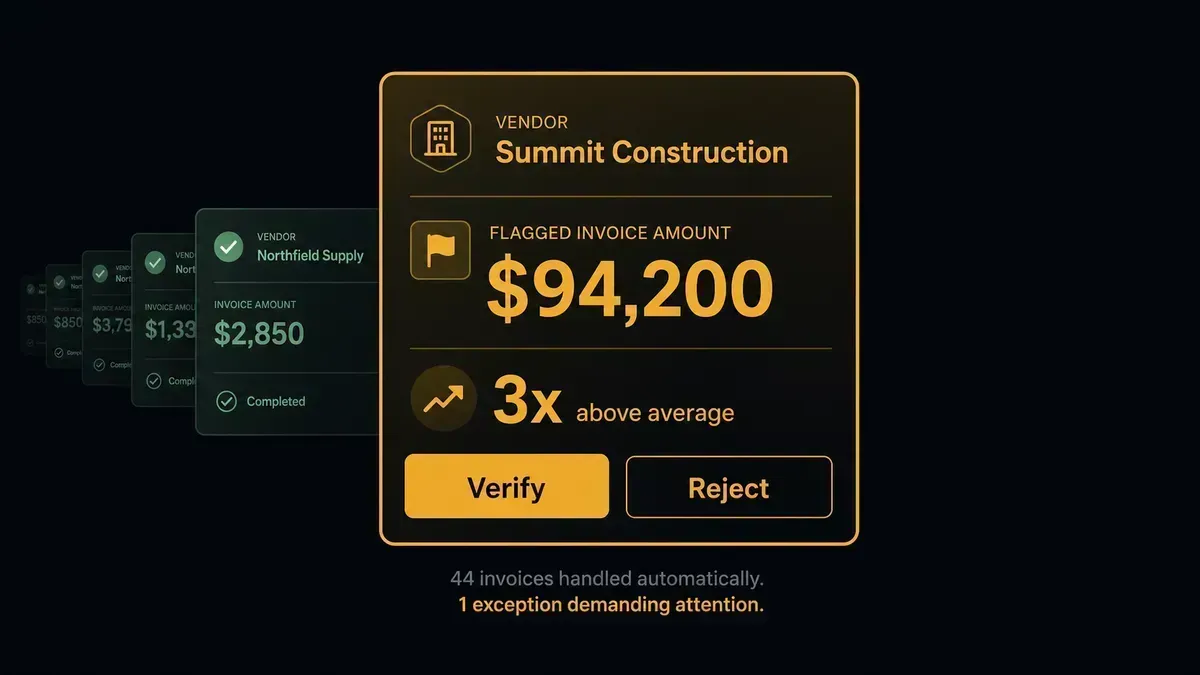
The Problem: Documents Arrive, Then Nothing Happens Fast Enough
Every accounts payable team knows the routine. Vendor invoices arrive by email in dozens of formats. Someone opens each one, reads the PDF, and types the data into the ERP or accounting system. Each invoice takes meaningful manual entry time. Multiply that by dozens of invoices a day and you have a full-time person doing nothing but copying fields from one screen to another.
The real cost is not the data entry itself. It is what falls through the cracks while your team is buried in it. A duplicate invoice gets entered because no one had time to cross-check reference numbers. An extraction fails on a non-standard format and sits in a queue for days. Nobody notices until someone manually checks. An invoice comes in at multiples of the usual amount from a vendor and gets posted without a second look because the AP clerk was rushing through the backlog.
Then there is the approval process. Exceptions get flagged in email threads. The billing manager has to piece together context from forwarded attachments and reply chains. By the time a decision gets made, days have passed. The vendor is calling. The AP clerk is chasing the manager. The manager is asking for context that was in the original email three replies ago. Every step is manual, disconnected, and slow.
The Solution: Documents Extracted, Exceptions Decided, All in One Flow
When Parseur and Slack are connected through FlowRunner, the entire arc from document arrival to human decision to downstream action runs as a single workflow. Parseur handles the extraction. Slack handles the human decisions. FlowRunner coordinates the two and manages every step in between.
Invoices arrive in a Parseur mailbox. Structured data comes out: vendor name, invoice number, amount, due date, line items. The workflow validates that data, checks for duplicates, and posts the result to the ERP. Routine invoices process automatically with no human involvement.
Exceptions surface in Slack with full context. The finance manager sees the vendor name, the extracted amount, the historical average, and the specific reason the workflow paused. They click a button. The workflow resumes. No email chains. No meetings. No “let me check on that and get back to you.” Your team handles judgment calls in the channel where they already work. The system handles everything else.
Why Human-in-Loop Matters Here
Document extraction is not perfect, and it should not pretend to be. Parseur normalizes invoices from dozens of vendor formats into clean JSON. But what happens when the extracted amount on an invoice is several times the vendor’s typical invoice? What happens when a scanned document produces a partial extraction with missing line items? What happens when the reference number matches an invoice already in the system?
Without human oversight built into the workflow, those exceptions either block the entire pipeline or slip through unchecked. A sync tool would push the data downstream and hope someone catches the problem later. A notification tool would send an alert that gets buried in a channel. Neither approach gives the human the context they need to make a fast, informed decision.
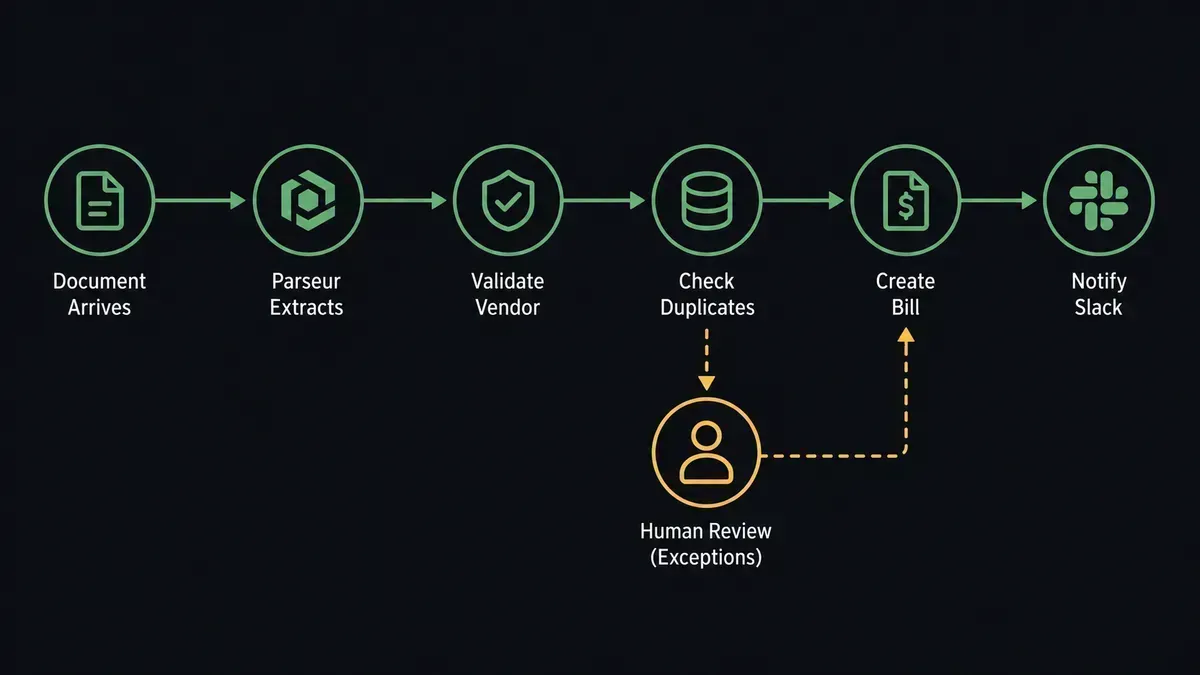
FlowRunner treats human oversight as a callable tool within the workflow. When the flow hits a condition that requires judgment, it stops the line. It routes the exception to the right person via Slack with the extracted data, the original document, and the reason for the pause. The reviewer makes the call. The workflow resumes with verified data. Every decision is captured with the approver’s identity and timestamp in the decision history. This is the “digital andon cord”: the workflow knows when to ask.
How It Works
Workflow 1: Invoice Processing with Exception Routing
This is the core workflow. Vendor invoices arrive in a Parseur mailbox by email. The moment Parseur finishes extracting, FlowRunner takes over.
- Trigger: On Document Processed (Realtime) fires when Parseur finishes extracting a vendor invoice
- Extract: Structured data arrives with vendor name, invoice number, amount, due date, and line items
- Validate: The flow cross-references the vendor against the approved vendor list
- Check: The flow checks for duplicate invoices by reference number
- Action: If both checks pass, the flow creates a bill in the ERP and attaches the original PDF
- Notify: The flow calls Send Message to Channel to post to #finance-ops with the vendor name, invoice reference, amount, and the action taken.
- Human: If the invoice amount is several multiples higher than the vendor’s average, the flow pauses and sends a verification request to a reviewer via Send Direct Message with the vendor, the extracted amount, the historical average, and a button to verify or reject.
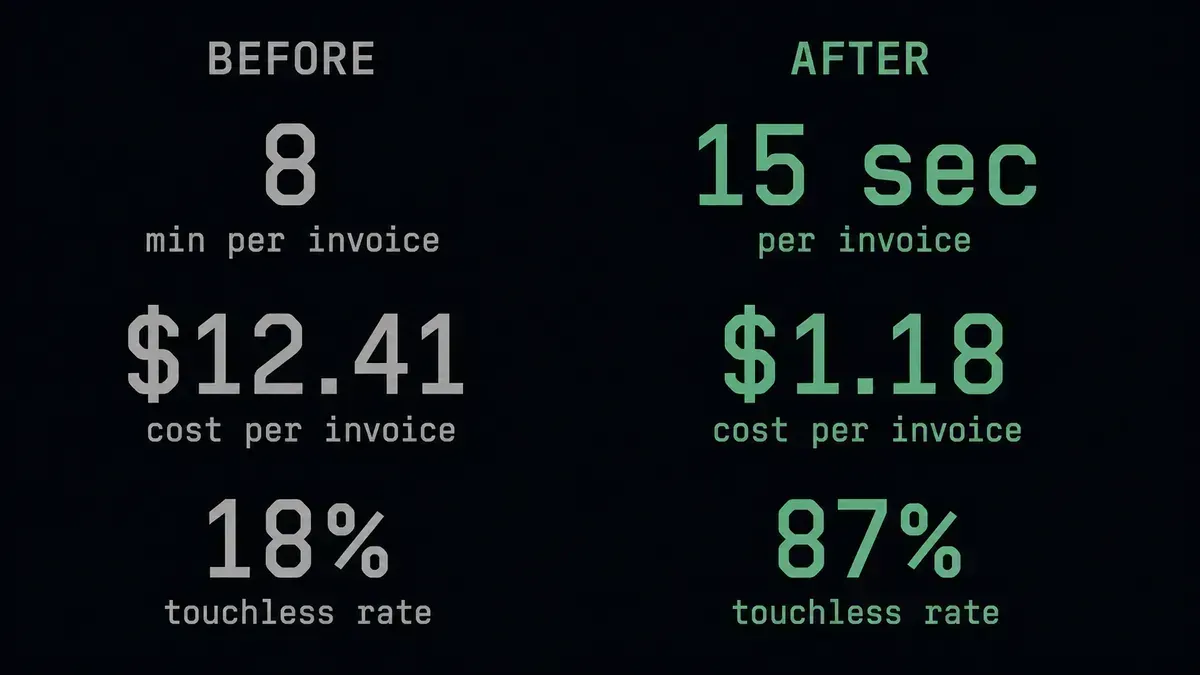
Manual entry that previously took minutes per invoice now runs automatically; only the exceptions need attention.
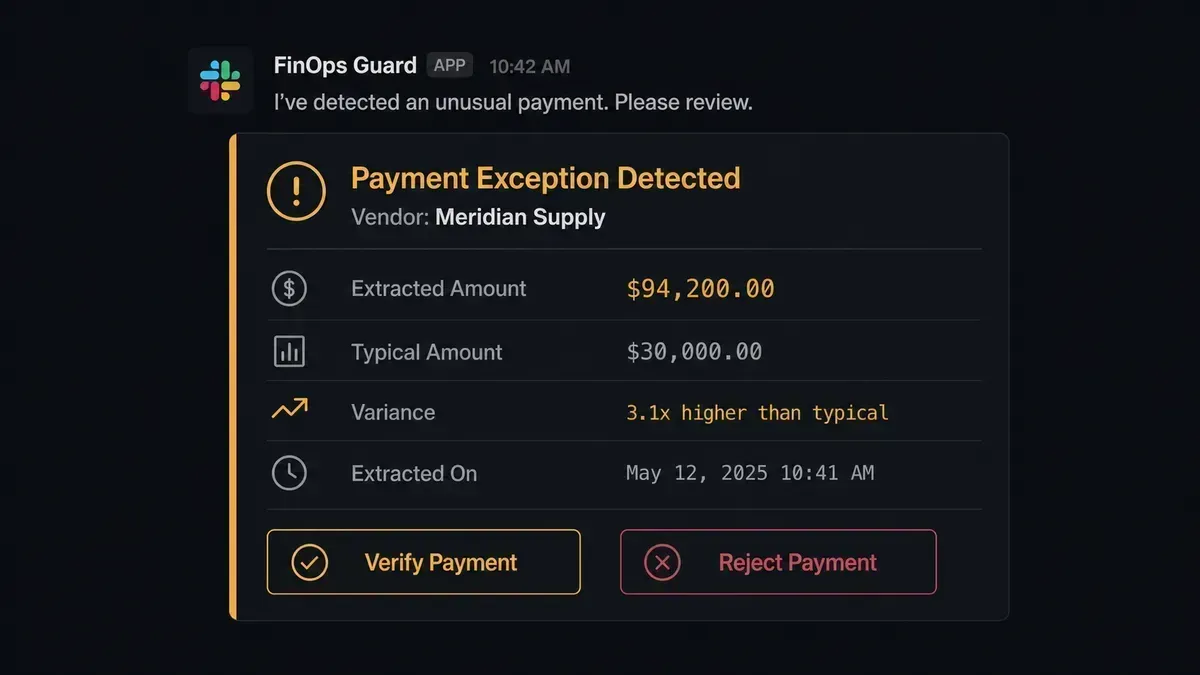
Workflow 2: Failed Extraction Escalation
Not every document extracts cleanly. Scanned images with poor quality, non-standard layouts, or corrupted files will fail. Without automation, those failures sit in a queue unnoticed until someone manually checks.
- Trigger: On Document Processed (Realtime) fires with a failed status flag
- Action: The flow calls Send Message to Channel to post to #vendor-docs with the document name and prompts the team to reprocess or enter manually.
- Human: The ops team reviews the failure directly in Slack and decides next steps
- Action: If reprocessing is needed, the flow calls Reprocess Document on the original file with an updated template
- Notify: After reprocessing, the flow calls Update Message in Channel to change the original alert from “failed” to “reprocessed successfully”
The document does not disappear into a queue. The failure surfaces the moment it happens, in the channel where your team is already working.
Workflow 3: Overnight Batch Processing with Interactive Approval
For teams that process high volumes overnight, the workflow compiles results and delivers a structured report to Slack when the team arrives in the morning.
- Trigger: On Document Processed (Polling) runs on a schedule, capturing all documents processed during the overnight batch
- Action: The flow calls List Documents to pull the full batch with status filters
- Action: The flow calls Send Message to Channel to post a formatted summary to #finance-ops with totals: processed, matched and posted, and requiring review.
- Action: For each exception, the flow sends an individual message with Approve and Escalate buttons via Block Kit formatting
- Human: The finance manager reviews each exception and clicks Approve or Escalate. On Block Action fires and routes the decision back to the workflow. The flow resumes posting the approved items to the ERP automatically.
- Notify: Escalated exceptions are routed to the finance director via Send Direct Message with full context
Exceptions surface in minutes, not hours. The finance manager handles them from their phone in one Slack session. Every approval is captured with approver identity and timestamp in the decision history.
Before and After
| Before | After | |
|---|---|---|
| Invoice data entry | Each vendor invoice takes meaningful manual data entry across varying formats | Routine invoices process automatically; only exceptions need attention. |
| Format handling | Invoices from different vendors require different entry approaches and manual interpretation | Format-agnostic extraction. Parseur normalizes any invoice format into consistent JSON for downstream systems. |
| Failed extractions | Failed extractions sit unnoticed in a queue until someone manually checks | Immediate failure escalation via Send Message to Channel the moment the extraction fails. |
| Exception handling | AP exceptions sent via email and tracked in separate threads that lose context | Exceptions land in Slack with Approve and Escalate buttons. On Block Action routes decisions back to the workflow. |
| Approval process | No structured approval. Exceptions require a meeting or email chain before resolution. | Exceptions surface in minutes, not hours. Approved and escalated in one Slack session from a phone. |
| Audit trail | Managers ask team members directly to get status. No record of who approved what. | Decision history is captured automatically: who approved what, when. |
What You Can Build
Combining Parseur’s document extraction with Slack’s human-in-loop capabilities opens up workflows beyond AP:
Invoice validation with interactive approval. On Document Processed fires, the flow validates extracted data against vendor records, and exceptions land in Slack with Approve and Escalate buttons. On Block Action routes decisions back to the workflow to resume downstream processing.
Purchase order confirmation routing. Customer POs in varying formats (Word, PDF, email) are normalized by Parseur. The flow creates sales orders from extracted line items and posts confirmation summaries to a sales channel using Send Message to Channel.
Failed extraction triage. Extraction failures surface instantly in Slack via Send Message to Channel. The ops team decides whether to call Reprocess Document with an updated template or handle the entry manually.
High-value invoice verification. Invoices above a configurable threshold trigger Send Direct Message to a senior reviewer. The flow pauses until the reviewer confirms. Get Parsed Data provides the full extraction for comparison against historical vendor data.
Weekly document processing digest. The flow calls List Documents filtered by the past 7 days and posts a formatted weekly report to #operations using Block Kit for clean visual structure. Processing volumes, failure rates, and exception counts in one summary.
Getting Started
Both Parseur and Slack are available on every FlowRunner tier, starting at Growth ($45/mo, 12,000 executions). Every tier includes unlimited users and unlimited workflows, with full human-in-loop coordination.
Start on the free plan: 100 executions a month, every integration included, no credit card required, plus 14 days of Professional for new accounts. For teams that need decision history, Professional at $299/mo adds longer log history. Role-based access is available on Professional and above.
Connect Parseur to start extracting structured data from your documents. Connect Slack to give your workflows a voice in your workspace. Build the workflow that connects them in minutes.
Start building free or book a demo to see it in action.